obsidian-footnotes
Makes creating footnotes in Obsidian more fun!
Obsidian Footnotes Plugin
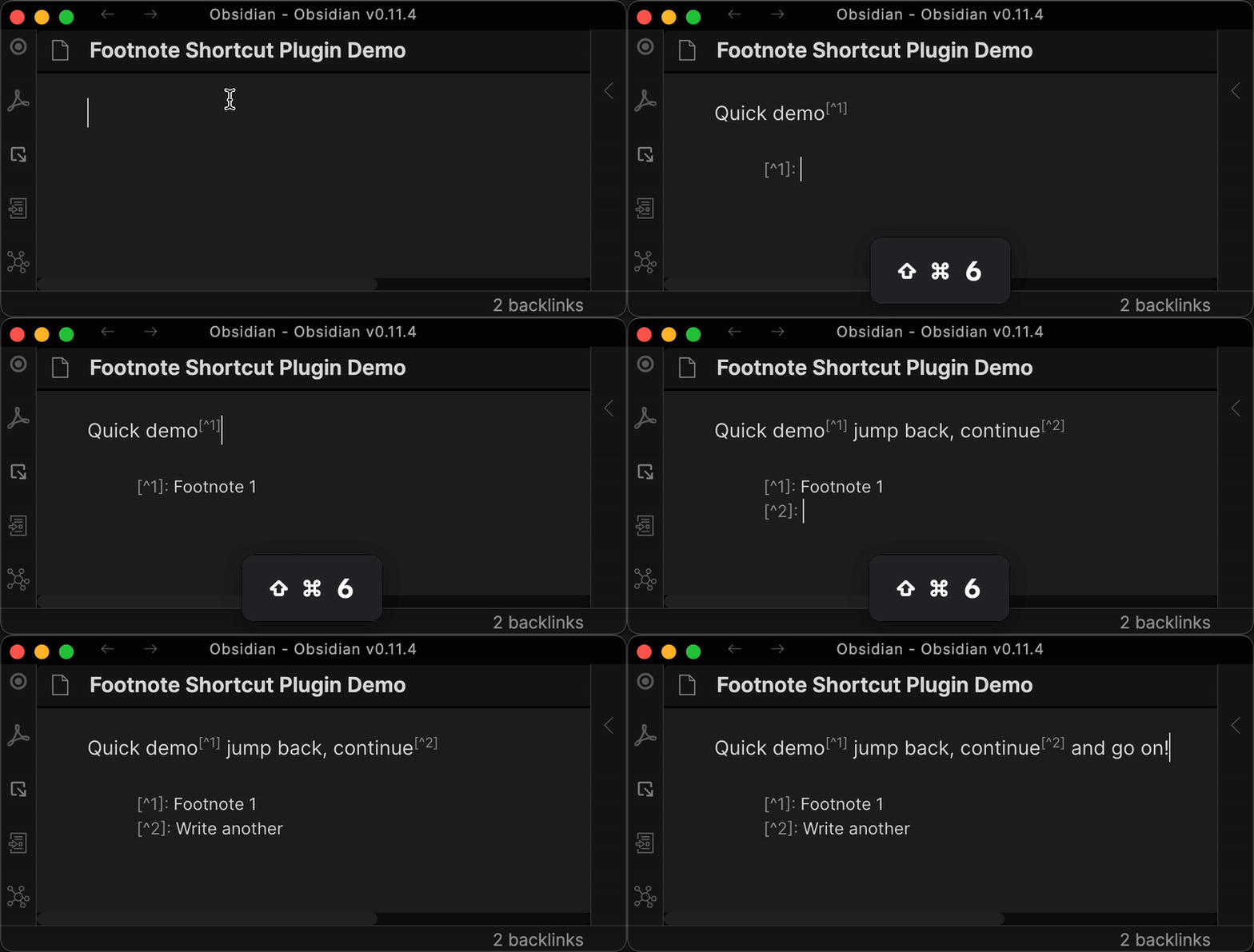
This hotkey lets you:
Insert a new footnote marker (e.g.
[^1]) with auto-incremented index in your text- Adds the footnote detail (e.g.
[^1]:) at the bottom of your text - Places your cursor so you can fill in the details quickly
- Adds the footnote detail (e.g.
- Jump from your footnote TO the footnote detail
- Jump from your footnote detail BACK to the footnote
IMPORTANT: You must to set up your footnote hotkey
After installing and activating this plugin, you still have to SET UP your hotkey. This is easy and quick:
Settings -> Hotkeys -> Search for "Footnote" -> Customize Command -> Your preferred hotkey
I personally use Command+Shift+6 because “6” on a US keyboard is where the uptick/footnote character “^” is.

Default Feature Details
Scenario: No previous numeric (e.g. “[^1]”) footnotes exist:
- Given my cursor is where I want a footnote to exist (e.g.
Foo bar baz▊) - When I hit
my footnote hotkey - Then a new footnote marker (e.g.
[^1]) is inserted where my cursor was (e.g.Foo bar baz[^1]) - And a new footnote details marker (e.g.
[^1]:) is inserted on the last line of the document - And my cursor is now placed at the end of the detail marker (e.g.
[^1]: ▊)
Scenario: Previous numeric (e.g. “[^1]”) footnotes exist:
- Given there is one or more numeric footnotes in my text
- And my cursor is where I want a footnote to exist (e.g.
Foo bar[^1] baz▊) - When I hit
my footnote hotkey - Then a new footnote marker with the next numeric index (e.g.
[^2]) is inserted where my cursor was (e.g.Foo bar[^1] baz[^2]) - And a new footnote details marker (e.g.
[^2]:) is inserted on the last line of the document - And my cursor is now placed at the end of the detail marker (e.g.
[^2]: ▊)
Scenario: Jumping TO a footnote detail
- Given I’m on a footnote detail line (e.g.
[^1]: ▊) - When I hit
my footnote hotkey - Then my cursor is placed right after the first occurence of this footnote in my text (e.g.
[^1]▊)
Scenario: Jumping BACK to a footnote
- Given I’m on - or next to - a footnote (e.g.
[^1]▊) in my text - When I hit
my footnote hotkey - Then my cursor is placed to the right of the footnote (e.g.
[^1]: ▊)
Known Limitations or Untested Scenarios
Indices are not updated
Inserting new footnote in-between two existing footnotes will insert the next numeric index (e.g. 1, 3, 2).
It will NOT update the indices according to their natural order (e.g. 1, 2, 3).
Example sentence[^1] with two▊ footnotes[^2] already.

[^1]: Foo
[^2]: Bar
After insertion:
Example sentence[^1] with two[^3] footnotes[^2] already.

[^1]: Foo
[^2]: Bar
[^3]: Baz
See “Automatically Re-Index Footnotes” below for a proposed feature
Future Possible Feature Ideas
Automatically Re-Index Footnotes
Re-index and re-sort all footnotes when you insert a new one in-between one or more existing numbered footnotes:
Example sentence[^1] with two▊ footnotes[^2] already.

[^1]: Foo
[^2]: Bar
Base Scenario
- Given there are two footnotes already
- When I enter a new footnote in-between those two
- Then the NEW footnote gets the index “2”
- And the previously second footnote gets the index “3”
- And the NEW footnote detail is inserted as the second entry at the bottom
- And the previously second footnote detail at the bottom is updated to be “3”
- And the previously second footnote detail at the bottom is updated to be in third position
Example sentence[^1] with two[^2] footnotes[^3] already.

[^1]: Foo
[^2]: Baz
[^3]: Bar▊
Edge Cases to consider (“What if…?”)
What if… new footnote is inserted before the first footnote?
Some sentence▊ with existing note[^1]

[^1]: Details
What if… text has the same footnote at several places?
Some sentence with existing note[^1] and the same▊ footnote re-appears later[^1].


[^1]: Details
What if…Footnote details are spread across the text?
Some sentence with existing note[^1] some more text▊

[^1]: Inline footnote details

Another text part▊
What if… the footnote details are multi-line on the bottom?
Some sentence with existing note[^1] some more text▊

[^1]: The details that
Span across
Multiple lines
What if… there are non-numeric footnotes in the text?
Some sentence with existing note[^✝] some more text▊

[^✝]: Details
Background
This plugin is based on the great idea by jacob.4ristotle posted in the “Footnote Shortcut” thread.
Use case or problem:
I use Obsidian to take school notes, write essays and so on, and I find myself needing to add frequent footnotes. Currently, to add a new footnote, I need to:
- scroll to the bottom to check how many footnotes I already have
- type [^n] in the body of the note, where n is the next number
- move to the end of the note, type [^n] again, and then add my citation.
Proposed solution:
It would be convenient to have a shortcut to automate these steps. In particular, I envision that the shortcut would: Using the smallest natural number n that has not yet been used for a footnote
- add
[^n]at the insertion point- add
[^n]:to the end of the note, and move the insertion point there.