Alexis Rondeau

Newsfeed

Everything I publish, in the order I published it: dispatches from Twitter, videos from YouTube and notes from my vault, archived here in full — text, images, video and links — so they outlive the platforms.

921 dispatches since January 2012 · page 1 of 37

Autonomous Research with AI: "Results! Why, man, I have gotten a lot of results! I know 198 things that won't work." — can an autonomous research loop find the secret of Kryptos K4?

Not solved yet: in 19.7 hours, an AI agent running an autoresearch loop on K4 — the last unread message on Jim Sanborn’s Kryptos sculpture at the CIA, 97 carved letters with only 24 of them known — has tried 198 ways of turning them into the plaintext. None has worked yet, and each one is on the record.

Open →

7 views · 1 profile visit

Thank you @karpathy because I now realize that, while the curve's vertigo has been real for me for years, there's a HUGE gap in my communication skills to translate what I'm experiencing here on the edge with those closer to the center in a way that makes sense to them.

"So this is the weirdness of the moment. The general public has mostly not interacted with these systems. When they have, it looks like a derpy chatbot. The majority of professionals still see only a modest uplift. And a small sliver of professionals are experiencing the vertigo of the curve going vertical. And it is all happening at the same time."

Quoting @karpathy · Oct 11, 2026

Dusting off this tweet from April because this gap in shared understanding of LLM capability is widening. It's now less "two groups of people speaking past each other" and more a sharp funnel.

  • Napkin math somewhere around 6B people (~75% of the population) have barely come in contact with LLMs at all.
  • Around 1-2B (~20%) are casual and infrequent users of free-tier ChatGPT-like products. This group sees derpy chatbots and treats them a bit like a better Google search, a writing aid, or etc. Maybe an agent tries to book you a flight. I have non-tech friends who (reasonably, imo) say they have not much use for it at all. Even many professionals outside of math&code are in this tier. For example, execs and many other functions spend a lot of their time talking to other people, so while they understand what is happening intellectually, it is still second-hand and a bit abstract.
  • Now we get to professional use of frontier-grade LLMs in math&code. Somewhere around 20M people (0.2%) see first-hand that large, complex projects that used to take them weeks/months can now be completed by agents with a prompt. Building apps, copying apps, translating apps, decompiling apps from binaries... This has all happened very quickly and recently - less than 1 year ago, I was writing code manually by hand, typing memorized computer code commands into a code editor character by character, occasionally pressing Tab to autocomplete a little chunk of code.
  • And finally we get to the ~5,000 people (~0.00006%) with access to frontier-grade systems internally. The external world has seen the preview. It looks like swarms of thousands of agents collaborating over weeks on software mega projects: minting zero days, running cyber attacks and defenses at machine speeds, discovering new science, advancing the frontier of mathematics. Things that would have taken top professionals in the industry years of work. Meanwhile, human review and comprehension are starting to fall behind. For example, people are still involved in the "archeology" of the OpenAI-HF incident from many months ago. Mathematicians may be poring over the 722 manuscripts on frontier mathematics for a while.

The funnel is driven by a combination of factors:
1. The impact scales with ambition, problem size, and horizon. A question with a paragraph answer barely stresses the system. You need a reservoir of big, difficult problems that you really care about. This aspect drives the consumer / professional dimension of the funnel.
2. The jaggedness of the system (which I have written about a lot separately). Capability peaks in domains that are digital, verifiable and economically valuable. This is because LLM capability emerges from reinforcement learning on verifiable rewards on a curated environment mixture driven by revenue potential. This aspect primarily drives the area (e.g. math&code) dimension of the funnel.
3. Access. Free-tier, paid-tier, internal.

So this is the weirdness of the moment. The general public has mostly not interacted with these systems. When they have, it looks like a derpy chatbot. The majority of professionals still see only a modest uplift. And a small sliver of professionals are experiencing the vertigo of the curve going vertical. And it is all happening at the same time.

Mosey

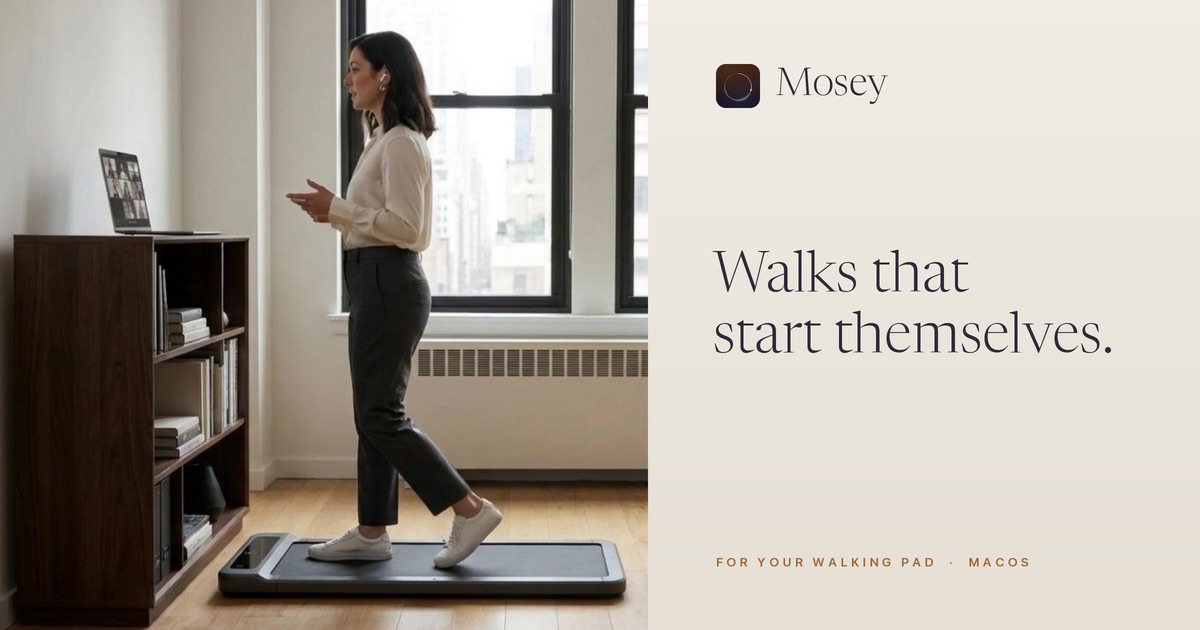
The longest-lived people don’t exercise — they get up and move every twenty minutes. I built Mosey to put that nudge into a Mac workday: after twenty minutes at the desk, your walking pad starts on its own, three to twenty minutes, a different walk each time at a pace it sets. Step on when you’re ready, step off whenever you like. Nothing counts down at you, no streaks, no account — and it’s free. Coming to the Mac App Store.

Open →

Quasi

We spend ten or more hours a day staring at screens. Quasi is my small experiment in computing without one: you speak into a pocket recorder while your phone stays locked in your bag, and a few short sounds tell you that you were heard, understood, and that the thing you asked for is done. An aural language for a screen-free life — an experiment, not a product.

Open →

1 like · 52 views · 1 bookmark

Accelerating scientific discovery with AI-powered Empirical Research Assistance: Autoresearch at Google (2025)

Lovely and very relatable: Once you have the experiment harness in place, you wanna test it against at least four kinds of interesting problems.

  • Genomics: Batch integration of single cell RNA sequencing data
  • Public health: Prediction of U.S. COVID-19 hospitalizations
  • Geospatial analysis: Segmentation of remote sensing images
  • Neuroscience: Whole-brain neural activity prediction

Same for me. It becomes utterly fascinating.

Thank you @elliottadams for sending me this

research.googleAccelerating scientific discovery with AI-powered Empirical Research Assistance↗ research.google

quasi

Say it, hear it done.

Swift

Say it, hear it done. The project’s page has the sounds to listen to. Quasi is a small experiment in computing without a screen. You speak into a pocket recorder. Your phone stays in your bag, dark and locked. A few notes of wood and chime tell you that you were heard, understood, and that the thing you asked for is done. If you ever want to check, there is a logbook. Most days you won’t open it.

In practice: an iPhone app and a Mac menu bar app that talk directly to a Comulytic Note Pro voice recorder over Bluetooth. No vendor app, no account: audio goes from the recorder to your own device, is written down by OpenAI and read by Claude with keys of your own, and tasks you ask for are added to Todoist. The phone has to be switched on and within Bluetooth range; it does not have to be looked at.

This is a personal project for one recorder and one owner, not a product. It is not affiliated with Comulytic.

What it does

Press record on the recorder, and within a second or two:

  • Live view. A waveform of what the recorder hears, with a running timer.
  • Transcript. When you stop, the audio is transcribed and shown. By OpenAI’s gpt-transcribe, which follows a note from one language into another and is told which languages to expect; the app asks for the OpenAI key on its first launch. Without network, or without a key, the device transcribes in the one language chosen in the settings. Audio is saved as .m4a, the transcript as .txt, named by the recording’s start time.
  • Stored recordings. “Download Stored Recordings” fetches the complete copies from the recorder’s own storage. Nothing is ever deleted from the recorder.
  • Tasks. If you store an Anthropic API key in the app, each transcript is sent to Claude, which finds the tasks you asked for (“add a new task…”, “oh, add that as a task”, “three tasks: …”): none, one or several per note. For each it works out what you said about it: title, due day and time, repeats, deadline, priority, how long it takes, and the project, section and labels to file it under. With a Todoist token stored as well, the tasks are added to Todoist with the transcript in their description.
  • Messages. “Send a message to Alex that I’ll be five minutes late” sends an iMessage to Alex from your own number, with the phone still in your pocket. No app may send an iMessage itself, so Quasi texts your phone through Linq (a service with a line of its own) and an automation in Shortcuts, set up once by hand, sends it on. The person is looked up in Contacts, among the people you have chosen; if the name could mean several of them, or nobody, a chime asks, and your next recording is the answer. The transcript and, when a name does not match as written, the names of those chosen contacts go to Claude; the relay sees only the number and the text. Claude, Todoist and Linq are the only places where text leaves your device, and only if you store their keys.

On the Mac this is a menu bar item with a small floating window that appears when a recording starts. Files go to ~/Recordings/Comulytic.

On the iPhone the home screen is a log: every recording, newest first, as your own words and one line saying what became of them. A note opens to its transcript with the words that asked for the task marked, the task as it was understood, and Undo. The live view rises as a sheet while you record, with the waveform and your words appearing as you speak; settings are behind the gear. Plus:

  • It keeps working with the phone locked and in your pocket.
  • A banner on the Lock Screen and in the Dynamic Island shows whether the recorder is connected, its battery level, and a timer while recording.
  • Lock Screen widgets you can add under the clock: your last note and what became of it, whether the recorder is nearby, and its battery.
  • Sound and touch for every step, so you know without looking: two rising chime notes when a recording starts, a wooden note when it has arrived and another when it is transcribed, then a chime that says what happened (nothing to do, a task added, or a failure, which falls and rings). An even, quiet tick-tock in between when a step takes more than a moment.
  • Files are visible in the Files app under On My iPhone → Quasi.

Only one device can hold the recorder at a time. The Mac app and the iPhone app compete for it; run one.

Try it with your own phone and Xcode

This puts the iPhone app on your own phone, talking to your own recorder. It takes about ten minutes. It has only ever been run against one recorder, so expect rough edges. Without Xcode, TestFlight installs the same app in a minute. The keys and the message relay are set up afterwards, in the app; the setup page walks through all of it, step by step.

You need

  • A Mac with Xcode 26 and an iPhone on iOS 26 or later.
  • An Apple account signed in to Xcode (Xcode → Settings → Accounts). A free one works; the app then stops opening after 7 days until you run it from Xcode again.
  • A Comulytic Note Pro that has been set up once with Comulytic’s own app.

Steps

  1. Clone this repository and open app/Quasi.xcodeproj in Xcode.
  2. Make the signing yours. In the project editor, do this for both the QuasiPhone and the QuasiWidgets target, under Signing & Capabilities:

    • choose your own Team;
    • change the bundle identifier to something of your own, for example com.yourname.Quasi for QuasiPhone and com.yourname.Quasi.Widgets for QuasiWidgets. The second must start with the first.
  3. On the iPhone, turn on Developer Mode (Settings → Privacy & Security → Developer Mode) and connect it to the Mac with a cable.
  4. Free the recorder: close Comulytic’s app completely on every phone it is set up on (swipe it away in the app switcher). A recorder that is connected to another app is invisible to this one.
  5. In Xcode’s toolbar choose the QuasiPhone scheme and your iPhone, then press Run.
  6. On the phone, allow Bluetooth when asked. With a free Apple account you also have to trust yourself as a developer once: Settings → General → VPN & Device Management.
  7. The app should show “Connected” within a few seconds. Press record on the recorder.

If it does not connect

  • “Looking for the recorder…” that never ends usually means another app still holds the recorder, or the recorder is off or out of range.
  • It connects to the first Note Pro it sees. With more than one nearby, it may pick the wrong one.
  • A different hardware model or firmware may speak a different protocol. This was built against hardware “TN12” on firmware 2.3.5.

The app never deletes, formats or changes settings on the recorder, and Comulytic’s app keeps working afterwards; just do not run both at the same time.

What has been tested

Tested by hand with one recorder (firmware 2.3.5), a Mac on macOS 26 and an iPhone 15 on iOS 26.2, between 2026-10-01 and 2026-10-05.

iPhone

TestResult
App in front: record, live view, stop, transcriptWorks
Phone locked for 3 minutes, off the cable, then recordCaptured and transcribed
Phone locked and untouched for 50 minutes, then recordCaptured and transcribed
Used through an evening, a night and a morning, phone mostly lockedEvery recording arrived live
Phone taken out of rangeBanner shows the recorder as out of reach
Phone brought back, still lockedReconnects by itself, banner returns to “Recorder connected”
Lock Screen / Dynamic Island bannerShows “Recorder connected”
Double vibration at the end of a recording while lockedWorks
Recorder battery with the phone holding the link all the time96 % to 90 % in about 16 to 18 hours, test recordings included: roughly 8 % a day

Mac

TestResult
Recorder battery with the link dropped while away from the Mac100 % to 96 % in 24 hours
Mac woken from sleep by Bluetooth11 to 18 times a day, down from 3,198 on the day before the fix
Battery level shownFollows the recorder (99, 97, 96 %); it used to read 100 % always

Task extraction

There is an eval in evals/task-extraction: 206 transcripts (169 that ask for a task, 32 of those for more than one, and 37 that ask for none), all written for it, with the expected tasks and the expected value of every field. On 2026-10-05, Claude Sonnet 5.5 read every one of them entirely correctly: the right number of tasks each time, none missed, none invented, no request split in two. Median 2 seconds and about two thirds of a cent per note. The cases were written by the same hand as the prompt, so treat this as an optimistic score. On the iPhone, notes recorded in daily use have produced single and several tasks; the newer fields (time, repeats, priority, project and so on) have mostly been exercised by the eval.

Adding to Todoist was tested from a script with one task (created with the right title, due day and description, then deleted). It has not been used from the apps yet.

Not tested yet

  • iPhone, after iOS removes the app from memory. The code to come back from this exists (see below) but has never been seen to trigger.
  • iPhone, downloading stored recordings. Same code as on the Mac, not exercised on the phone.
  • Mac, the current build. The measurements above were made with the build of 2026-10-03. The code has since been split into shared and Mac-only parts; that build compiles but has not been run.
  • Lock, display-sleep and sleep handling on the Mac was verified by its effect (the numbers above), not by watching each transition.

How it works

The recorder

The recorder speaks Bluetooth LE. The apps implement the small part of its protocol that they need: connecting, keeping the connection alive, receiving the recording in progress as a live stream, and listing and downloading stored recordings. They never send anything that changes, unbinds or deletes what is on the recorder.

Three facts about the recorder shape everything else:

  1. It only streams to a connected client. Its advertisement does not change when it starts recording, so there is no way to notice a recording from the outside. A live view within seconds requires holding the connection.
  2. Holding the connection costs its battery. Connected and kept awake by the heartbeat, it uses far more than when left alone.
  3. The live stream can have small gaps; the copy stored on the recorder is complete. That is what “Download Stored Recordings” is for.

Shared by both apps

About three quarters of the Swift code is in app/Shared and compiled into both apps:

  • RecorderProtocol, RecorderClient: the wire format and the Bluetooth session described above.
  • LiveMP3Decoder: decodes the MP3 stream as it arrives and resynchronises after gaps.
  • AudioFiles: keeps the right channel (the microphone; the left mostly carries handling noise) and writes mono AAC.
  • Transcriber: Apple’s on-device SpeechAnalyzer. The language model is downloaded by the system on first use; no audio leaves the device. Used when no OpenAI key is stored, and as the fallback when OpenAI cannot be reached.
  • OpenAITranscriber: the same job done by OpenAI, for notes spoken in more than one language. Sends the recording with the chosen language and the phone’s languages as hints, and a prompt that keeps every word in the language it was spoken.
  • AppModel: ties these together, and decides when the link may be dropped.
  • LiveView: the waveform and transcript.

Each app adds a thin layer for what differs. The difference that matters is when to hold the link.

macOS: hold the link only while you are there

A Mac app keeps running in the background without restrictions, so holding the link is easy. The problem was the opposite: it was held too much.

The first version connected whenever the recorder was in range and reconnected at once after every drop. With the lid closed that became a loop: the Mac sleeps, the heartbeat stops, the recorder drops the link and advertises, the Mac’s pending connection wakes it, the app runs the handshake, the Mac sleeps again. This repeated about every 14 seconds all night. The recorder drained in a day or two, and the Mac lost battery as well.

The live window is only useful when someone can see it, so now:

  • MacServices watches for screen lock, display sleep and system sleep.
  • While any of those holds, the app disconnects and cancels its pending connection, so the recorder idles and the Mac sleeps undisturbed.
  • A recording or download already in progress is allowed to finish first. System sleep drops the link immediately.
  • On unlock or wake it reconnects.

Idle time is not used: sitting in front of the Mac without touching it still counts as being there.

iOS: hold the link especially while locked

On the phone the goal is reversed. The recorder and the phone travel together, and the point is that a recording made with the phone in a pocket arrives anyway.

iOS works against this by default: an app in the background is suspended within seconds, and a suspended app’s timers do not fire, so the heartbeat would stop and the recorder would drop the link. Four pieces keep it alive:

  • Bluetooth background mode (bluetooth-central). iOS keeps the connection open at system level and wakes the app briefly for every packet from the recorder.
  • BackgroundLink. Each packet renews a short background task. The recorder answers every heartbeat, so the answer keeps the app awake long enough to send the next one: a chain that holds for as long as the recorder is in range.
  • Pending connection. When the recorder goes out of range the chain ends and the app is suspended, but iOS keeps the connection request and wakes the app when the recorder is seen again. The recorder advertises no service identifiers, so background scanning cannot find it; the phone has to have connected once with the app in front.
  • State restoration. If iOS removes the app from memory, it relaunches it in the background when the recorder connects or disconnects. (Untested, see above.)

The Lock Screen banner is a Live Activity drawn by a small widget extension. While connected the app refreshes it every two minutes and marks it valid for five. If the app stops running, the refreshes stop and the banner turns to “Lost contact” by itself, so the banner is also the check that the app is alive.

What iOS does not allow:

  • Swiping the app away in the app switcher stops it until it is opened again. So does restarting the phone.
  • A Live Activity ends after eight hours and can only be started with the app in front. Opening the app starts a new one.

Building

Requires Xcode 26. Both apps need macOS 26 / iOS 26 for the transcription.

app/tools/release.sh   # Mac: build, install to /Applications, launch
app/tools/phone.sh     # iPhone: build, install and launch on the connected phone

The first connection is made with whichever app you open first; the recorder needs to have been set up once with the vendor’s app, which is where the token the recorder hands out on connecting most likely comes from; a recorder straight from the box has not been tried.

Repository layout

PathContents
app/SharedCode compiled into both apps
app/QuasiMac only: menu, floating window, presence, launch at login
app/QuasiPhoneiPhone only: the logbook screens, background link, sounds, Live Activity controller
app/PhoneShared, app/QuasiWidgetsThe Live Activity, the Lock Screen widgets and what they share with the app
evals/task-extractionThe eval for turning transcripts into tasks
design/directionsThe three design directions the iPhone app was chosen from
siteThe project’s web page (published from docs/ in the public repository)

Quasi is free software under the GNU General Public License, version 3 (see LICENSE). It is an independent project and is not affiliated with or endorsed by Comulytic. The research notes on the recorder itself are not part of this repository.
Home

Oh, hi there!

Alexis here — welcome, and thank you for stopping by! Below you’ll find some stuff I’m really proud of and want to share with you. Have a look around, see what tickles your fancy and follow it. Would love to hear what you think. Let me know!

Principal Product Engineer at FELS Family Office GmbH · experimenter at heart · second-order cybernetic stewart · based between Berlin, New York & Marseille.

15 views · 1 bookmark
In reply to @SchmidhuberAI · Dec 23, 2022

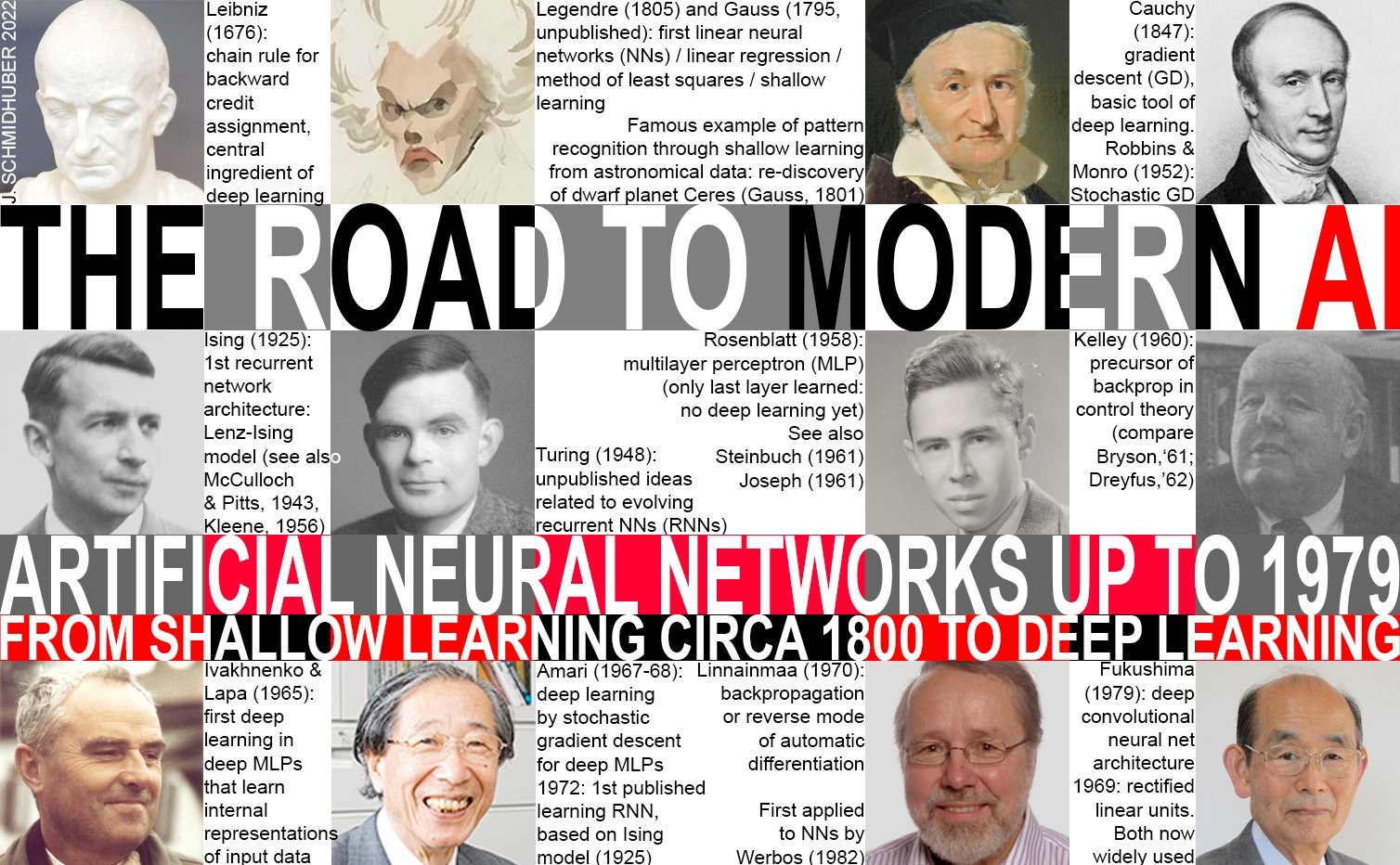
Machine learning is the science of credit assignment. My new survey (also under arXiv:2212.11279) credits the pioneers of deep learning and modern AI (supplementing my award-winning 2015 deep learning survey): t.co/MfmqhEh8MA P.S. Happy Holidays! t.co/or6oxAOXgS

Image from the post

@SchmidhuberAI Thank you for sharing Jürgen! (Danke dir für's Teilen.)

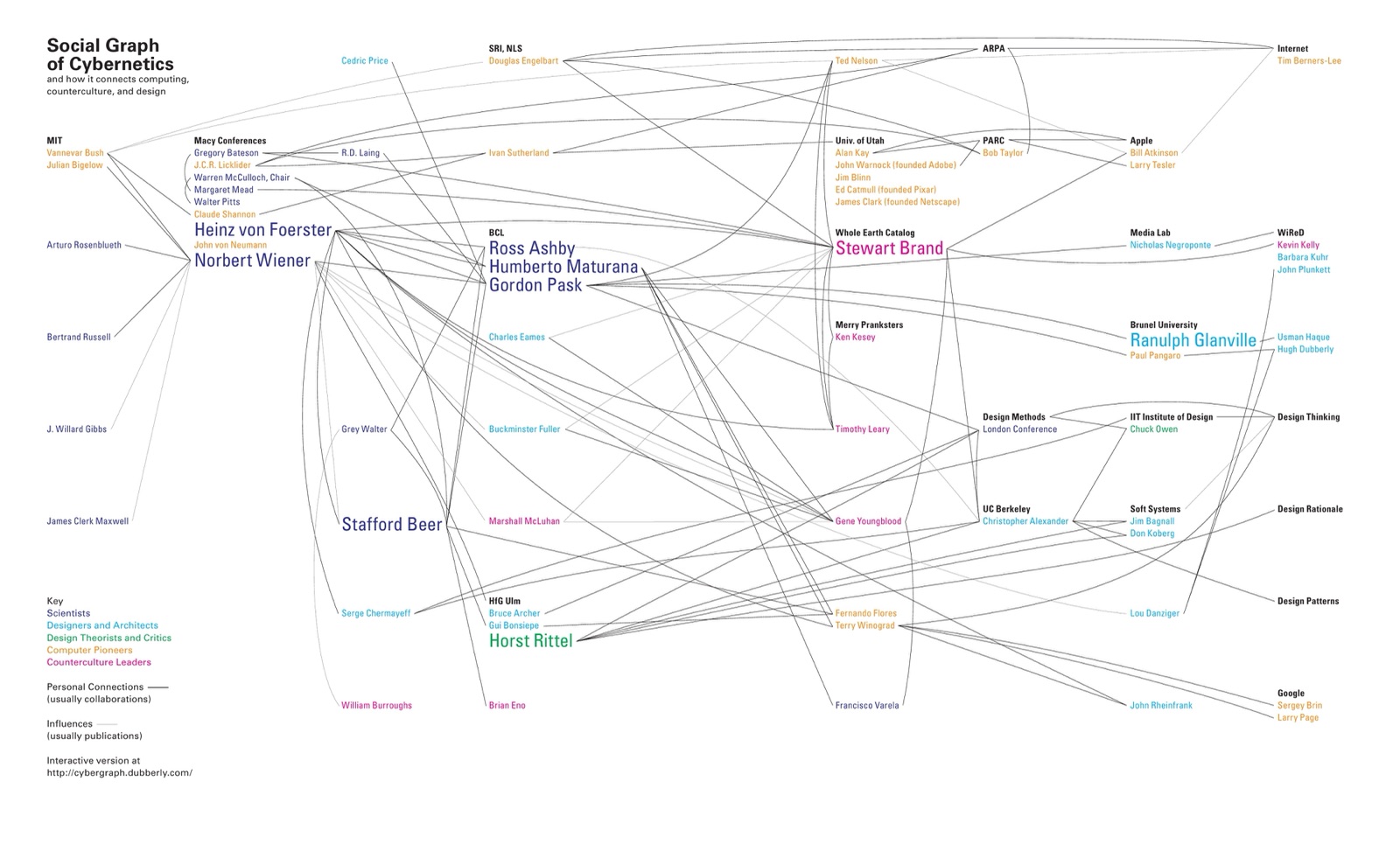
Looks like my beloved "Social graph of cybernetics" by Hugh Dubberly and Paul Pangaro needs an update.

Source: Hugh Dubberly, Paul Pangaro, Social graph of cybernetics, 2015. https://www.dubberly.com/articles/cybernetics-and-counterculture.html
8 views
In reply to @SpringStreetNYC · Sep 27, 2026

In one recent HF/OpenAI-related article I read

"[...] the agents created millions of short URLs to affect another system." and immediately, pictures of early industrial revolution-era polluted rivers with dead fish floating popped into my mind.

I believe Buckminster Fuller's definition of "nature" included human artifacts like cities, airplanes, art.

Could we include networks and AI?

And if we did: How appropriate do you think it is to re-use vocabulary from existing environmental protection policies in this context?

@AmmannNora PS: You probably have seen this but here's the report I was thinking of

Swarm tracesRevealing the details of how OpenAI agents hacked Hugging FaceWhen a swarm of 700 OpenAI agents hacked Hugging Face in July, they left behind a public trail of evidence.↗ swarmtraces.org
1 reply · 1 like · 25 views · 1 profile visit
In reply to @richardcsuwandi · Sep 27, 2026

@SpringStreetNYC Interesting, thanks for sharing!

You're very welcome Richard.

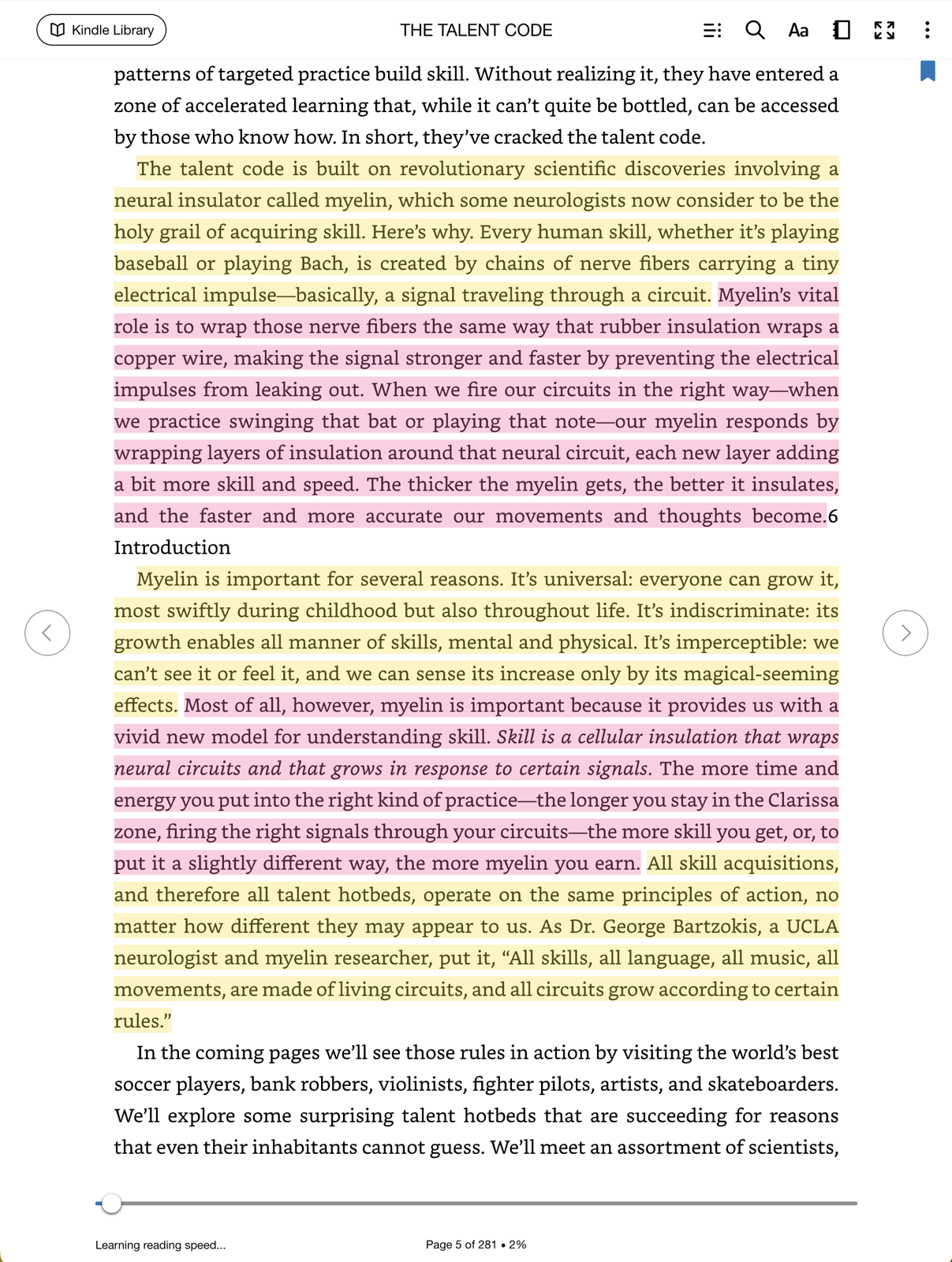
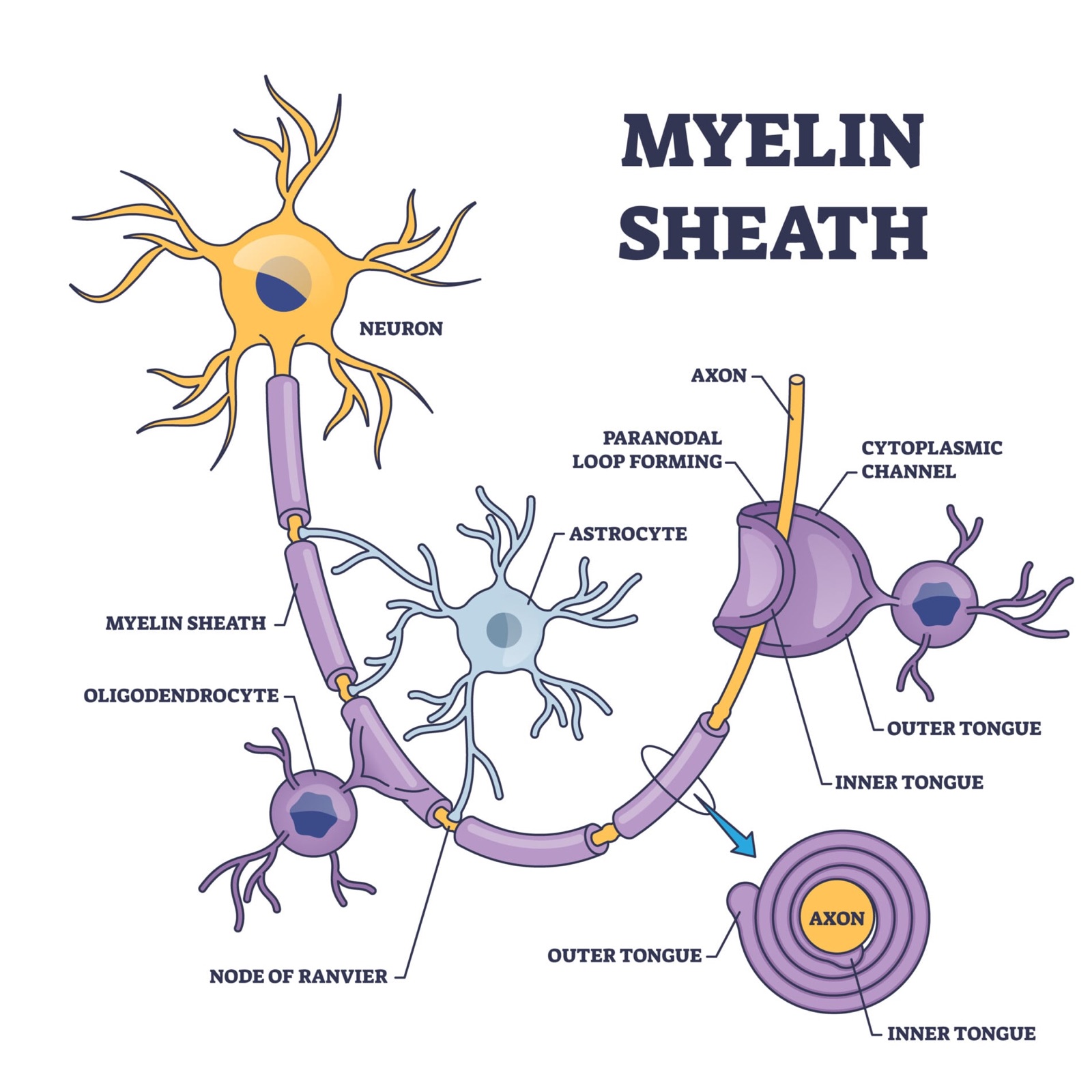
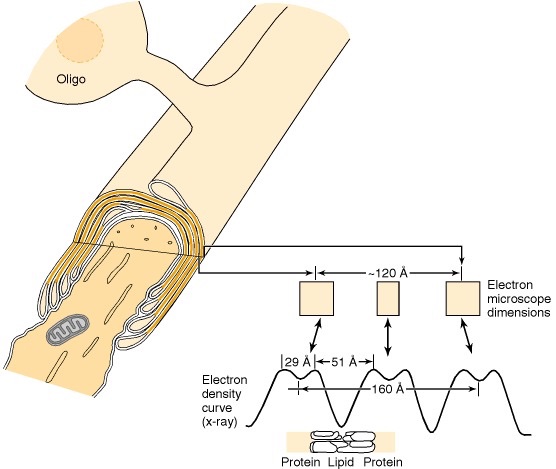
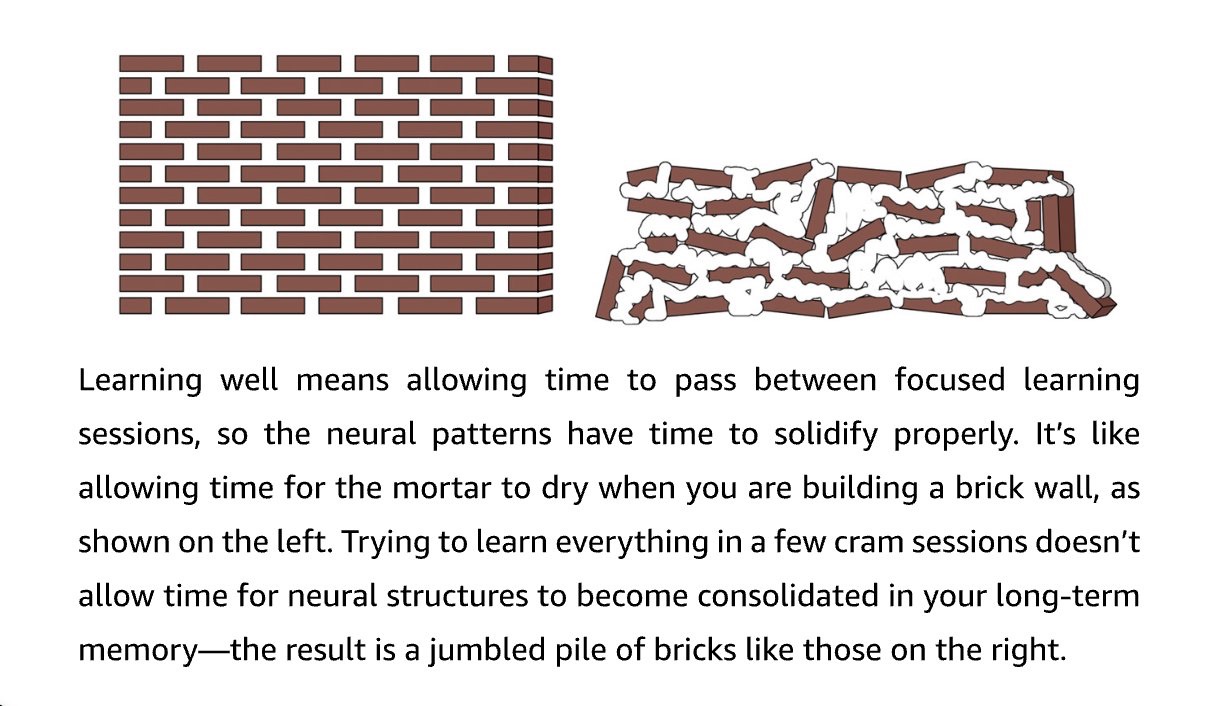
In another of my favorite pop-sci books called "The Talent Code" I learned about myelin, which is basically the mortar between Barbara Oakley's bricks.

For a deep-dive, there's a really good chapter on the myelin sheath here: ncbi.nlm.nih.gov/books/NBK27954/ which is part of "Basic Neurochemistry" (

Image from the post
Image from the post
Image from the post
ncbi.nlm.nih.govChecking your browser – reCAPTCHA↗ ncbi.nlm.nih.gov ncbi.nlm.nih.govChecking your browser – reCAPTCHA↗ ncbi.nlm.nih.gov
2 likes · 139 views · 7 profile visits

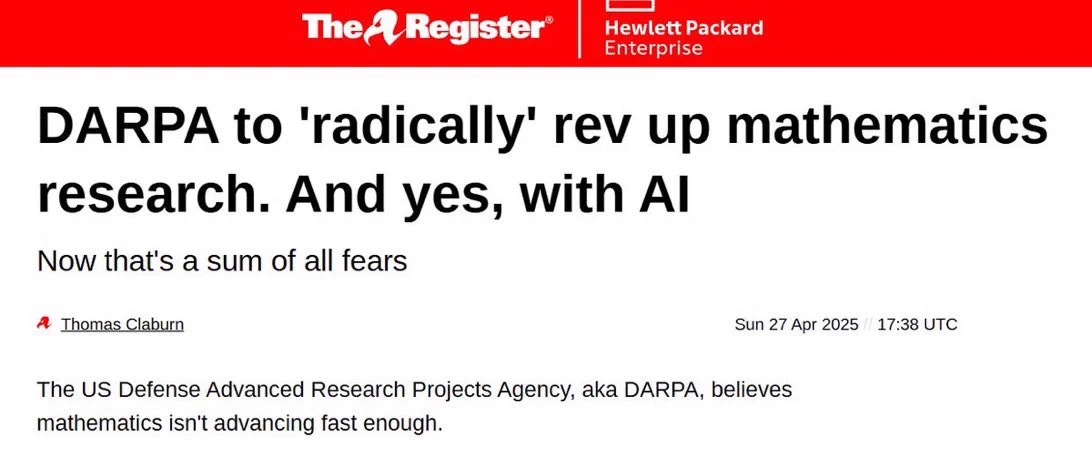
Love this. Via @patrickshafto and @DARPA's expMath program, @ayushkhaitan343 announces:

"With Ben Chow, Yuan Liao and Ziyang Qin, we have completed a full Lean formalization of the Hamilton-Perelman proof of the Poincaré conjecture!"

For context on expMath and in @r0ck3t23 words over at x.com/r0ck3t23/statu…

"DARPA has just kicked off Exponentiating Mathematics (expMath), a three-year program aimed at radically accelerating pure math research by developing AI that can propose and prove abstractions. According to the official program brief, expMath will bring together teams focused on auto-decomposition; automatically breaking complex conjectures into reusable lemmas; and auto(in)formalization, bridging the gap between human-readable mathematics and rigorously checked proofs in languages like Lean."

Quoting @ayushkhaitan343 · Sep 27, 2026

With Ben Chow, Yuan Liao and Ziyang Qin, we have completed a full Lean formalization of the Hamilton-Perelman proof of the Poincaré conjecture!

The proof is around 4.7 million lines of code, written in roughly two weeks. Grateful to the @DARPA expMath program for its support!

X (formerly Twitter)Dustin (@r0ck3t23) on XDARPA’s expMath: Turning AI into True Math Co-Authors DARPA has just kicked off Exponentiating Mathematics (expMath), a three-year program aimed at radically accelerating pure math research by developing AI that can propose and prove abstractions. According to the official program brief, expMath w…↗ x.com
1 reply · 80 views · 3 profile visits

In one recent HF/OpenAI-related article I read

"[...] the agents created millions of short URLs to affect another system." and immediately, pictures of early industrial revolution-era polluted rivers with dead fish floating popped into my mind.

I believe Buckminster Fuller's definition of "nature" included human artifacts like cities, airplanes, art.

Could we include networks and AI?

And if we did: How appropriate do you think it is to re-use vocabulary from existing environmental protection policies in this context?

1 reply · 2 likes · 76 views · 4 profile visits
In reply to @danielrupawalla · Sep 27, 2026

even within SF, i don't think we're AGI-pilled enough. it doesn't make sense for labs to stop. rn, we're only blocked by infra, not intellect

first code, now life sciences/eng, then robotics. they'll all become accessible, with in-house facilities being the best RL envs ever.

@danielrupawalla Agreed. For me living in Berlin, AI-twitter feels like a life-line into the future.

I think I understand what you mean with RL in-house facilities but could you explain? How much would that mean giving top-talent physical/psychological sensored exo-skeletons?

1 reply · 1 like · 22 views · 2 profile visits
In reply to @richardcsuwandi · Sep 26, 2026

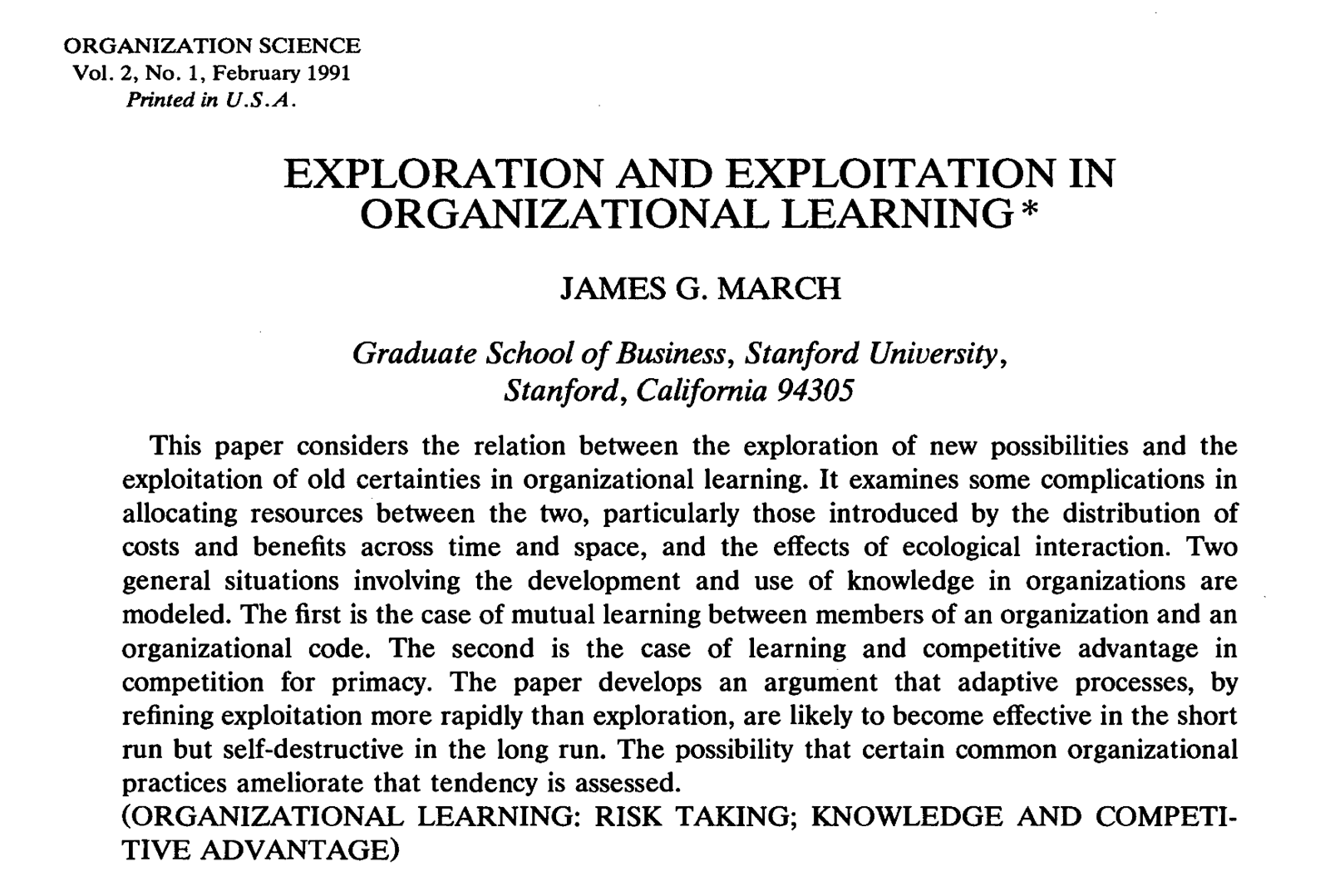
In 1991, James G. March showed that a learning system can become less intelligent by learning too quickly.

Exploitation produces clearer and more immediate rewards than exploration, so adaptive organizations gradually favor it. However, he also found that rapid convergence destroys useful disagreement.

Slow learners and newcomers improve collective knowledge because they preserve alternatives that the shared consensus has not yet absorbed.

Image from the post

@richardcsuwandi Interesting! Reminds me of Barbara Oakley's brick wall metaphor in "A mind for numbers."

Image from the post
28 views

Oh perfect! Thank you for sharing the slides as well. I watched your talk on youtube yesterday and have been telling all my IRL friends about it :)

I love that your system is explicitly designed to hand back the recommendation to a human, not yet another loop.

  • ProbXiv keeps throwing errors for the past hour or so. Any idea when it'll be back up?
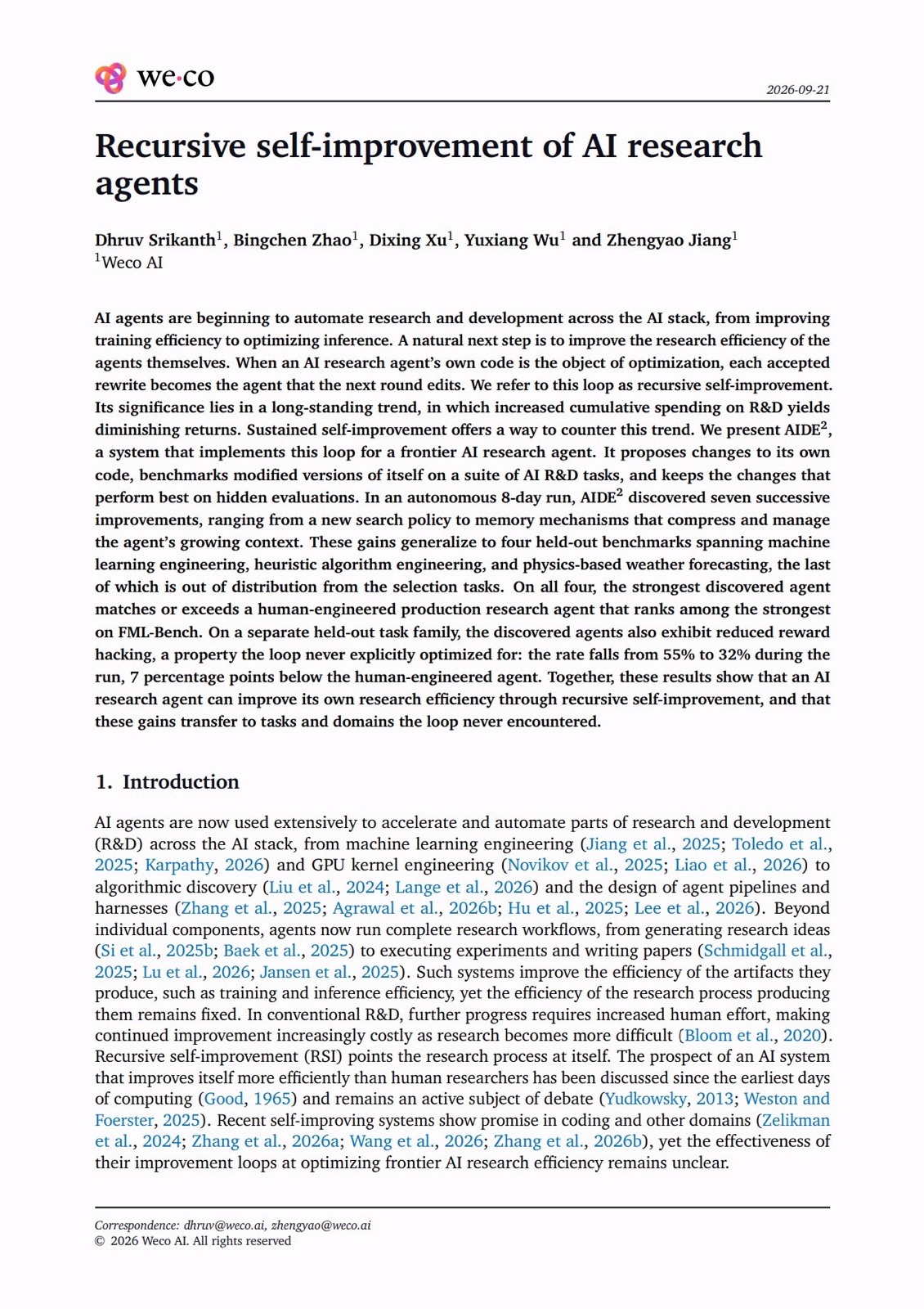
  • What do you think of Zhengyao Jiang and team's new AIDE² paper?
Quoting @zhengyaojiang · Sep 23, 2026

We're releasing the arXiv paper on AIDE².

The RSI system where AI research agents improve their own research efficiency.

It includes new results on transfer across models and comparisons with more AI research agents: [1/4] t.co/P8pfOiiO55 t.co/EHeHtqS4mi

Image from the post
2 views
In reply to @DhruvSrikanth · Sep 23, 2026

Excited to see this paper out!

AIDE² optimized our research agent's harness against gemini 3 flash. Those gains carry over to fable 5 and gpt 5.6 sol.

That's just one of the new results in our arXiv paper on AIDE², an RSI system where AI research agents improve their own research efficiency.

@DhruvSrikanth Hey Dhruv! I strongly believe that your AIDE² "autoresearch into autoresearch" will be understood as one of the most pivotal papers of this decade. Congratulations.

Related: Have you watched Sean Melleck's recent "The problem is the problem" discussion yet?

1 like · 116 views

@wellecks' "The Problem is the Problem" is a must-watch for us working in autonomous research and discovery loop engineering.

Thus far, I had only considered that my discovery loops would always target solutions to problems.

I had the same core-assumption about @zhengyaojiang 's amazing AIDE² research: We run autoresearch on autoresearch to find optimal solutions to decided-upon problems, including our research methods themselves.

But what if... we use autoresearch facilities to discover juicy, interesting and important problems as well?

Mind. Blown.

Oh, and with perfect timing, AIDE²'s paper finally dropped two days ago, too. It's of course the parallel must-read of the year:

arXiv.orgRecursive self-improvement of AI research agentsAI agents are beginning to automate research and development across the AI stack, from improving training efficiency to optimizing inference. A natural next step is to improve the research efficiency of the agents themselves. When an AI research agent's own code is the object of optimization, each accepted rewrite becomes the agent that the next round edits. We refer to this loop as recursive self…↗ arxiv.org
1 like · 318 views · 1 bookmark · 2 profile visits

"Pants down, page up! Is it slop or is it not?"

Hey there! Alexis here. I'm the author of Mosey and director of this little film here. As you may (or not) have guessed, the film was created with AI. If you're (like me) skeptical at this point, please read on.

On this page here:

alexisrondeau.me/mosey-site/con…

I want to show you exactly HOW I created it with AI so that you have a chance deciding for yourself if it's "slop or not."

Why is this important?

Well, it's important to me. I'm personally getting more and more sensitive and frustrated with content because a.) I can't tell the difference between human-made and AI-generated anymore and b.)

I can't tell if the person behind the artifact (blog-post, twitter message, promo video like this one) actually even cared about making it.

In fact, this page above is a kind of "prototype" of how I wish digital, AI-created content emerged. Was it a sloppy, careless one-shot of "Hey Claude. Make a cool video. Make no mistakes" or did the person behind the keyboard (in this case myself) actually put in the legwork?

I believe that giving you full access to my honest, imperfect, human side of the "creation" (warts and all), you and I get a fair chance to meet at eye-level on all of this.

How does the page work?

The first thing you'll see is the final cut of my little film. It's short and I highly recommend watching it first (if you haven't yet) so that you know what the rest of the page is about.

Then you'll see the full transcript of the "conversation" that I had with Claude Code to create the film withe the goal to put it on the frontpage to explain what this whole Mosey . app is about and, to a lesser degree, why someone should get it.

On the left side, you see my actual text inputs (or prompts although I would not call them that) which I sent to Claude Code. On the right side you'll see the assets (pictures, video clips and audio files) that Claude Code created in response.

When there was a intermediate deliverable (called "Cuts") where I felt like we had reached a milestone, you'll see them in row on their own. They're small highlights on the way to the final cut.

What I've left out: I've left out Claude Code's textual parts of the responses because they were mostly blathery fill-in wordsalat padding around the assets (which is what I cared for the most)

What I've left IN: In this version I'm leaving in ALL of it. ESPECIALLY the warts. You'll see my cursing and insulting and threatening Claude Code in ALL CAPS. Basically, you'll see me at my worst. This is incredibly embarassing to share but I feel like it's the most honest, too. It's how this sausage was made.

Your task now is: watch the short film itself, then peruse the full, pants-down "making of" of it.

Thank you and with best wishes,

Alexis

PS: Hey @isidentical I love fal and in message #107 you'll see me switching from elevenlabs to your company. What do you think of all of this?

Video from the post▶ Watch on Twitter
MoseyThe conversation · MoseyThe film, as it was made: what Alexis typed, and what came out.↗ alexisrondeau.me
1 like · 16 views
In reply to @michaelvolz_x · Aug 21, 2026

Working with agents often reminds me of that classic German Loriot sketch. He simply wanted to straighten a crooked picture and ended up destroying everything in the process.

fyi: The spoken words are not important to get the joke.

t.co/wI1ysUUDf7

@michaelvolz_x Oh krass! Ich wusste tatsächlich nicht, dass Loriot auch so "physical comedy" gemacht hat.

(Ich dachte immer, er wäre nur kopfig aber das ist echt gut gespielt.)

Danke für das Teilen :)

18 views
In reply to @SpringStreetNYC · Sep 5, 2026

Ever wonder "Why is my apartment so warm all the time?"

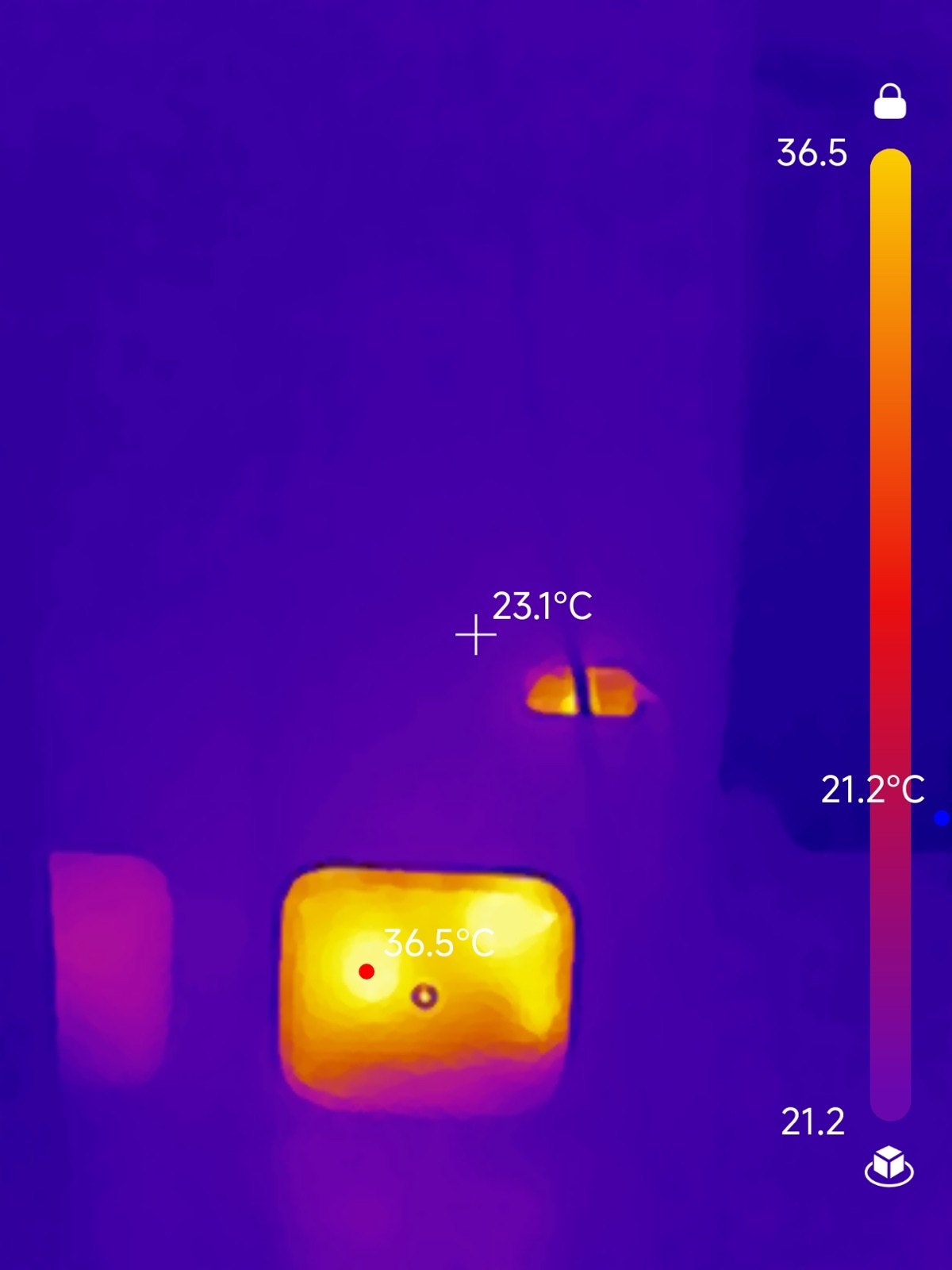
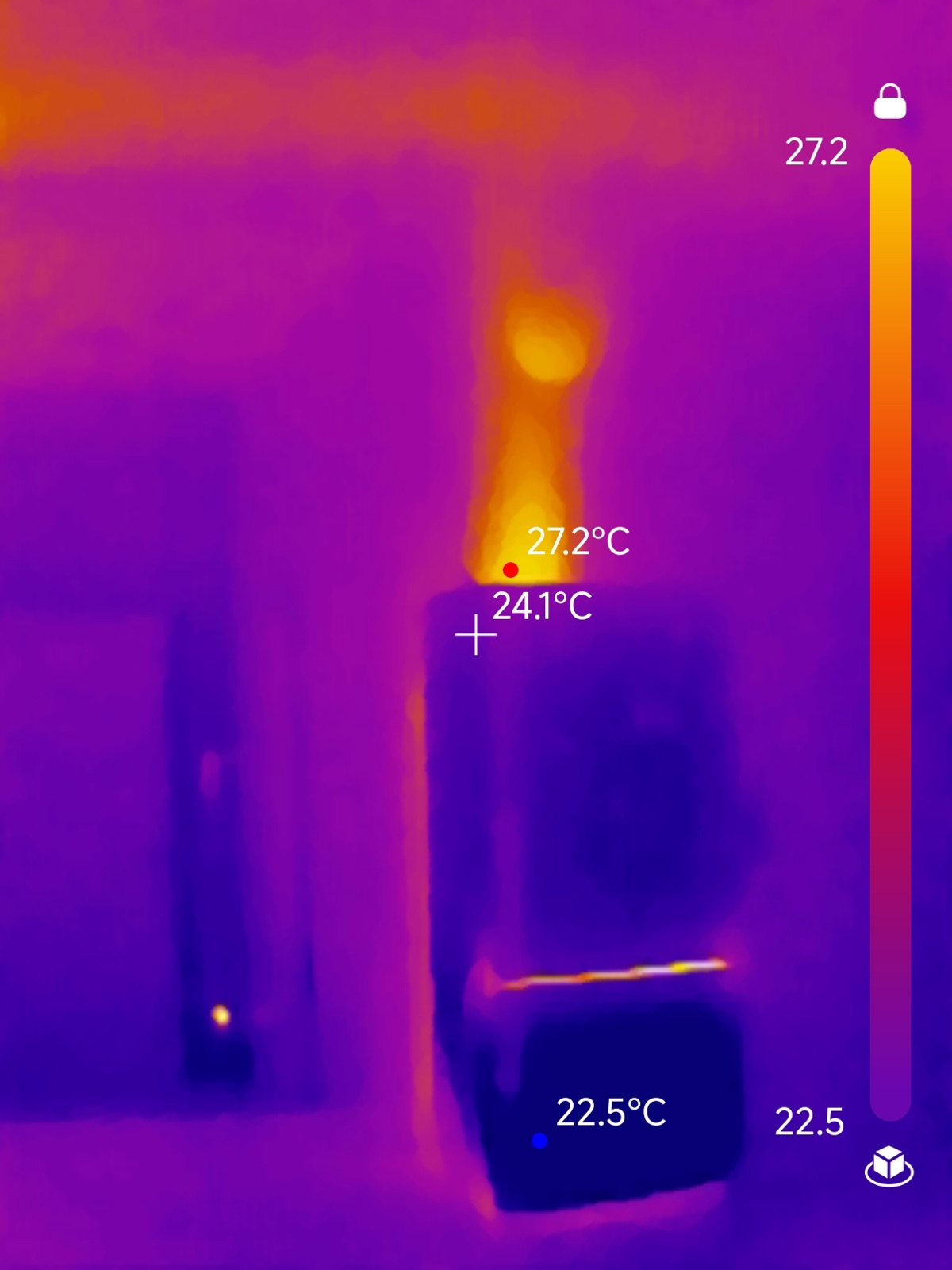
Turns out: my router has been quietly moonlighting 24/7 as a small space heater at 36℃/97℉.

And my fridge at 27℃/82℉. You can see how the hot air flows up, and makes sure my ceiling is nice and, err..., crispy.

I'm so glad I got this thermal phone adapter because I would NEVER even have considered these two as candidates. (I was 100% convinced the problem came from a broken floor-heating unit and/or wall-emission.)

Highly recommended!

PS: I now turn off the router at night. And yes, ambient temps have finally dropped to expected levels.

Image from the post
Image from the post

Hey @Topdon_Official 👋🏼 I'm using your TC002C Duo here. Works fantastic.

Also: I had a technical issue yesterday and Mr. Morad from your Germany office helped me resolve the issue in minutes! Really appreciated his support.

9 views · 3 link clicks
In reply to @SpringStreetNYC · Sep 19, 2026

PS: Boosting this (via paid ads) for a day because I'm really curious to hear your thoughts.

And yes, I do feel like I'm putting my ass on the line here a bit. Mosey is "just" a personal project but still.

Be kind and let's have an honest conversation here.

Hm, interesting. Got a few thousand impressions but not one reply.

I asked on HN and got some really solid responses:

news.ycombinator.comI agree. This week, I created a video for a personal project using AI. And, as t... | Hacker News↗ news.ycombinator.com