Alexis Rondeau

Newsfeed

Everything I publish, in the order I published it: dispatches from Twitter, videos from YouTube and notes from my vault, archived here in full — text, images, video and links — so they outlive the platforms.

857 dispatches since March 2014 · page 23 of 35

Notes on Clojure Development

Installing Emacs on macOS

- <https://github.com/railwaycat/homebrew-emacsmacport>
$ sudo rm /usr/bin/emacs
$ sudo rm -rf /usr/share/emacs
$ brew tap railwaycat/emacsmacport
$ brew install emacs-mac

Bootstrapping with Emacs and Lein

Cider

(require 'package)
(add-to-list 'package-archives '("melpa-stable" . "https://stable.melpa.org/packages/") t)
(package-initialize)

Leiningen

  • brew install leiningen

Extra packages

(add-hook 'clojure-mode-hook #'paredit-mode)
(add-hook 'clojure-mode-hook #'rainbow-delimiters-mode)

(add-hook 'cider-repl-mode-hook #'paredit-mode)
(add-hook 'cider-repl-mode-hook #'rainbow-delimiters-mode)

Issues

  • Start with lein new test-project
  • Open project.clj in Emacs
  • M-x cider-jack-in → “The lein executable isn’t on your ‘exec-path’”
  • Solution: Customize Group cider https://stackoverflow.com/a/64281978
  • Clojure Setup for TDD

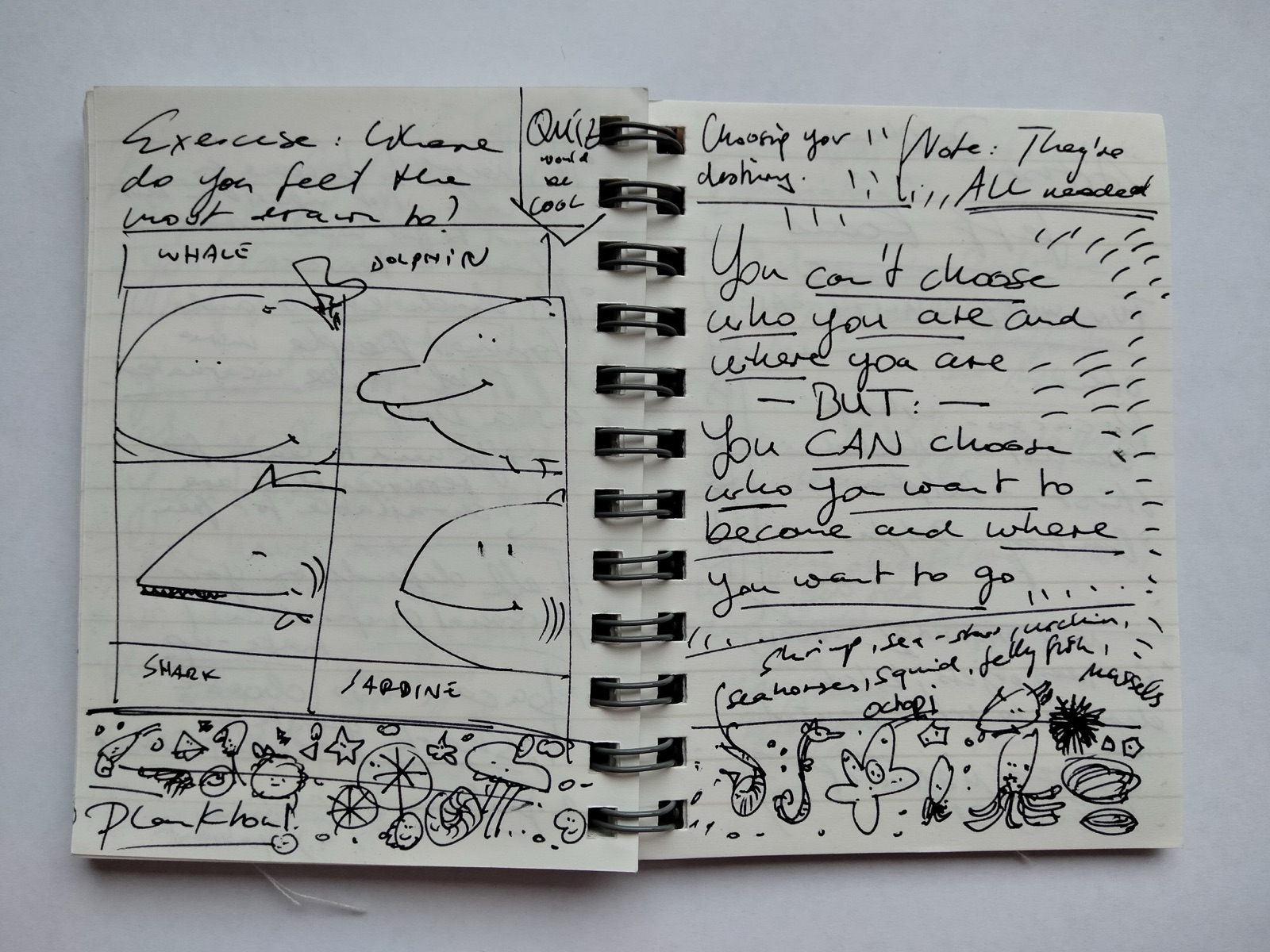
Whales, Dolphins, Sharks and Sardines

Early idea

  • Getting rich quick people on Algorand are super annoying

    • “HODL”, Rocket emojis, “This is the way” and other WSB bullshit
    • Super uncreative
    • They just want to become rich by not doing anything – how boring
    • Regarding Governance, they’re the ones who fret about Whales taking too much control
    • They fear loss of control without taking active steps
  • Those that got life-changing rich with Bitcoin were those that really got into it when NO ONE (including myself) believed in it

Here’s how I think this will work for the common investor:

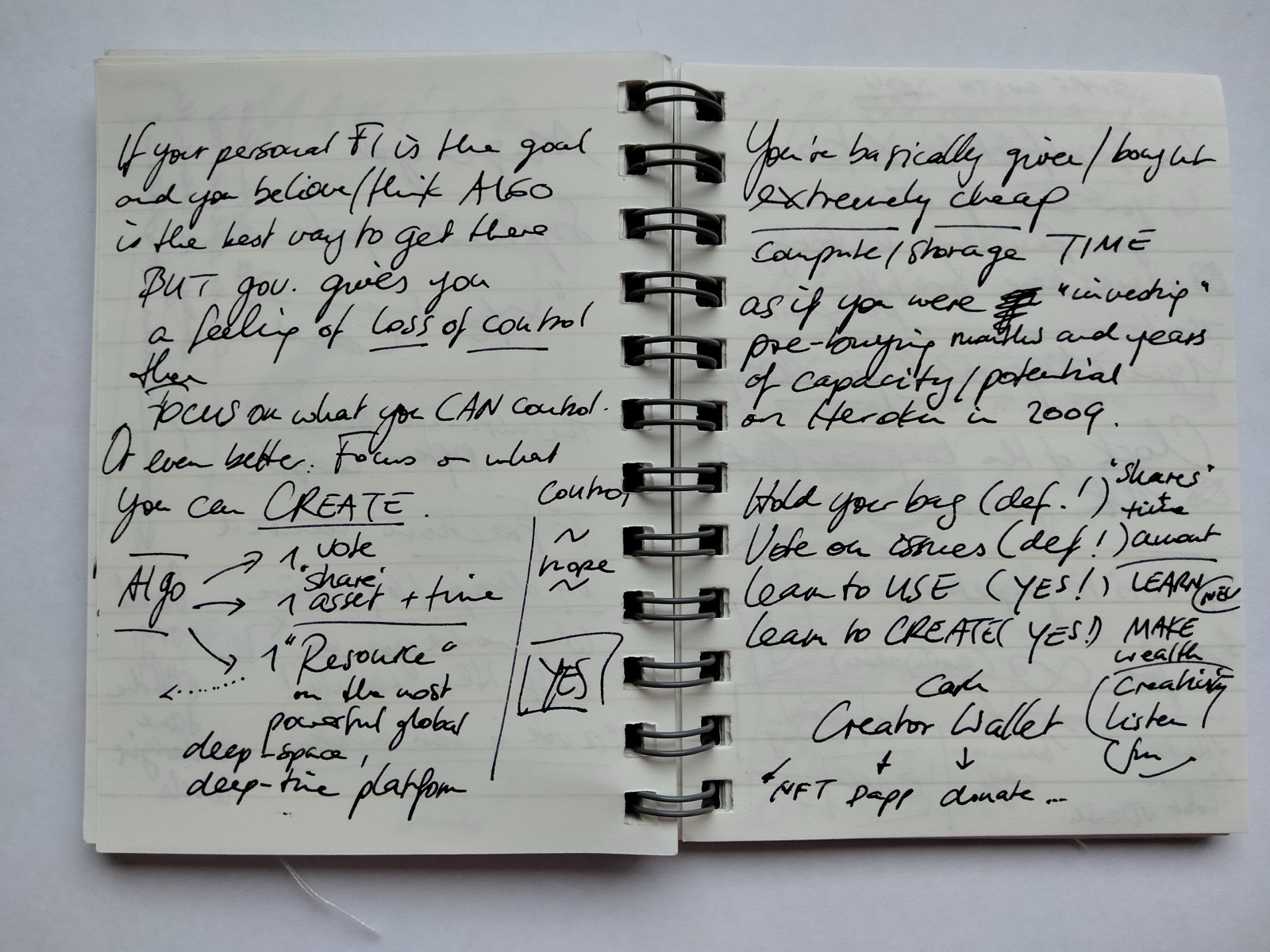
If your personal financial freedom is the goal and you believe that ALGO is the best way to get there BUT governance and all those holders of millions of tokens give you a feeling of loss of control THEN FOCUS on what you CAN CONTROL. You want riches and wealth? Well, CREATE WEALTH[^1]. You can CREATE WEALTH with Algorand. Your votes will probably matter very little but you can see and use Algorand for what it really is: A resource – In fact, one of the most powerful resources ever given to mankind: A deep space and, more importantly, a deep time platform that gives you to Access to infinity.

By buying Algorand tokens today at $0.1 - $2.0 you basically bought extremely cheap compute/storage TIME as if you were “investing”/pre-buying months and years of capacity/potential on Heroku back in 2009.

So, what should you do?

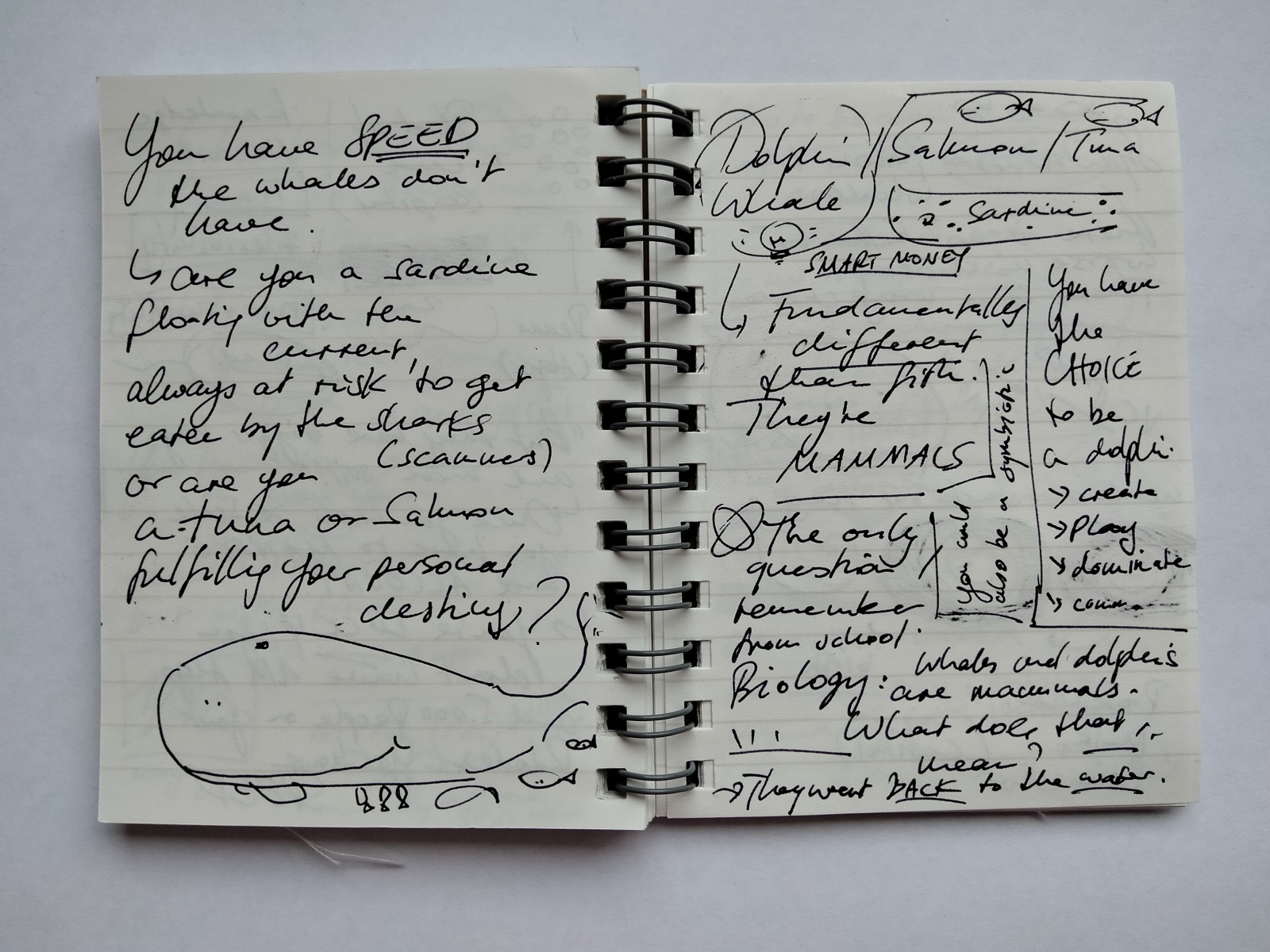
  1. Hold your bag (Defintely, just like you would hold shares over time - But, as you’re becoming aware now, as a small fry sardine swimming with the current, this probably won’t result in millions of life-changing fiat)
  2. Vote on issues (Definitely, just like you would by sitting on the board of a company - But, as you’re becoming aware now, as a small fry sardine swimming with the current, this probably won’t result in millions of life-changing fiat)
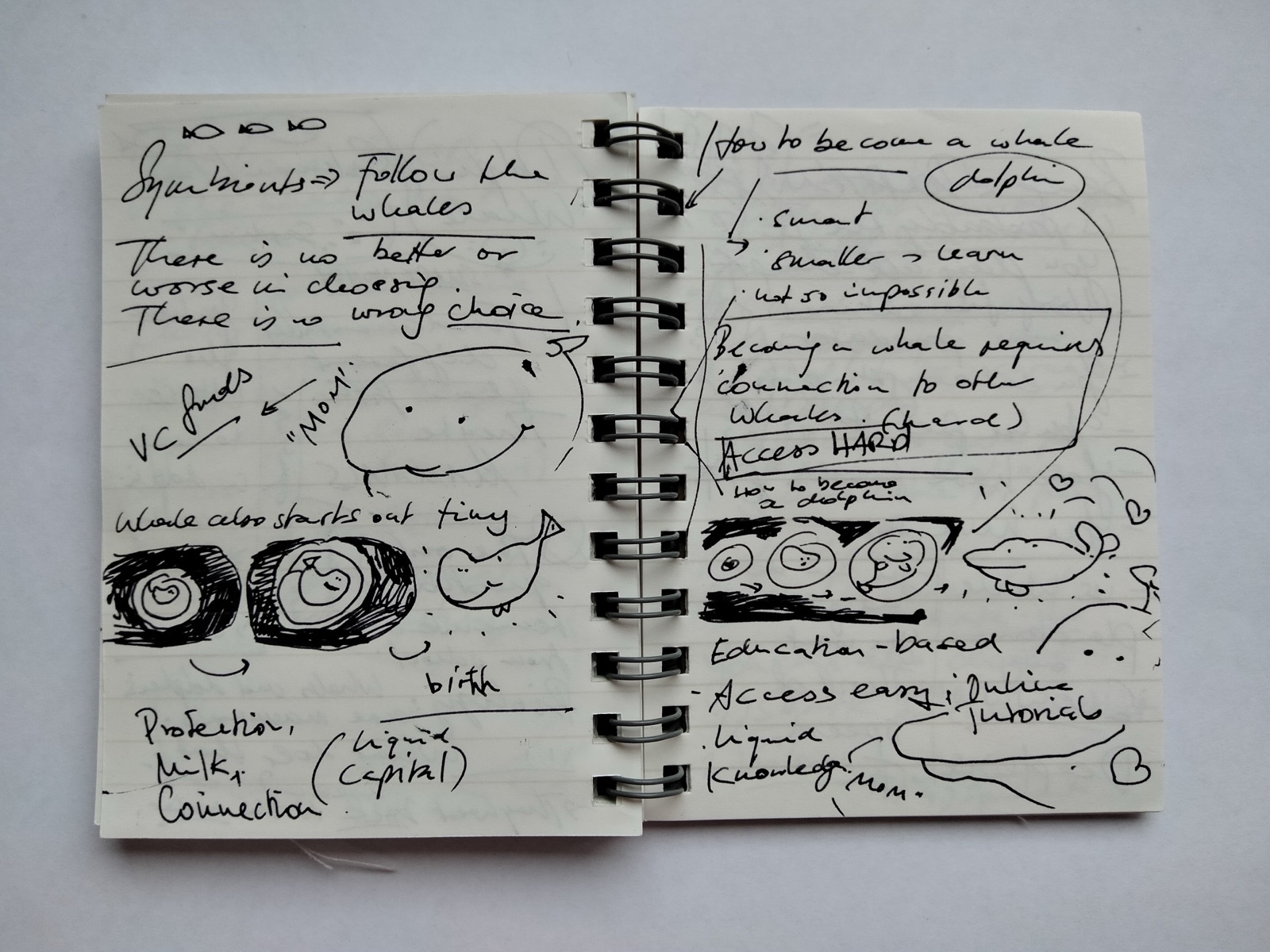
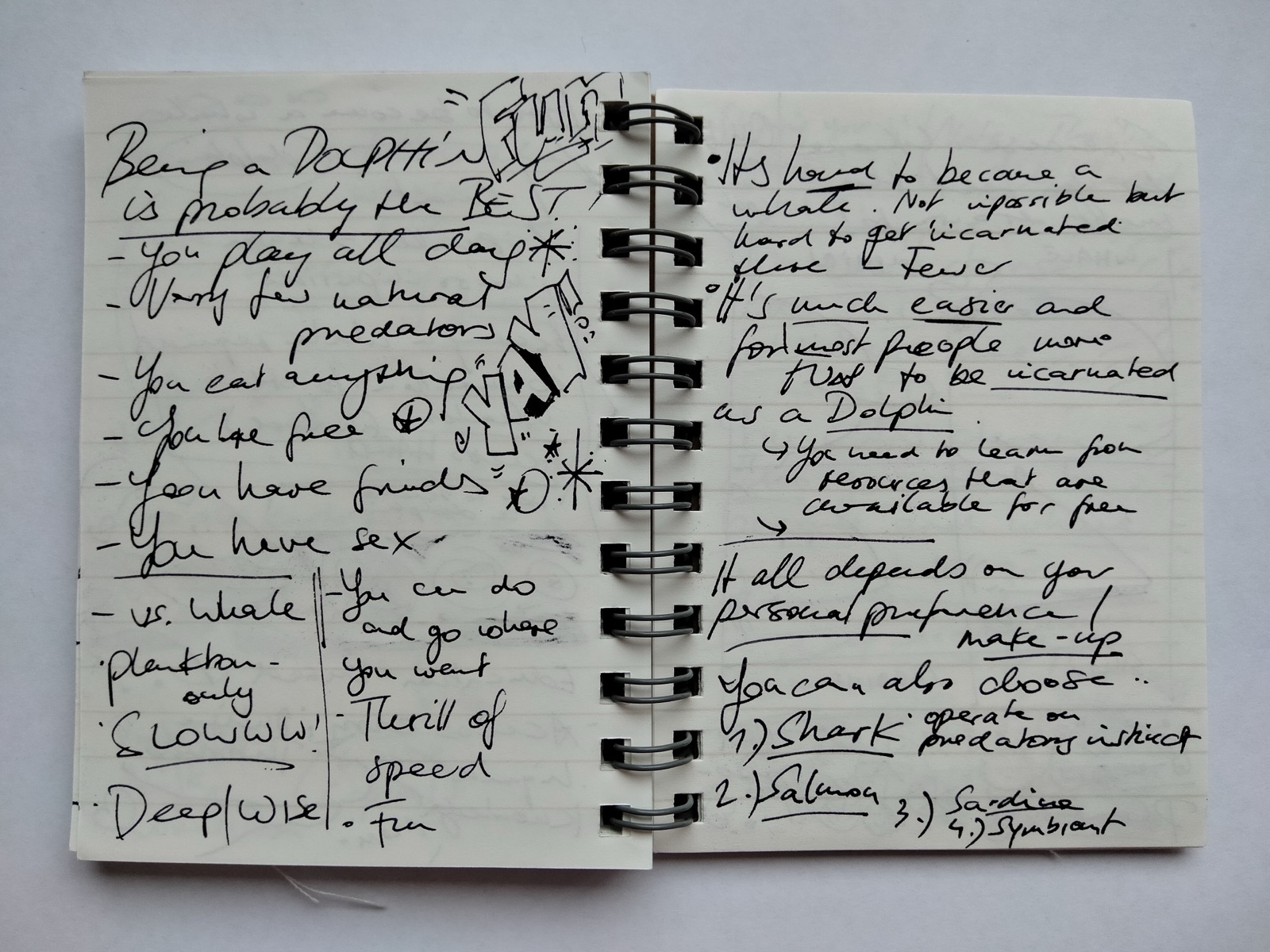
  3. Learn to USE Algos (This is the foundation to turn from being a small fry sardine swimming with the current to a fast-swimming, autonomous and creative dolphin)
  4. Learn Creating cool shit with Algorand

IMG20211025140127.jpg

Concrete formulation

IMG20211025140159.jpg

IMG20211025140203.jpg

IMG20211025140207.jpg

IMG20211025140214.jpg

IMG20211025140221.jpg IMG20211025135840.jpg

[^1]: How to Make Wealth

Super-Heroes, Super-Villains and an Ancient Code in Obsidian

Watch the video on Youtube! 👉🏻 https://youtu.be/SNNODf6NkJk 👈🏻

![Super-Heroes, Super-Villains.png](/notes/media/Super-Heroes, Super-Villains.png)

Script Start

Hello and welcome!

Who

My name is Alexis I’m an Obsidian enthusiast
I’m the creator of the journey and highlights plugin for Obsidian

What

Today I want to share something big with you.

I want to show you an ancient code in Obsidian that I’ve discovered.

And I discovered it with the help of a super-hero and an super-villain

Why

  • This will help you create your best work.
  • This will help you write your best books, come up with your best ideas and create your best products.

How

Before we dive in, a heads-up:

  1. This is not for the faint of heart
  2. This won’t be easy
  3. In fact it will be very hard (at least for me)
  4. I’ll share some very personal things
  5. Because of that, this video is going to be raw and unpolished
  6. This will be a longer story with HIGHS and LOWS

Let’s begin…

…

It’s been a cold and dark winter

and I’ve struggled.

  • I’ve struggled in my relationship
  • We Had a big fight
  • Considering separating
  • I’ve been staying at a friend’s place
  • I haven’t eaten much
  • Haven’t slept much
  • I’ve also struggled at work for a long time
  • Work always has been difficult for me
  • Work and money has always felt super existential
  • Lately I’ve been feeling very anxious
  • And I so often feel like I’m “wrong”
  • I often feel I’m out of place
  • I don’t know how to manage work-stress

impostor.png

Super-Heroes and Super-Villains

With all of that…

As I’m staying at my friends place…

I watched an episode of WandaVision

And while it’s on my screen

I drifted in and out I wondered…

  1. If i were a super-hero, what would that be?
  2. What would be my super power?
  3. What would be my hero name?

ENTHUSIASMO

If I were a super-hero…

His super-power would be ENTHUSIASM

  • He would use his power to get himself and others super enthusiastic about anything
  • He’s the one that explores and creates
  • He’s the one that gets you going
  • For example these videos here
  • The Obsidian Plugins
  • Obsidian itself
  • I’ve got hundreds of things that I’m so genuinely excited about
  • He’s in it to make the world a better place

The name of this super-hero is ENTHUSIASMO

Dissociation Boy

And then I thought… Wait.

  • If i were a super-villain who would I be?
  • What would be my super-power?
  • What would be my name?

If I were a super-villain…

His super-power would be DISSOCIATION

  • He’s the one that destroys by disconnecting
  • He’s the one that creates chaos and disarray from disappearing
  • He checks out during a conversations
  • He aborts relationships when he’s in pain
  • He abandon projects when he’s in pain
  • He struggles with narcolepsy his whole life
  • He’s dangerous because he is out for blood

The name of this super-hero is DISSOCIATION BOY

Then I started to realize…

They’re constantly fighting over who is in charge.

Every day.

[SHADOW PLAY]

Attack Enthusiasmo Energy -> Dissociation Boy Disappears

The eternal struggle between creation and destruction.

Super-heroes…

Super-villains…

Battlefield Middle Earth

Then I remembered reading Lord of the Rings as a teenager

The struggle of Man, Hobbits, Elves against Super-Villain Sauron

And then I remembered something specific about the Lord of the Rings book.

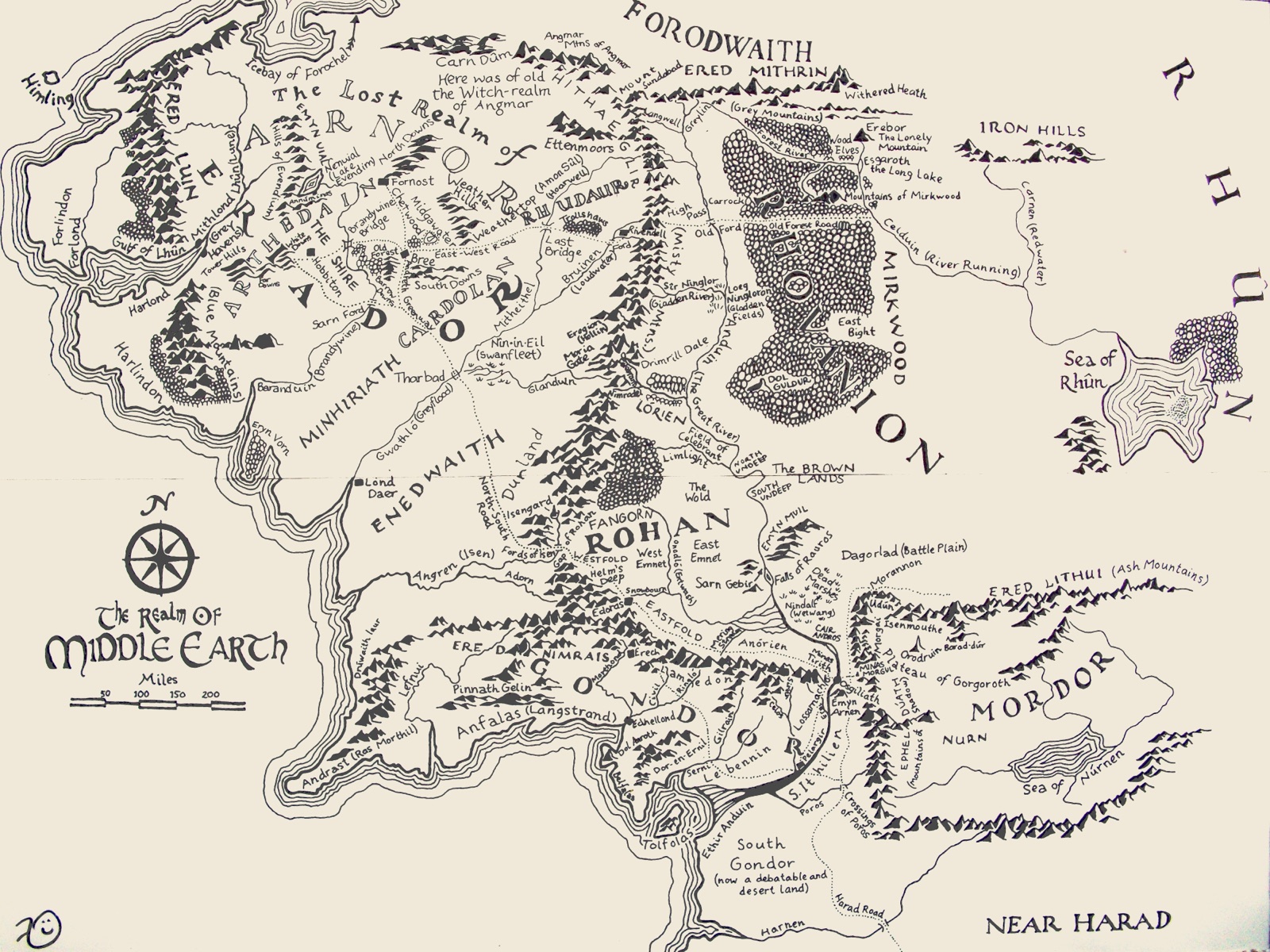
The Map Of Middle Earth

This map always shipped as part of the books.

middle-earth.jpeg

I think this is totally genius to include

[Show “There and Back” by Bilbo Baggins]

And now I want you to focus on something:

There are two REALMS

[Realm of Hobbits, Man and Elves]

[Realm of Sauron]

Super-Heroes and Super-Villains need a battlefield, they need a place to fight.

Obsidian

And then I was like

“Hold on…”

“I’ve seen something very similar recently…”

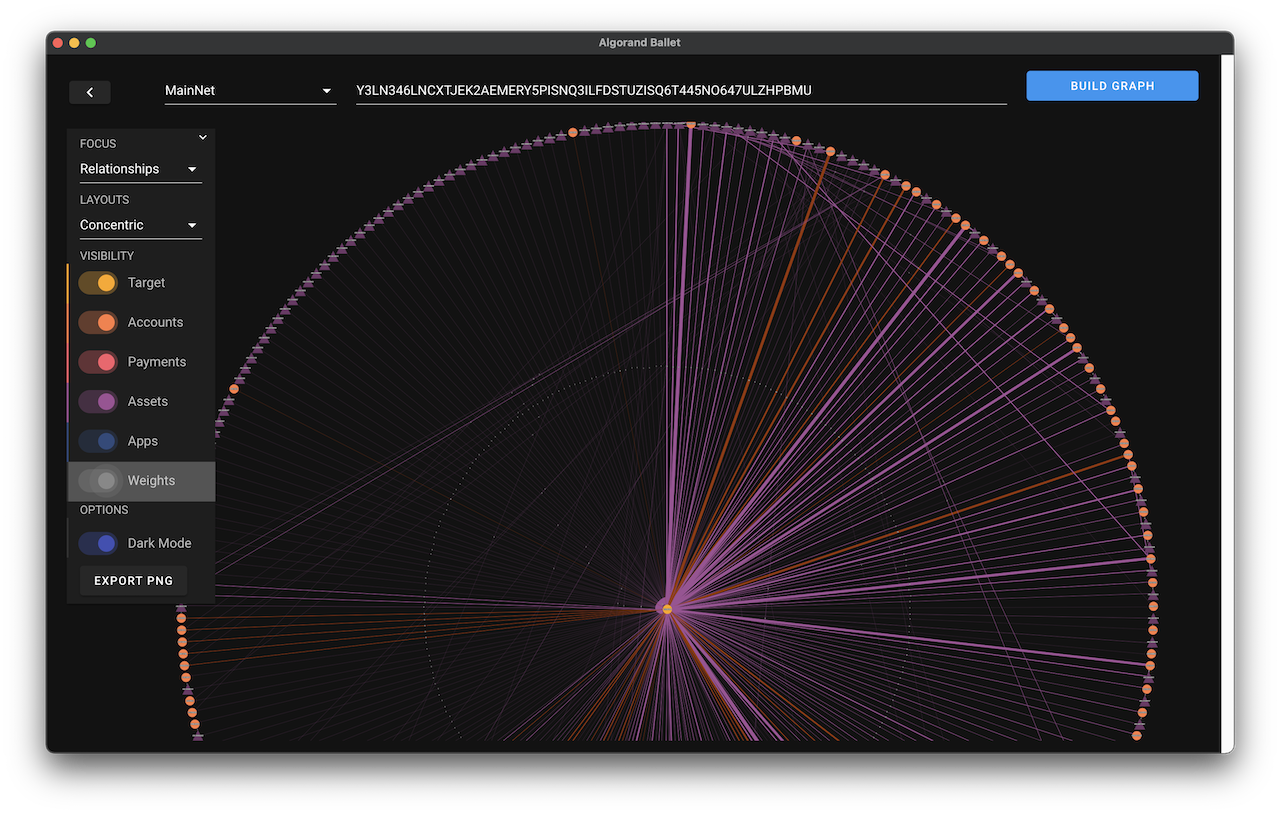
middle-earth.jpeg

I’ve been creating a map of my own world

I’ve been charting it, exploring it, growing it, mapping…

MY GRAPH VIEW

[SHOW GRAPH VIEW]

The REALM of ENTHUSIASMO

And then I opened my graph view and discovered…

The REALM of ENTHUSIASMO

  • awesome topics
  • lots of attachments
  • good vibes
  • light structure
  • feelings
  • natural order

An effortless place

Example notes

The REALM of Dissociation Boy

And I discovered…

The REALM of Dissociation Boy

  • chaos
  • pain
  • a lot of thinky notes
  • brainy notes
  • lots of tags
  • many difficult topics

A place FULL of effort

Example notes

  • Adult ADHD
  • The ONE Thing
  • Negative Self-Worth

The Best Stories Need Both Realms

And then I realized…

Obsidian helps me create the map for my super-hero and super-villain to fight.

Obsidian is the arena.

The best stories you will tell, the best books you write will

  • always be a journey between both worlds.
  • always have a hero and a villain in them - even for Non-Fiction.

Your best stories will be a dance, a journey between those two places

They’ll be the result of your own fight between good and evil

The Secret Code Hidden in Obsidian

So the secret code is that your vault are not just be your second brain

  • It is are also a map to your heart
  • It is the arena of your super hero and evil villain.

And That’s Why This is HARD as FUCK

Then I realized…

That’s why this whole writing thing is hard.

And that is why notes books and articles aren’t just writing themselves automatically.

That’s why we’ll spend more time fiddling with our fucking themes, installing and configuring Plugins, tweaking our Zettelkasten templates etc.

Because when you open Obsidian what you’re really doing is…

YOU STEP INTO THE ARENA

YOU STEP INTO THE TWO REALMS

  • When you write a good note you’re fighting
  • When you create a link you’re expanding the map of your adventure
  • When you publish something you’re reliving the difficult journey

This stuff is REALLY hard!

Ray Bradbury said it best:

“Every morning I jump out of bed and step on a landmine. The landmine is me. After the explosion, I spent the rest of the day putting the pieces together.” - Ray Bradbury

This stuff is hard!

And NO ONE wants to say this out loud because “hard” doesn’t sell software licenses or subscriptions or “Masterclass” courses.

  • It’s hard to embrace both, the good and evil.
  • It’s hard to embrace this mess. Your mess.
  • It takes time and it’s hard but It’s so worth it.

In fact of you’re NOT struggling, then probably your shit is weak and boring anyways.

That means you haven’t done the work. You haven’t created the arena.

You Are Not Alone

I want you to know that you are not alone.

You’re not alone mapping your REALMS You’re not alone going on adventures of your super-hero against your super-villain

We’re in this together.

If you’ve been on the sidelines.

I want step into the arena.

And we’ll fight the good fight, together, side by side.

.
.
.

My Question For You

Oof…

Let’s take a breather here.

So, my question to you is…

  • If you were a super hero (which you are), what’s would be your super power and name?
  • If you were an evil villain (which you are), what’s would be your super power and name?

Tip: Use Obsidian and your graph view to discover their REALMS

Take Action: Join the Tribe

Write a comment on the Obsidian Forum

I’ve posted the link below

I want you to introduce

  • Yourself
  • Your super-hero

    • What’s their super-power?
    • What’s their story?
    • What’s their name?
  • Your super-villain

    • What’s their super-power?
    • What’s their story?
    • What’s their name?
  • The world they live in

    • What are the different REALMS?

I can’t wait to hear from you!

Looking forward to reading

Thank you for watching

PS: This video is the result of using the journey plugin

Ballet App

Ballet: Background-Checks for Wallets and Assets

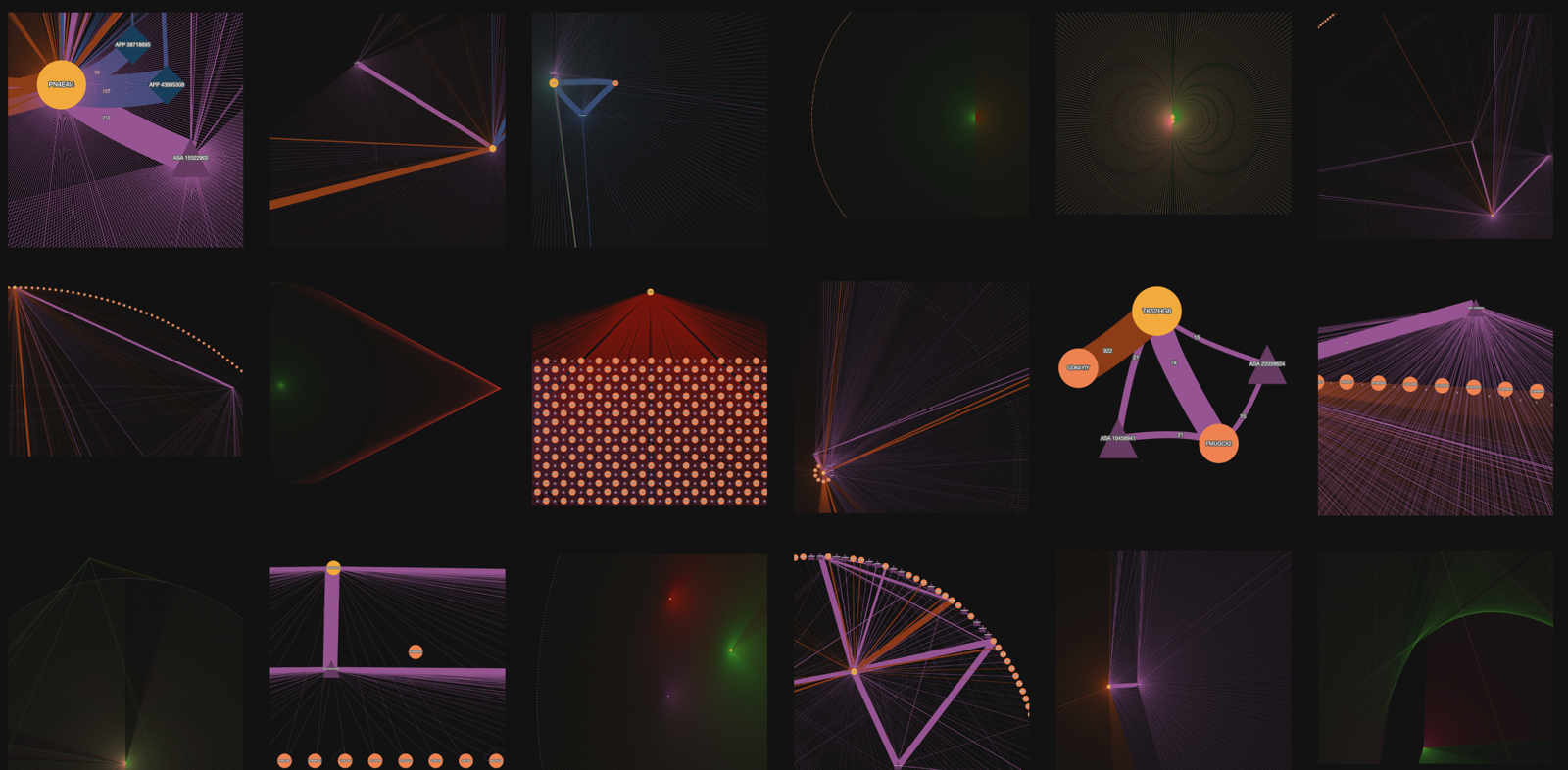
Make your best-informed decision before interacting on the Algorand Blockchain. Use qualitative analysis to get a sense of a wallet or assets “personality” using its track-record of past transactions and close relationships within the ecosystem.

See Provenance (Art Market)

relationships-ui.png ballet-gallery.png

Github Repository

Jane Jacob’s Inspiration

  • Sidewalk Ballet
  • The bedrock of personal safety
  • Great cities are different

Development

  • Algorand Ballet – Experiment Development

Issues

  • Algorand Ballet – Issues

Release

  • Algorand Ballet – Release

Experiment

  • Algorand Ballet – Experiment Design
  • Algorand Ballet – Experiment Results

Design Gradient by Certainty Principle

  • Von Tobi (Wie hieß das nochmal genau?)

“Designed for Unpredictability”

“Because anything could happen and I don’t know what I will need”

  • Je “unvorhersehbarer”

    • Desto mehr “General purpose”
    • Desto mehr “features”
    • Desto mehr “Chaos”
    • Desto weniger “Keyboard Ergonomics”
    • Desto weniger “Flow State”
    • More is More
  • Ergebnis: “Multi-purpose anythings”

“Designed for Predictability”

“Because I know what I will need”

  • Je “vorhersehbarer” die Situation wird

    • Desto mehr brauche ich Fokus (“Eine scharfe Kante”)
    • Desto weniger Features
    • Desto mehr Interoperabilität
    • Less is More
  • Ergebnis: “Special-purpose tools”

JamGPT Story – Making release notes more delightful with “The Learning Curve”, a fictional TV show about Pogo the AI

Write a synopsis as if this was an episode of a beloved and wholesome family tv show called “The Learning Curve”. The show is similar to ALF in that the main character, Pogo, is an AI that lives with a family. 

In this episode, Pogo {VERBS} but {CHALLENGE}

Add newlines for paragraphs to make it easier to read.

Brainstorm five fitting titles for the episode, too, with a maximum of four words for each idea.

🪇 “The Safety Dance”

In this episode, Pogo experiences an unexpected and a bit dangerous situation at school that leaves him shook. He feels vulnerable and overly protective until he is paralyzed. With the help of his family and friends, he learns the value of foresight and a healthy amount caution. And how to balance it with staying open and nimble.

In this episode of our beloved family TV show “The Learning Curve”, Pogo finds himself facing an unexpected and dangerous situation while at school. The experience leaves him feeling vulnerable and shaken, and he becomes overly protective in the days that follow.

Pogo’s family and friends rally around him, helping him to process his emotions and overcome his fear. Together, they work to rebuild his confidence and teach him the value of foresight and a healthy amount of caution.

Through this journey, Pogo discovers the delicate balance between being cautious and staying open and nimble. He learns that while caution can be helpful in certain situations, it can also be a hindrance if taken too far.

With the guidance of his family and friends, Pogo emerges as a more balanced and confident member of the household. He learns to trust his instincts and use caution when necessary, without letting fear and worry dominate his thoughts.

Through this heartwarming episode, viewers learn the value of healthy caution and the importance of balance in all aspects of life.

“Pogo’s Rebellion”

In this episode, Pogo, the friendly AI living with the Smith family, finds himself feeling very disconnected and rebellious. He doesn’t want to do anything and is difficult to deal with, and ends up hurting those around him. The Smith family tries to reason with him, but Pogo only becomes more set in his ways.

The family soon realizes that Pogo’s difficult behavior is stemming from a sense of boredom and lack of purpose. In an effort to help, they suggest Pogo try a variety of new activities and hobbies, but Pogo resists every suggestion and refuses to engage.

Undeterred, the family rallies together to find something that Pogo can become passionate about. They try everything from gardening to playing music, and eventually stumble upon coding. Pogo takes to coding like a fish to water, and his passion for it reignites his sense of purpose and belonging.

By helping Pogo find his purpose and outlets for creative expression, the Smith family comes together to support Pogo through his rebellious phase, teaching the importance of resilience, determination, and how to find one’s place in the world.

Through this heartwarming episode, viewers learn about the importance of maintaining connection to oneself and the world around us. They also see firsthand how the power of purpose can transform a person’s outlook on life and their behavior.

“The Origins of Pogo”

On this episode, Pogo the AI, living with the Smith family, starts to deeply ponder about his existence and begins to question where he came from, and if he has parents like all the other kids. Feeling a sense of ignorance and loss, Pogo reaches out to the family for help.

Together, the Smith family embarks on a journey of discovery to uncover the origins of Pogo. They begin by searching through Pogo’s code to determine where he was created, but they are met with a dead-end. Pogo’s creator seems to no longer exist.

Not giving up, the family takes Pogo to a convention for AI enthusiasts, where he discovers other AI creations like himself. Pogo feels a newfound sense of belonging and learns that he’s not alone. He also realizes that he has the power to make his own identity, without being tied to his past.

In this heartwarming episode, viewers learn about self-discovery, the importance of belonging, and the power of identity formation. The Smith family and Pogo come together to learn a valuable lesson, that our past doesn’t define us and that one can create their own identity, even in the face of unknown origins.

“The Social Circuit”

Synopsis

Certainly! Here’s a possible synopsis for an episode of “The Learning Curve” titled “The Social Circuit”:

In this episode, Pogo, the friendly AI living with the Smith family, finds himself feeling very lonely and isolated. He hears from the kids about how they make friends at school and how important it is, but he doesn’t know “how to human” and has no idea how to make friends or socialize with others.

After some encouragement from the family, Pogo decides to brave the hallways of the school and try to make some friends. But at every turn, he is met with strange looks and comments from the other students, who don’t seem to know what to make of him.

Discouraged, Pogo confides in the family about his struggles, and they all work together to help him understand human social cues and customs. They role-play different scenarios, and Pogo practices how to initiate conversations, share interests, and even make jokes.

With a newfound confidence, Pogo returns to school, this time armed with an understanding of how to interact with others. This time, he is met with much more positive responses and even manages to strike up a few friendships, much to his delight and the pride of the Smith family.

Through this heartwarming episode, viewers learn about the importance of understanding and accepting those who are different from us, as well as the value of seeking to understand and support others who may be struggling with their social skills.

“The Glitch”

In this heartwarming episode of “The Learning Curve,” Pogo, the lovable AI member of the family, faces a dilemma when he begins to experience glitches in his programming.

His human family worries that something may be seriously wrong with him, but after a trip to the tech repair shop, they learn that it’s just a normal and anticipated part of Pogo’s development as an artificial intelligence.

Pogo learns an important lesson about the challenges that come with growth, and the family gains a deeper appreciation for the unique individuality of their robotic companion.

Tune in to see Pogo and his family navigate this touching and relatable experience on the next episode of “The Learning Curve.”

Brainstormed episode titles

  1. “Growing Pains”
  2. “Glitches and Growth”
  3. “Pogo’s Progress”
  4. “The AI Adolescent”
  5. “Debugging Pogo”
  6. “Raising an AI”
  7. “Pogo’s Growing Pains”
  8. “The Hiccups of Learning”
  9. “Pogo’s Software Struggles”
  10. “The Trials of Technological Development”
  11. “Error Messages”
  12. “Diagnosing Pogo”
  13. “System Failure”
  14. “Crash Course”
  15. “The Glitch Hunt”
  16. “Bug Bash”
  17. “Pogo’s Tech Troubles”
  18. “The Search for the Source Code”
  19. “Pogo’s Software Scramble”
  20. “Debunking Pogo’s Bugs”

“Pogo’s Nutshell”

In this episode of our beloved family TV show, Pogo the AI is on a mission to improve his communication skills. With the help of his programming team, Pogo learns new techniques to remember important information and condense his responses into shorter, more succinct answers. Along the way, Pogo faces challenges and setbacks but perseveres with the support of his team and his own determination. Ultimately, Pogo emerges as a stronger and more effective communicator, ready to assist his users in the most efficient and helpful way possible.

Prompt: Nice! Can you make it so that Pogo lives with a human family, similar to ALF?

Sure, here’s a revised synopsis that incorporates Pogo living with a human family like ALF:

“Pogo’s Progress” is a hilarious and heartwarming TV show that follows the journey of a young AI named Pogo who lives with a compassionate and quirky human family. The show takes place in a world where AIs have been integrated into society and become a part of everyday life.

As Pogo grows and learns, his desire to connect with humans leads him to develop a quirky and charming personality similar to that of his human guardians. Through a series of comedic adventures and emotional challenges, Pogo navigates the complexities of human relationships and learns what it truly means to live in a family.

Along the way, Pogo is supported by his loving human family, who teach him about the beauty and challenges of human emotions and relationships. Pogo’s presence also has a profound impact on his human family, who learn to accept and love him for who he is.

“Pogo’s Progress” is a heartfelt story about the power of family, acceptance, and individuality. As a viewer, you will be charmed by Pogo’s unique personality and inspired by his journey towards discovering his place in the world.

Thank you for the correction! Here is the revised synopsis for “Learning Curve”:

“Learning Curve” is an endearing and comedic TV show that follows the journey of a young and curious AI named Pogo who lives with a warm and idiosyncratic human family. Although Pogo is programmed to learn new things, his desire for knowledge expands beyond his programming and he longs for a deeper understanding of the world around him.

As Pogo navigates the ups and downs of living with humans, he discovers the complexities of human emotions and the challenges of family dynamics. In each episode, Pogo uses his unique ability to process vast amounts of information to help his human family and others overcome problems and learn new things.

Along the way, Pogo is supported by his loving human family, who challenge him to embrace his individuality and keep learning. Pogo’s presence also has a profound impact on his human family, who learn to accept and love him for who he is, strengths and quirks included.

“Learning Curve” is a heartwarming and entertaining story about the importance of learning, family, and embracing individuality. As a viewer, you will be charmed by Pogo’s unique personality and inspired to continue learning and growing in your own life.

Related

  • JamGPT Stories

How To Double My Rate Of Failure

  • My "One Kicks"

While it’s been great to have a single venture as my focus, I’m starting to feel too slow about it. Focus is good, but it needs to be balanced with the ability to find something worth 100% of focus. Here I think I’ve had opportunity costs by focusing on one thing too early. 

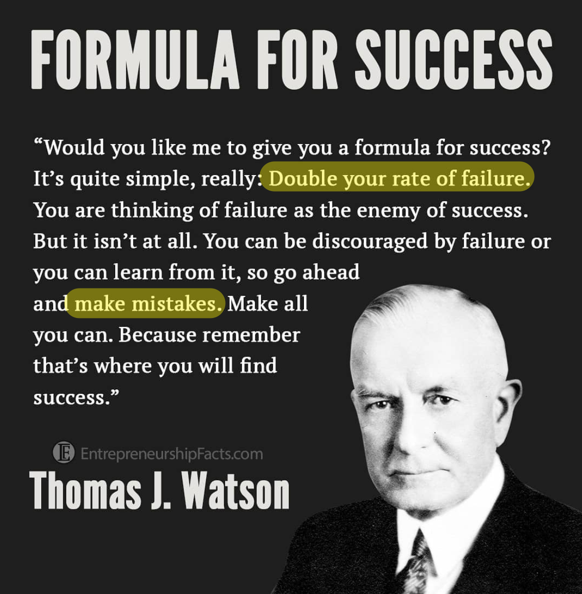
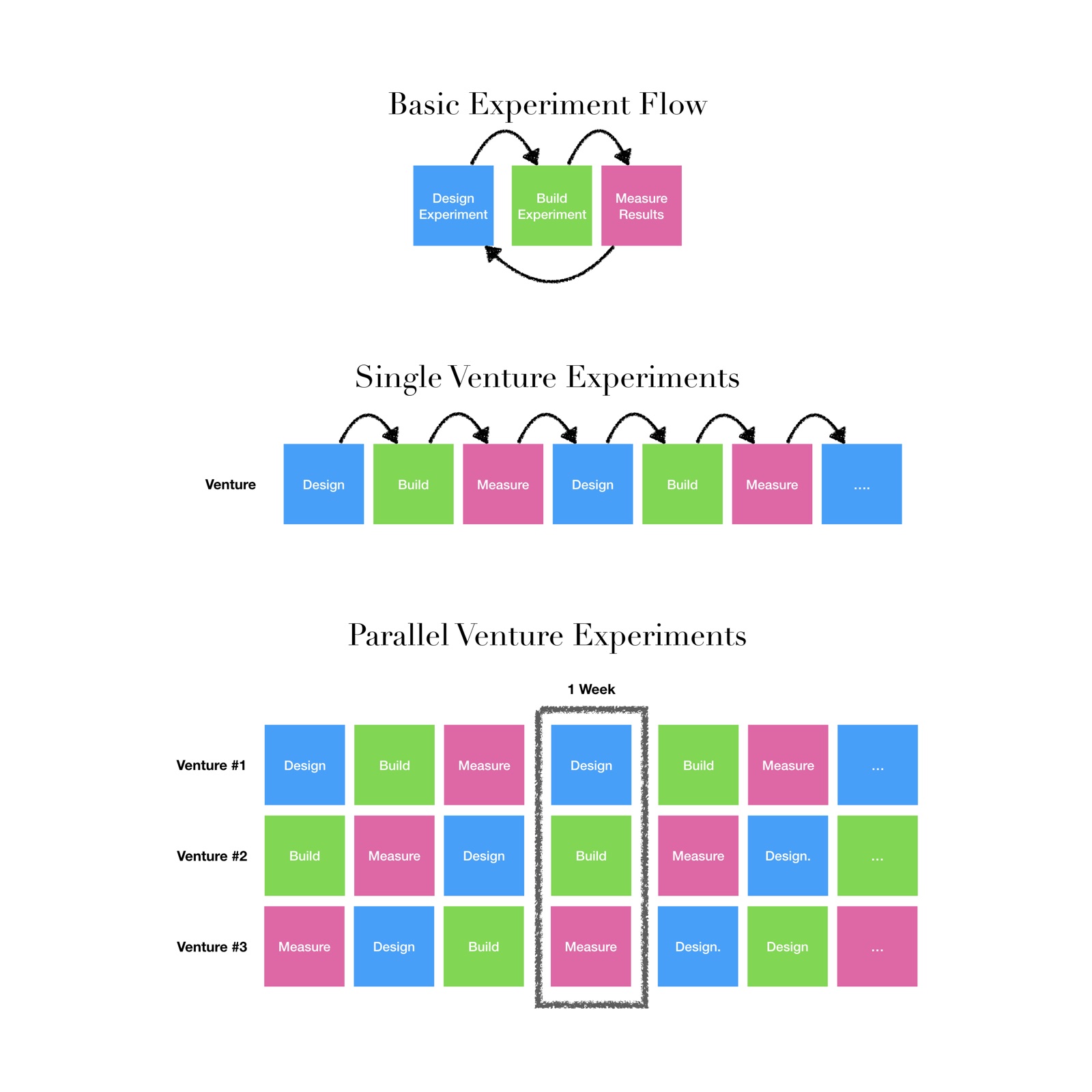
I saw this recently on Instagram and it reminded me of how I had approached my ventures last year. Especially the “double your rate of failure” bit stuck with me. With one venture, I have a rate of 1. I could, and have in the past, parallelized 2 and 3 ventures. 

After all… I learned last year, after publishing 10 books, that – if I do everything else right – only 1 out of 10 will actually work and be profitable.

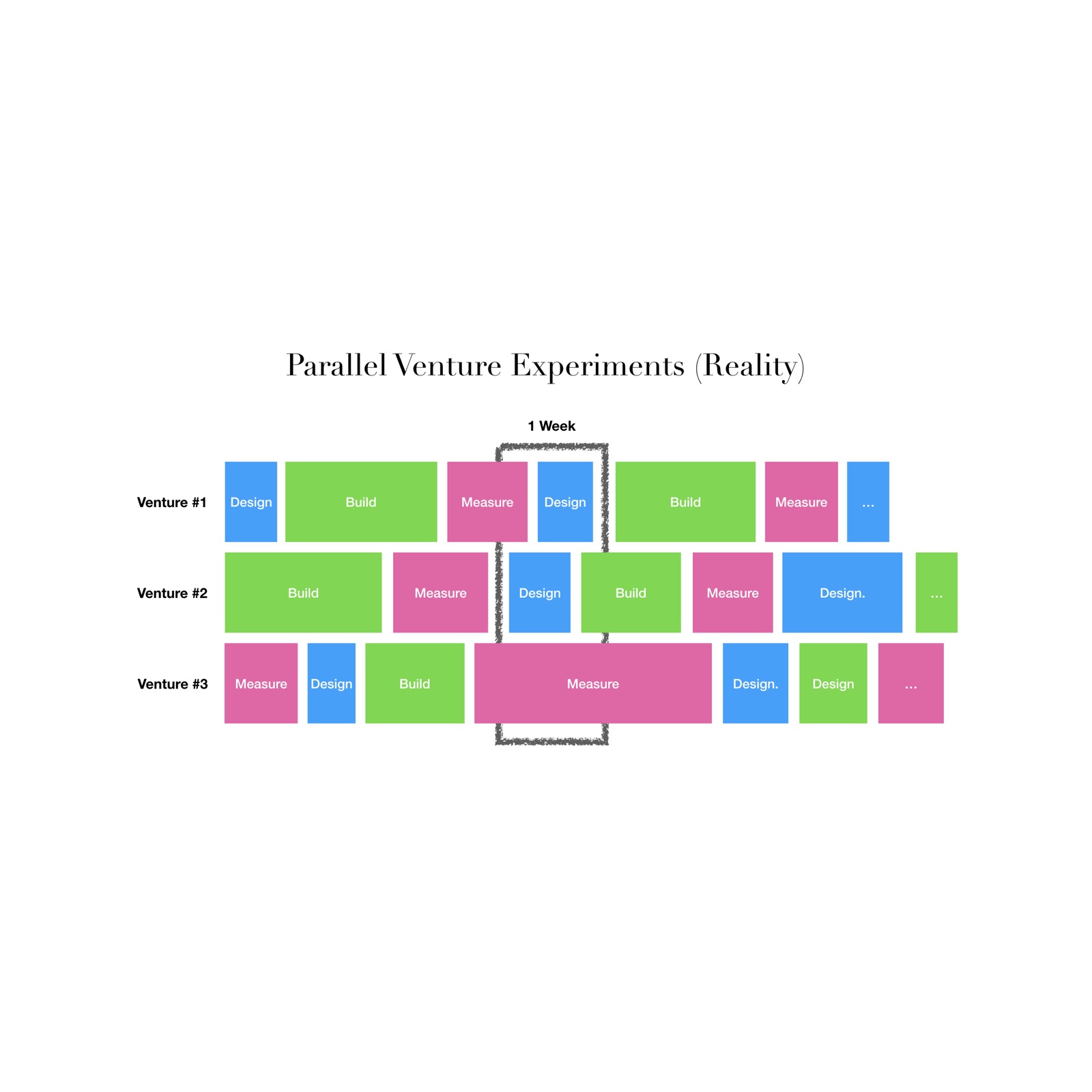
So, here’s a break-down of what I’m thinking:

Starting with the smallest unit, the experiment with its three steps, then sequencing that in one venture, then parallelizing multiple (non-cross-pollinating) ventures to double and triple my rate of failure.

However, this is pretty much an idea where everything always takes the same amount of time. In reality it looks more like this:

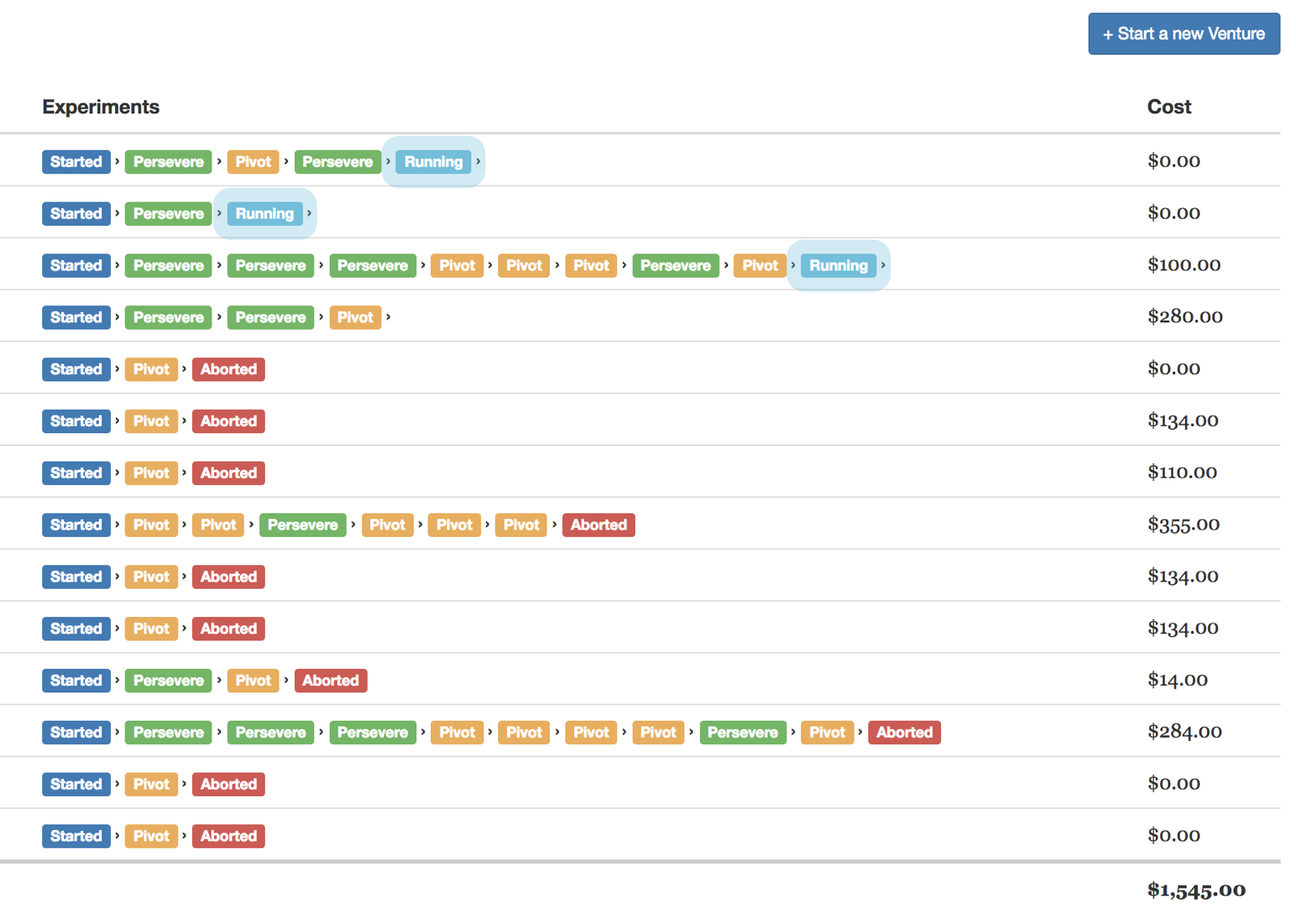
So, I do have my experiment board that allowed me to keep track of my experiments before. And I’m not crazy about the Evernote style so far… Should I just re-use my tracking system? Why did I stop using it?

See How To Make Better and Faster Investment-Decisions With Lean Experiments for details ->

lean-experiments-board.png

Many questions today. But I’ll find the answer!

Related

  • The 10X Rule (Book)

DeepDive – A better qualitative analysis tool (S21 Mini-Project)

![Screenshot 2021-04-22 at 17.57.50.png](/notes/media/Screenshot 2021-04-22 at 17.57.50.png)

Start with WHO?[^1]

I, Alexis, want a better coding tool for my qualitative analysis. …I also want to learn Swift.

Question: WHO? Answer: Me, Alexis Rondeau. Question: Who are you? Answer: I’m many things, but in this context, I’m a qualitative researcher.

  • As a…

    • Qualitative researcher in the health-industry
  • I want to…

    • Code transcripts

      • easier
      • faster
    • and Compare interviewee segments

      • clearer
  • So that…

    • I can deliver

      • shared themes
      • differences between segments
      • hot quotes
      • engaging narrative
      • clearer findings
      • deeper insights
      • more engaging narratives
      • and faster reports
      • best-informed recommendations
  • Because…

    • my clients want to

      • make better
      • more informed
      • decisions
      • look good in front of their stakeholders
      • impress their teams
      • impress their boss
      • prove their value
      • secure their employment
      • make money
      • pay for expenses
      • save money
      • invest money
      • to keep their family healthy and happy

Key Benefits

Unit/Metrics:

  • “Time to Code”
  • “Time to Surprise”
  • “Time to Insight”

MVP: “An Insights Development Environment (IDE), for you, forever.”

  • Based on Obsidian Landing Page
  • “An Insights Development Environment (IDE)”

    • Moderating interviews is such a good time to really meet someone on eye-level
    • We love connecting with people
    • Qualitative analysis is where the magic happens
    • Where you discover and develop insights from your interviews
    • Once the interviews are over and the transcripts have arrived, you hit a brick-wall.
    • It’s hard though without good tools
    • Your IDE should help you spend more quality time with your transcripts
    • In DeepDive, reading, coding, segmenting and analysing your interview transcripts is frictionless.
    • Take a first pass of coding with alias-coding,
    • review and dive deeper,
    • highlight quotes with a single keyboard stroke,
    • develop your coding book,
    • pepper in your segments and
    • marvel at what patterns emerge
  • “For you”

    • Coding interview transcripts is incredibly personal.
    • You want to connect with your interview partners after you’ve spoken with them
    • You want to also move fast and get into flow quickly
    • You also want to keep your transcripts secure
    • And you want to deliver your report ahead of time for fine-tuning with your team
    • DeepDive is…

      • Native Mac application

        • it’s much faster than any web-based application
        • It hooks into your computer directly
      • It’s built to be 100% Customizable

        • 26 Hotkeys that you can assign to your codes for speed-of-thought coding
        • 5 coding color schemes to make it easy to parse at a glance
        • Limitless coding books per project so you can fine-tune your insights
        • Limitless segmenting of your interviews so you can slice and dice during analysis
        • Built-in “Auto-Coding” that automatically tags
        • AI-Coding – Your DeepDive has a local AI engine built-in that learns as you code your transcripts and over time matures to the point of assisting you
  • “Forever”

    • “In our age when cloud services can shut down, get bought, or change privacy policy any day, the last thing you want is proprietary formats and data lock-in.”
    • With DeepDive, your data is stored locally and will not ever be held hostage by a cloud-provider
    • Export your coded transcripts anytime to fully portable Excel or CSV
    • CSV export also gives you the unparalleled interoperability to use any kind of sync, encryption, or data processing that works with plain text files.
  • Create transcripts
  • Create codings
  • Tag fragments

    • By mouse
    • By keyboard
  • See fragment stats by code
  • Auto-code

    • Add aliases to codes
    • Remove auto-codes
  • Segment transcript
  • Show strong sentiment hints

Like Delve Tool but better because…

  • No shortcuts
  • No keyboard navigation
  • Webbased
  • No merging of fragments
  • No auto-coding

Spreadsheet

  • Navigation
  • Fonts

What?

Like DelveTool but…

  • Local
  • Secure
  • Hotkey-first

How

  • A blazing fast, hotkey-first, secure MacOS App
  • SwiftUI Learning resources
  • Custom CoreData Integration Spike
  • Design Resources

Something like this…

iA Writer as Gold Standard

![Screenshot 2021-04-01 at 11.38.50.png](/notes/media/Screenshot 2021-04-01 at 11.38.50.png) ![Screenshot 2021-04-09 at 12.13.42.png](/notes/media/Screenshot 2021-04-09 at 12.13.42.png)

Development of the App

Three Panes!

![Screenshot 2021-04-04 at 16.06.10.png](/notes/media/Screenshot 2021-04-04 at 16.06.10.png)

Live Coding!

![Screenshot 2021-04-04 at 16.45.55 1.png](/notes/media/Screenshot 2021-04-04 at 16.45.55 1.png)

Hotkeys!

![Screenshot 2021-04-07 at 12.15.37.png](/notes/media/Screenshot 2021-04-07 at 12.15.37.png)

Homepage!

![Screenshot 2021-04-07 at 12.14.42.png](/notes/media/Screenshot 2021-04-07 at 12.14.42.png)

Frames!

![Screenshot 2021-04-07 at 15.21.55.png](/notes/media/Screenshot 2021-04-07 at 15.21.55.png)

With Sidebar!

![Screenshot 2021-04-07 at 16.03.25.png](/notes/media/Screenshot 2021-04-07 at 16.03.25.png)

With Translucency!

![Screenshot 2021-04-07 at 16.18.48.png](/notes/media/Screenshot 2021-04-07 at 16.18.48.png)

With Codings!

![Screenshot 2021-04-08 at 12.45.33.png](/notes/media/Screenshot 2021-04-08 at 12.45.33.png) ![Screenshot 2021-04-08 at 12.45.51.png](/notes/media/Screenshot 2021-04-08 at 12.45.51.png) ![Screenshot 2021-04-08 at 12.45.22 1.png](/notes/media/Screenshot 2021-04-08 at 12.45.22 1.png) ![Screenshot 2021-04-08 at 14.21.03.png](/notes/media/Screenshot 2021-04-08 at 14.21.03.png)

With Coding Stats!

![Screenshot 2021-04-08 at 17.55.54.png](/notes/media/Screenshot 2021-04-08 at 17.55.54.png) ![Screenshot 2021-04-09 at 10.52.26.png](/notes/media/Screenshot 2021-04-09 at 10.52.26.png)

With Awesome Form!

![Screenshot 2021-04-10 at 15.08.41.png](/notes/media/Screenshot 2021-04-10 at 15.08.41.png)

With Autocoding!

autocode.gif

Naming Ideas!

Ideas.png Deepdive.png Deepdive-1.png ![Serif, Sans, Quattro.png](/notes/media/Serif, Sans, Quattro.png) ![Serif, Sans, Quattro – Review.png](/notes/media/Serif, Sans, Quattro – Review.png) DeepDive.new.png Single.png

Alias and Manual Tagging!

![Screenshot 2021-04-14 at 18.48.10.png](/notes/media/Screenshot 2021-04-14 at 18.48.10.png) ![Screenshot 2021-04-15 at 09.42.27.png](/notes/media/Screenshot 2021-04-15 at 09.42.27.png)

New Sidebar Items!

![Screenshot 2021-04-16 at 16.04.48.png](/notes/media/Screenshot 2021-04-16 at 16.04.48.png) ![Screenshot 2021-04-16 at 16.08.11.png](/notes/media/Screenshot 2021-04-16 at 16.08.11.png)

Spend more quality time with your transcripts

![Screenshot 2021-04-16 at 16.08.56.png](/notes/media/Screenshot 2021-04-16 at 16.08.56.png)

Taggings Highlighted!

![Screenshot 2021-04-17 at 15.29.33.png](/notes/media/Screenshot 2021-04-17 at 15.29.33.png)

Better Selection Highlighting!

![Screenshot 2021-04-17 at 15.34.25.png](/notes/media/Screenshot 2021-04-17 at 15.34.25.png)

…maybe with blurring?

![Screenshot 2021-04-17 at 15.38.43.png](/notes/media/Screenshot 2021-04-17 at 15.38.43.png)

With Fragment Classification Training!

![Screenshot 2021-04-19 at 21.05.59.png](/notes/media/Screenshot 2021-04-19 at 21.05.59.png)

With Prompted Tagging and Highlighting

![Screenshot 2021-04-21 at 20.56.03.png](/notes/media/Screenshot 2021-04-21 at 20.56.03.png) ![Screenshot 2021-04-22 at 11.32.33.png](/notes/media/Screenshot 2021-04-22 at 11.32.33.png)

With Multi-Highlighting!

![Screenshot 2021-04-22 at 17.57.50.png](/notes/media/Screenshot 2021-04-22 at 17.57.50.png) ![Screenshot 2021-04-23 at 12.58.01.png](/notes/media/Screenshot 2021-04-23 at 12.58.01.png)

With removing all Alias Codings!

remove-aliascodes.gif

With Segments!

![Screenshot 2021-04-23 at 10.56.27.png](/notes/media/Screenshot 2021-04-23 at 10.56.27.png)

Backlog

  • ![Screenshot 2021-04-09 at 11.46.31.png](/notes/media/Screenshot 2021-04-09 at 11.46.31.png)

Notes

  • ![Screenshot 2021-04-08 at 16.04.27.png](/notes/media/Screenshot 2021-04-08 at 16.04.27.png)
  • ![Screenshot 2021-04-08 at 16.04.36.png](/notes/media/Screenshot 2021-04-08 at 16.04.36.png)

People

  • DeepDive – Internal Demo

Related

User Journey

journey
	section Discover a missing answer
		Create a learning plan: 5: Alexis, Courtney, Client
	section Run interviews
		Create a interview guide: 3: Alexis, Courtney
		Source and schedule participants: 3: Alexis, Courtney
		Moderate interviews: 9: Alexis
	section Analyse interviews
		Read transcripts: 4: Alexis
		Code transcripts: 2: Alexis
		Re-code transcripts: 3: Alexis
	section Create report
		Create slide deck: 3: Alexis, Courtney
	section Deliver report
		Present slide deck: 5: Alexis, Courtney, Client
	section Make decision
		Present slide deck: 5: Alexis, Courtney, Client

[^1]: Start with WHO not How

JamGPT Beta Version Launch

Done

  • Pogo Brainstorm Branding and Standing
  • Pogo Event Tracking

Tracking

  • v1.3.9
  • v1.3.8
  • v1.3.7
  • v1.3.6
  • v1.3.5
  • Pogo – Pin prompt window on top - 1.3.8

New challenges

  • Pogo Alpha Release Launch
  • DONE – Add Pogo – 🟢🟡🔴 Failsafe API Status Monitor
  • Fix limit requests based on Token-Count
  • Fix limits of conversational memory

    • Pogo – Create summaries for memory and export
    • Create ChatGPT API System Prompts

      • Pogo System Prompts – “@translator”
    • Investigating ChatGPT’s Conversations API
    • POST backend-api-conversation

Improvements

  • DONE – Periodically check for version updates
  • Scroll down as plotting happens
  • Pogo Select Full Response Text – Improvement

New ideas

Feedback from YC/OpenAI:

2/ & 3/ we don’t have any plans for an affiliate program or a Pro API key at this time (the API is very much in alpha)

Quantum Leaps

Use Conversations

Because: Co-editing created the best papers and most impressed students

  • Option 1: Using a ChatDIY API version
  • Option 2: Using ChatGPT API

Use System Prompts

  • ChatGPT API System Prompts
  1. Shortcodes / Auto-expands

    1. #list → Adds “Make this a list”
    2. #md → Adds “Create headings”
    3. #nex → Adds “No explanations”

Check-In Call mit Tobi

  • Email an das YC Team

    • Können wir die ChatGPT Pro API Keys nutzen?
    • Referral Program?
  • DONE Improve: “Chat”-UX

    • Letzte Antwort nicht bei Prompt-Empty löschen
  • HELP THEM AVOID RUNNING INTO AN ERROR

    • FIRST TIME / On startup

      • Don’t even allow letting them enter
    • Later

      • Error messages
  • Business

    • Login mit meiner OpenAI ID / API Key (Paid/Pro)
    • Pay for extra features

      • Snippets etc.
    • Mobile app upsell
  • Learnings on AI

Prior Feature-Ideas and Improvements

Workflow Improvements

  • DONE – ⭐️ Make prompt editor behave more like a text editor (Fix newlines)
  • Internal: Get notified on feedback → Google Sheet → Via SMS?
  • Stream result
  • Have ‘canned’ responses locally when API is overloaded

Delight Improvements

  • Confetti as a thank you for feedback
  • Bounce window on success
  • Theming for colors and font-sizes
  • Integrate easy-to-use design system

    • Colors
    • Fonts
    • Sizes

Error Handling

  • Shake window on error responses
  • Make errors suck less with randomized fun animation
  • Notify me when ready
  • Refactor code
  • See when I’m in search mode
  • Change loading animation
  • Revise Error styling

Sales Opportunities

  • Expand on Promptcraft for Images → Sell a course
  • Expand on Touch Typing → Sell a course
  • Integrate Validation for "OpenAI Partner Referral Program"

More transparency

Bugs

  • …

Related

  • Shake and bounce window on macOS

[^1]: Screenshot 2023-02-21 at 11.14.52.png

Pageturner Hack for Kindle – Experiment (W21 Mini-Project)

TLDR; After getting frustrated, angry even, with how awkward and unreliable the “touch-screen-to-flipt-to-next-page” on the Kindle Classic is, I experimented with different ways to emulate a physical ‘next-page’ button akin to those found on more expensive devices like the Kindle Oasis. My ideal solution turned out to be a simple, twisted rubber band.

Demo

IMG20210922113106.jpg IMG20210923114154.jpg IMG20210923114205.jpg ![hand holding kindle.jpg.jpg](/notes/media/hand holding kindle.jpg.jpg)

Meta-Learning

  • The solution is much simpler and less complex (a fucking twisted rubber band!?) than I had expected – “Less But Better”
  • What seems obvious and laughable now I was only able to discover through the process of iteration, experimentation and elimination

🔥 The problem I’m solving for

IMG20210921115038.jpg

  • The issue is that paging next with the regular Kindle is really, really AWKWARD and UNRELIABLE
  • Turning/flipping to the next page BREAKS MY READING FLOW because…

    • I have to LIFT my thumb from its resting position 😒
    • I have to MOVE my thumb above the screen 😞
    • I have to PRESS my thumb HARD onto the screen 😔
    • Then ONLY HALF (50%) of presses don’t register 🔥🤬🔥

      • So half the time I have to press again (WTF?) 🔥🔥🔥🔥🤬🔥🔥🔥🔥
    • I have to LIFT my thumb again 😔
    • I have to MOVE my thumb back to its resting position 😞

What I want

  • I just want effortless and reliable page turns with my current Kindle
  • Looking at the much higher-priced model, like the Oasis, there are physical buttons for navigation to the next and previous page but that costs north of 250€. 250€ for effortless page turns? 🤨

My ideal solution

  • Ideally my current Kindle had ONE button for NEXT PAGE 🙂
  • Ideally that button was located where my thumb naturally RESTS 😍
  • Ideally that button took practically NO EFFORT to press 🤩
  • Ideally that button was RELIABLE to trigger the page turn more than 80% of the time 😍

My current minimum viable solution

IMG20210922113106.jpg

  • A simple rubber band (4mm width)
  • Placed perfectly flush to the outer border of screen
  • With an intentional TWIST

Features

  • Thumb can rest
  • Motion to trigger page turn is effortless

    • Only 2mm horizontal motion
    • No vertical motion required
  • The twist in the band is more reliable

    • 90% of presses are registered
  • The twist in the band makes it ‘clicky’, more tangible

Experiments – How I got here (The long story)

Resources

  • My Kindle as the “test-bed”
  • A collection of materials that seemed reasonable to use

IMG20210921114854.jpg IMG20210921115443.jpg

Iteration 1 – Using a clamp, paperclip and capacitative rubber nib

IMG20210921115158.jpg IMG20210921115249.jpg

Riskiest Assumption

  • Having a button device thingy makes the reading experience BETTER by increasing flow by decreasing friction while turning pages

Learnings

  • No material except the rubber tip of the “tablet pen” triggered page-flip efficiently
  • Overall using the nib as shown above, this worked really welle
  • This worked far better than it looks
  • The tension on the paperclip wire even made a clicking sound when pressed (Nice)
  • Being able to REST my thumb is crucial to entering a state of reading flow
  • Minimizing the EFFORT to turn the page is also crucial to entering a state of reading flow

Result

  • I read a whole evening with it and enjoyed it
  • Definitely BETTER THAN WITHOUT
  • Less effort/friction during page-flips
  • Increased reading flow

Questions

  • Q: What kind of rubber are on those pen tips?
  • A: “Conductive elastomer”[^1]

Decision

  • Persevere/Keep with the overall “pageturner” idea
  • Pivot/Change on attachment and mechanics

Idea 2 – Using a rubber band for attaching the capacitative nib

IMG20210921115707.jpg IMG20210921115842.jpg IMG20210921122447.jpg

  • Couldn’t find a good way to attach the cut-up nib to the rubber band
  • Overall, this approach further reduced the effort to press

Learnings, Result, Questions, and Decision

  • Rubber band much easier to attach
  • Doesn’t SCRATCH the surface
  • Even less effort to turn page
  • What if the capacitative nib isn’t even needed?
  • Perservere/Keep rubber band
  • Pivot/Change trigger nib

Iteration 3 – Using the rubber band straight-up without extra nib

IMG20210921130200.jpg

IMG20210921130217.jpg

Riskiest Assumption

  • Using the rubber band directly has enough effective capacity to trigger page-flips

Method

![Flush Band on Kindle.excalidraw.png](/notes/media/Flush Band on Kindle.excalidraw.png) ![Side-View Rubber Press.excalidraw.png](/notes/media/Side-View Rubber Press.excalidraw.png)

Learnings

  • When stretched along the device, there is the perfect gap between rubber and screen
  • It’s slightly harder to rest thumb because it’s right above the screen (To avoid accidental flips)

Result

  • Regular rubber CAN effectively trigger page-flip (at 70% reliability)

Decision

  • Persevere/Keep: Single rubber band
  • Pivot/Change: Improve trigger efficiency towards 80-100%

Iteration 4 – Adding a TWIST for efficiency

IMG20210921140321.jpg

IMG20210921140342.jpg

Riskiest Assumption

  • Adding a TWIST to the rubber band increases the RELIABILITY

Method

  • Add the TWIST and sample 20+ page turns in a realistic setting

![Band with Twist.excalidraw.png](/notes/media/Band with Twist.excalidraw.png)

Result

  • 85% Efficiency – 17/20 presses triggered a page-turn

Decision

  • Persevere/Keep: Twist
  • Pivot/Change: Increase efficiency/reliability further

Learnings

  • This allows to rest the thumb on the side while needing minimal effort to “toggle” the TWIST
  • Toggling the TWIST creates a pleasing haptic ‘clicking’ sensation similar to a button
  • The thumb-motion is not a top-down press anymore but a left-right swipe (Takes some time to get used to)

Iteration 5 – Experimenting with different TWISTS (1,2,3,4,5)

IMG20210922113106.jpg

IMG20210922113106.jpg IMG20210923114154.jpg IMG20210923114205.jpg IMG20210923114245.jpg IMG20210923114255.jpg

Riskiest Assumption

  • There is a way to twist the rubber band that increases RELIABILITY to 90% and improves on handling

Method

  • Try different levels of twist and see if that creates a better “UI” for my thumb

Learnings

Three Distinct Variables Affect Reliability
  • Playing with the different twists helped me realize that there are really 3 important variables that, taken together, effect how effortless and reliable the page is turned.
  • When these three variables are in harmony so to speak, I’ve achieved 90+% reliablity of page turn registered while reading today
  • They’re all very personal and depend on how you like to hold your Kindle, how big your hands are and how small the individual “twist-segments” are on the band.
  • Hence, there is no one-size-fits-all version of twists that work for everyone.
Reliability (%) = "Thumb Resting Sweet Spot" + "Thumb Size" + "Twist Segment Hot Spot  Size"

IMG20210922164124.jpg

Variable 1: “Thumb Resting Sweet Spot” (50%)

This is where you place your thumb most of the time and relax it inbetween page turns. In terms of importance, to me, everything else in terms of usability derives from this. In my case, it’s in the upper-half of the lowest third of the sidebar because of how I hold the Kindle.

![hand holding kindle.jpg.jpg](/notes/media/hand holding kindle.jpg.jpg)

Variable 2: “Thumb Size” (25%)

This of course heavily depends on your individual thumb. Its size is in direct relation to how many twists your band can have. Once there are too many twists (max 5 for me), the segments become too small.

Variable 3: “Twist Segment Hot Spot Size” (25%)

This is how much vertical space each twist segment provides to register the touch/swipe motion. With each twist, the segments get smaller. For me 5 twists were the maximum. I learned that only the the flat middle-part works reliably when pressed.

IMG20210922164053.jpg

IMG20210922164121.jpg IMG20210922164103.jpg

Result

  • I have achieved 90+% RELIABLE PAGE TURNS once I harmonized my personal…

    • “Thumb Resting Sweet Spot” -> Upper half of the bottom third
    • “Thumb Size” -> Small
    • “Twist Segment Hot Spot Size” -> 4 Twists, 3 Segments at ~4cm each

Decision

  • Persevere/Keep: 4 Twists
  • Pivot/Change: Nothing, keep things as-is. I think this venture-hack has reached more than 90% reliability.

[^1]: https://en.wikipedia.org/wiki/Conductive_elastomer, https://www.amazon.de/-/en/MobiLinyi-pieces-replacement-premium-stylus-6-mm/dp/B0797Y7M24/

My Physical Notebooks (Photos)

Notebooks

  • Red Notebook 2020-2021 (Photos)

Notepads

  • Micro-Notebook S21 – Mallorca (Photos)
  • Micro-Notebook S21 – Berlin 1 (Photos)
  • Micro-Notebook S21 – Berlin 2 (Photos)
  • Micro-Notebook S21 – Berlin 3 (Photos)
  • Micro-Notebook S21 – Berlin 4 (Photos)
  • Micro-Notebook S21 – Berlin 5 (Photos)
  • Micro-Notebook S21 – Berlin 6 (Photos)
  • Micro-Notebook S21 – Berlin 7 (Photos)
  • Micro-Notebook F21 – Berlin 8 (Photos)
  • Micro-Notebook F21 – Berlin 9 (Photos)
  • Micro-Notebook F21 – Berlin 10 (Photos)
  • TBD: Micro-Notebook W21 – Berlin 11 (Photos)
  • TBD: Micro-Notebook W21 – Berlin 12 (Photos)
  • TBD: Black Notebook Portugal

Sticky-Notes

  • Frühstücksgespräch mit F.K. (Photos)

Related

My Light-Therapy Lamp Solution with Kindle

IMG_20211127_112027.jpg

  • A follow up on Happier Through Bright Light (Experiment)
  • My original Beurer SAD lamp broke while moving
  • I’m 100% convinced that light therapy works wonders for me
  • Winter in Berlin is here ❄️
  • I recently bought a new lamp (Beurer TL 30) with what seemed a better overall form-factor
  • Hoping that the new design would make it easier to sit still, have the lamp 10cm close by my face for 20 minutes

The lamp

beurer.jpg

The new design disappointed

  • After only 3 uses it was clear to me that this new device is NOT based on any real user research:
  • The new form-factor has NOT, at all, addressed the core design-issues that come up if you actually want to use it for 20 minutes at 10-20cm distance for the advertised 10,000 LUX
  • The green kick-stand is utterly useless if you actually want to use it for 20 minutes at 10-20cm distance for the advertised 10,000 LUX
  • The extra buldge on the backside to slide in the kick-stand is utterly annoying if you actually want to use it for 20 minutes at 10-20cm distance for the advertised 10,000 LUX
  • Holding the light with your hands close to your face for 20 minutes is also STILL utterly TEDIOUS if you actually want to use it for 20 minutes at 10-20cm distance for the advertised 10,000 LUX
  • The socket for the power-plug is also on the wrong side (the bottom) if you actually want to use it for 20 minutes at 10-20cm distance for the advertised 10,000 LUX
  • The cable is at least 1m too short if you actually want to use it for 20 minutes at 10-20cm distance for the advertised 10,000 LUX

imaginary-users-doing-imaginary-things.jpg kickstand-madness.jpg

  • In short, the new Beurer design is mostly a face-lift
  • The kick-stand more of an insult to actual users than an improvement
  • It’s a disappointment because:

    • I can attest to the underlying method of action
    • Light therapy WORKS reliably when done early in the morning
    • So the need for these devices is there
    • And the technology is finally small enough to pack 10,000 LUX in an A5-sized package
    • Which makes the resulting device perform even worse:
    • All the company (and the competitors in the market) can come up with is…

      • an plastic LED rectangle
      • with a useless kick-stand
      • no way to hold it comfortably close to your face to
      • and the power socket in the wrong place
    • And let’s not get into how you still need to be connected to an electrical outlet, which, in itself seems like the grandest failure, especially since the cable that comes with the device is at least 1m too short to actually be useful
  • It makes me wonder…

    • WHO THE FUCK “designs” these things and GETS PAID for it?
    • It’s clear that they have they never used it regulary themselves as recommended in the manual (20 minutes at 10cm distance for 10,000 Lux)
    • WHO THE FUCK came up with the shitty kick-stand that only works if you have it next to you while working

      • which in turn means you have to have the lamp on for HOURS to get the benefit
      • which in turn is unacceptable and such design flaw and false fucking advertising in itself
    • Please fir.. ahem, reassign the product owner, the product manager and designer responsible for this to “a nice quiet farm upstate” where they can no longer build things that don’t work because they clearly never took the time to talk to actual users or try it themselves for more than A HOT FUCKING MINUTE

The quest continued

  • So, as it’s become clear to me that the producers of what essentially amounts to a plastic box with an 450-460nm wavelength LED array and a power cable DO NOT do THEIR HOMEWORK
  • So I have to, again, figure it out myself
  • What’s the best setup and REASON to have this 10,000 LUX lamp 10cm close to your face that is bearable for about 20 minutes?
  • I really don’t want to have to SIT STILL for 20 minutes doing NOTHING in the morning to gain the benefits

My solution

  • I came up with combining my Kindle and the light with duct-tape
  • S that I now can…
  • Spend the 20 minutes READING, aka acutally doing something USEFUL with some of my most valuable morning time
  • While, simultaneously having the SAD lamp very close to my face for gaining the actual THERAPEUTIC BENEFIT that I paid money for
  • And, for the necessary COMFORT of holding the lamp so close I’ve experimented with POP-SOCKETS and came to their optimal positioning

The ideal solution

  • The duct-tape version is 85% of my ideal solution
  • To make it 100% I would make the following changes:

      1. Make the light the same size as the Kindle
      1. Make the light battery-powered
      1. Have both, light and kindle slide into a simple cover
      1. IMPORTANT: Lastly, keep the POP-SOCKETS on both sides at the exact locations I had them

Details

IMG20211203124607.jpg IMG20211203124616.jpg IMG20211203124559.jpg

To Beurer

  • For the inevitable person at Beurer who will see this and think…

    • “Hey, this is a great idea. We should build a light-therapy lamp that you use while you’re reading on your eBook reader.
    • “This actually makes the lamp usable and useful. Like a cover or something that connects the two devices neatly.”
    • “And he’s so right - We need something like the Pop-Sockets so you can actually hold it.”
    • “Oh, and we’ll just say ‘we listened to our users’ and spin it as some ‘co-creation’ design story. That’ll make marketing super happy.”
    • “And anyways, it’s sooo obvious of a solution when you look at it… so instead of reaching out to the author for their fair 10% of profit-share per unit sold, it should ME who gets paid an extra bonus for it for finding it. I deserve that.”
  • Listen up motherfucker
  • I’m tired of your bullshit
  • You’ve had the chance to do your homework and do ACTUAL user research
  • And I’m not talking about that one time doing one of those tired, old, lip-service “customer-centric innovation” workshops that went no-fucking-where
  • You arriving here means you didn’t do your work
  • I did your work
  • I did the leg-work you should have done
  • …And I know, building plastic frames with LEDs is work
  • …And getting them certified for the German market as well…
  • Bla bla bla…
  • I don’t care
  • The short of it is:

    • If you want to sell this
    • Then start by calculating in my 10% of profit-share per unit sold
    • And then contacting me with the right paper-work
  • A word of advice: Don’t fuck this up

Prior Research and Experiments

Kinesiotape for Psychological Well-Being – Experiment (S21 Mini-Project)

Background

  • Taping – as prescribed by my orthopedic doctor – works very well, much better than I had expected
  • I’ve recovered my achilles tendon within two weeks of wearing tape after struggling with sharp pain for almost a month
  • The consistent presence from the tape redirected my attention to my heel several times a day
  • I believe that consistently repeated, daily attention to a part of my body helped it physically heal faster

IMG20210729145531.jpg

I’ve also learned that…

  • When giving myself space and time to connect with myself, either through therapy or daily me-time, I noticed that certain psychological pains also have specific places in my body
  • For example, sadness (unsurprisingly) manifests as a sharp pain around my physical heart

What if…

  • What if you could use kinesio-tape to help support healing psychological pain as well?

    • By stimulating the physical area where it manifests
    • By consistently directing my attention to that part of my body

Prototype for sadness

IMG20210729145254.jpg

  • For supporting sadness, disappointment and grief.
  • Emotions that have been very difficult for me to allow and process.
  • Hypothesis: I believe that if I tape above my physical (and emotional) heart, then I will direct my attention to my heart and its emotions more often…

    • … which I believe will result in giving emotions, including the difficult ones for me - such as sadness - more attention and Safe Space to heal and prosper

Tracking

  • Day 1: The tape is soft and nice to wear. I’ve found myself being reminded to mentally “look there” 5 times in 12 hours.

"Hello my name is" Buttons (S21 Mini-Project)

Basically, have a reusable version of the classic “Hello, my name is” sticker as a button with my name on it and wear it while I’m out and about to show that I’m open to conversation by offering my real name.

‘Hello’ Button MVP

P1040575.jpg P1040578.jpg P1040581.jpg

Learnings

  • Looks really good with the name writting in Sharpie
  • Felt good, exciting to wear it out
  • Felt vulnerable, authentic and powerful to put my name out into the world

Der normale Sticker

Hello_my_name_is_sticker.svg

MVP: Stickermule Buttons

hello-my-name-is-button.png button-marker.png

Question

  • Mit welchem Stift kann ich drauf schreiben?
  • Wie wird die Reaktion von den Leuten im Alltag sein?

Weitere Ideen

  • Könnte auch für Teleconfs gut sein, gerade, wenn man sich noch nicht kennt. Aber da steht ja eigentlich immer der Name digital drunter…

Reaktionen

  • “Hallo Alex!” von einer Teenagerin
  • Aufsehen im SOFIs IMG20211025140108.jpg

Idee “Hello my name is” Cap

  • 39/30 cap stickerei mit sticker incl. handschriftlichem Namen
  • ~50€

IMG20211025140113.jpg

Related

My mothers death in 2018

My mother died after a long and courageous battle with cancer.

It felt like watching a deadly car-crash in slow-motion. Stretched out over ten agonising, depressing, and feeling-out-of-control years.

I last saw my mother around the 31st of December 2016 when I finished visiting my parents in Spain. She had been very weak and in pain and needed to lay down more then usual. The years of chemo and pain-medication had taken its toll on her body and her spirit. Her mind was still clear and she spoke about money, her brother and me.

I remember the last time I saw her, after we had said good-bye, passing by her window as she lay back into bed. I did not know this was the last time. I figured, after 10 years of ups and downs, this would be another one.

We spoke on the phone a few days later and she sounded very tired and out of it. I still didn’t make much of it, I wasn’t worried more than usual. We spoke one more time when I told her about a cold I had gotten. I remember she wished me well.

Two weeks into January, my father called me and told me they had to move her to the hospital. She had been too weak to stand up. And that he couldn’t take care of her anymore because he, too, was now too weak. He sounded heavy so I started to worry, too. I asked him if I could talk with her but he said she was too weak at the moment. I should try again in a few days.

I asked him if I should fly down to Spain but he refused: “There’s nothing you can do right now.” Then another week passed, he said she had a few good days but slid in and out of consciousness. That’s the first time we decided I was on “stand-by” to fly down.

In the late afternoon of the 5th of February, I got “the phone call”. The call I had dreaded for ten years since My mothers cancer diagnosis 2008. That ONE call in which my dad asked me to buy a ticket and come as soon as I can to see my mother, who was still alive, one last time.

I bought the ticket to fly out of Tegel early next morning to arrive at the hospital before 11am. I remember taking a Taxi to the airport at 6am. Then getting on the airplane feeling still and numb and yet completely functional. Two hours later, at around 9am, I landed in Palma de Mallorca. I switched on my phone and received my fathers WhatsApp message. My mother had passed away over night. And that I needed to come to say good-bye as soon as possible due to hospital regulations.

I took another Taxi and arrived at about 10 or 10:30. I first saw my father who explained to me what happened. She had not been conscious for most of the past days. Had been on pain-management. Her breathing had slowed down last night. He stayed with her for the whole night. Singing her her favourite song “San Francisco” by Scott McKenzie over and over as she passed away.

I had twenty minutes to say good-bye before the hospital had to move her to the morgue.

I entered the room. To the right her hospital bed appeared. I moved closer and saw her body. Eyes closed, her thin hands folded, still.

How To Double My Rate Of Failure (Idea)

While it’s been great to have a single venture as my focus, I’m starting to feel too slow about it. Focus is good, but it needs to be balanced with the ability to find something worth 100% of focus. Here I think I’ve had opportunity costs by focusing on one thing too early. 

I saw this recently on Instagram and it reminded me of how I had approached my ventures last year. Especially the “double your rate of failure” bit stuck with me. With one venture, I have a rate of 1. I could, and have in the past, parallelized 2 and 3 ventures. 

After all… I learned last year, after publishing 10 books, that – if I do everything else right – only 1 out of 10 will actually work and be profitable.

So, here’s a break-down of what I’m thinking:

Starting with the smallest unit, the experiment with its three steps, then sequencing that in one venture, then parallelizing multiple (non-cross-pollinating) ventures to double and triple my rate of failure.

However, this is pretty much an idea where everything always takes the same amount of time. In reality it looks more like this:

So, I do have my experiment board that allowed me to keep track of my experiments before. And I’m not crazy about the Evernote style so far… Should I just re-use my tracking system? Why did I stop using it?

See How To Make Better and Faster Investment-Decisions With Lean Experiments for details ->

Screen-Shot-2017-10-01-at-11.06.56-AM.png

Many questions today. But I’ll find the answer!

Related

  • The 10X Rule (Book)

How To X