Alexis Rondeau

Newsfeed

Everything I publish, in the order I published it: dispatches from Twitter, videos from YouTube and notes from my vault, archived here in full — text, images, video and links — so they outlive the platforms.

921 dispatches since January 2012 · page 30 of 37

Unblah

Ever leave a meeting wondering if you talked too much — or never got a word in? I built Unblah to quietly show your talk-time as it happens, so you can catch yourself in the moment and hit the balance you’re aiming for. It works across Zoom, Teams, WebEx and calls, and never records or shares a thing.

Open →

Feature Demo: Qualitative Relationship Analysis with Algorand Ballet

Hi there, Alexis here - maker of Ballet. Today I want to give you a quick run-through to demo the features for relationship analysis of Algorand accounts with Ballet.

Start exploring any account at akaalias.github.io/algorand-ballet/

The video is fast-paced and uncommented to give you an idea of what you can do with Ballet. The wallet you're looking at was chosen for demonstration-purposes only.

PS: If you want, you can play around with the exact same starting-point here: akaalias.github.io/algorand-ballet/?deeplink=…
PPS: For a full "download" on who/what/why/how you can also check out the project on Github: github.com/akaalias/algorand-ballet

0:56 long

plotto-for-obsidian

Write your plots faster with this 'batteries-included' collection of Plotto plain text markdown files for Obsidian.md

16 stars · HTML

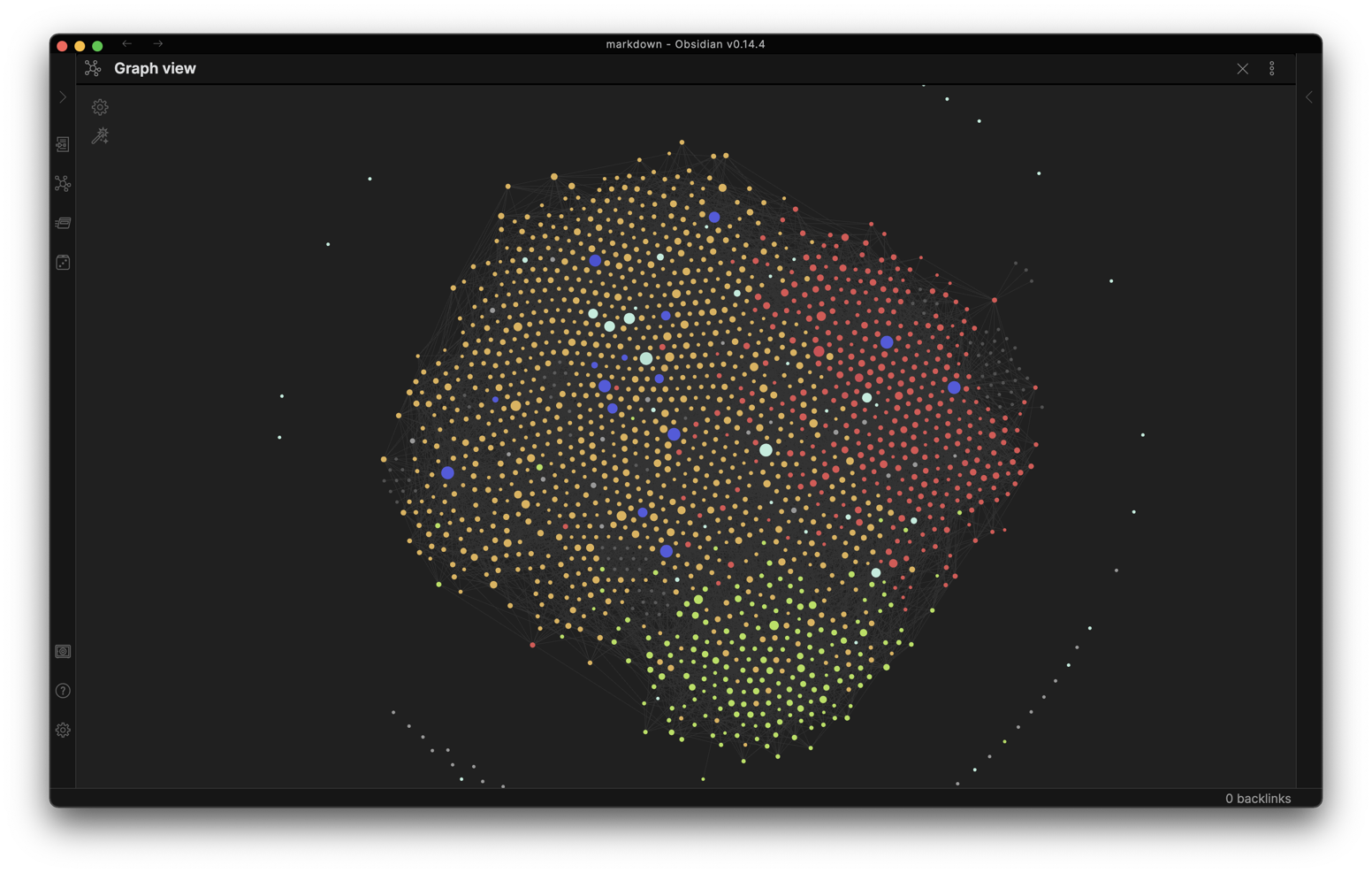
A Plotto Vault for Obsidian

Plotto Universe

Obsidian Graph View

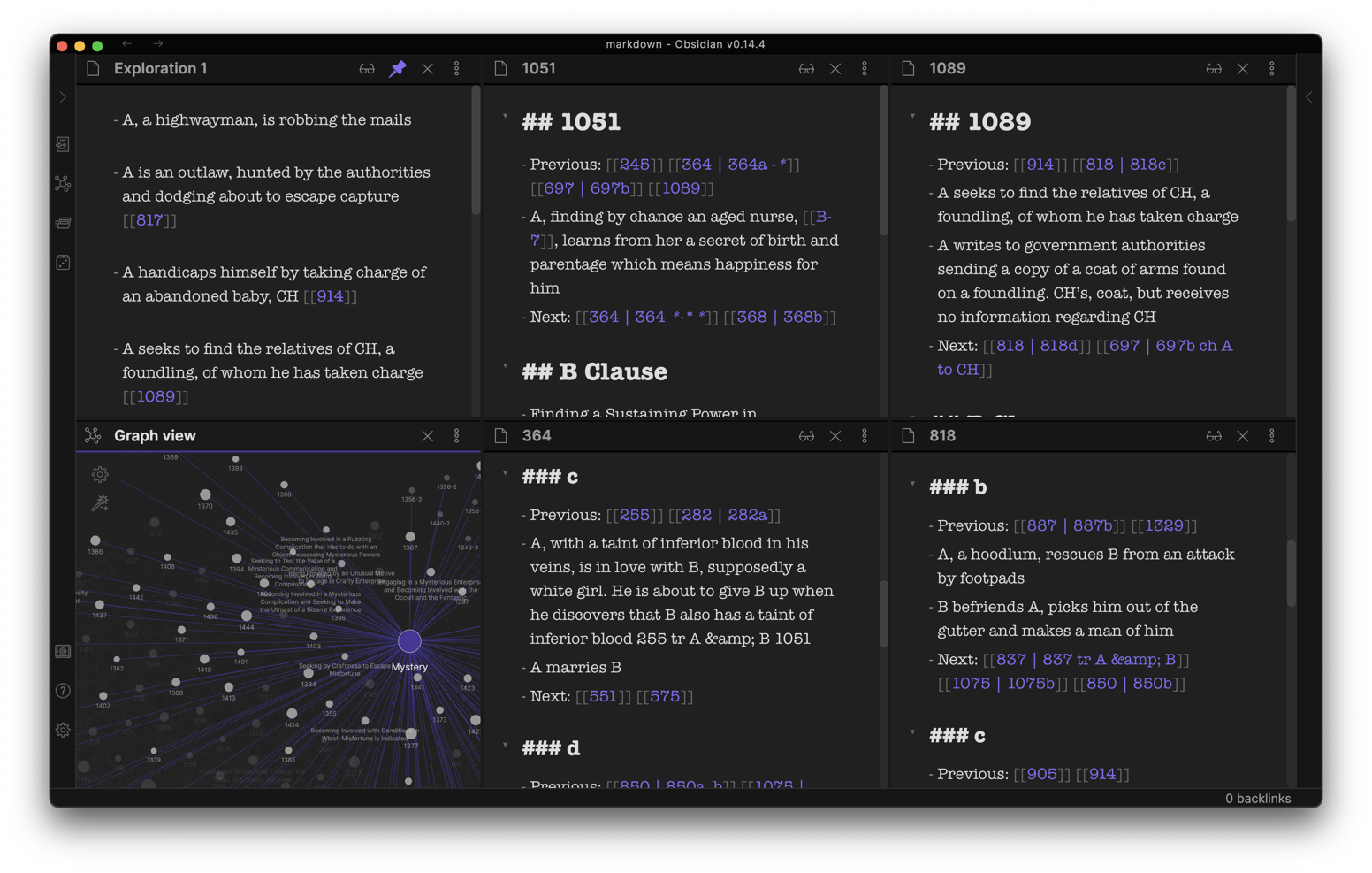
Example Obsidian Workbench

Obsidian Workbench

Plotto for Obsidian changes how you conjure plots for your stories by making…

  • Conflicts easy to explore
  • Clauses easy to explore
  • Characters easy to explore
  • Note-taking and scribbling easy
  • A Random-note button to jump-start

How to get started

  1. Download and install Obsidian (free) from https://obsidian.md
  2. Download this repository as .zip
  3. Start Obsidian and open the “markdown” folder from this repository as your vault

Once you have this set up, check out the “START HERE” guide for sketching your next plot.

Plotto

by William Wallace Cook, 1867-1933 Published 1928

Resources

Algorand Ballet

My open-source OSINT tool for the Algorand blockchain. See who a wallet really deals with: drop in any account and watch its activity unfold as a map you can explore — follow the connections, spot the patterns, and dig into any account, asset or app with a click. I built it as a simple way to do your own homework before you trust, invest, or just satisfy your curiosity.

Open →

algorand-ballet

A qualitative analysis tool for the Algorand blockchain

16 stars · Vue

MacOS Version License

Algorand Ballet

Relationships

Feature Video

Oh, hi there!

My name is Alexis and I am a product manager, developer and Algorand enthusiast.

I wanted to share a research project I’ve been working on with you.

Qualitative Blockchain Analysis

Ballet is an interactive qualitative analysis tool for the Algorand blockchain. “Qualitative” in that it gives you a glimpse into a wallet’s “personality” based on their past track-record with other wallets, ASAs and Applications.

Ideally, Ballet is a qualitative extension to your existing quantitative blockchain wallet analysis, auditing and diligence workflow.

Your Benefits

Your Personal Benefits

1. Get Decision Support

For when you have an Account ID (also often called Wallet address) and you want to get a better picture of who they are, what they do, with whom and how often.

Ballet gives you a qualitative “smell-test”, an extra data-point to make your best-informed decision before interacting with an untrusted wallet. By looking at their qualitative track-record, there is no need for “official identity” to get that sense of “personality” in the same way I can get a first impression of a person by looking at them without the need to know their name or see their passport. I think that’s really cool.

2. Find Better Questions

This is when you don’t yet know what you’re looking for or you just want to get to better understand how Algorand works (technically) and how it’s going (ecologically) by taking a stroll down main street.

Ballet supports this kind of inductive observation and experimentation by simply diving in with a random Account ID, even your own, switching between focuses and layouts, untangling some knots and clicking on other nodes.

By just futzing around I’ve had several moments of “Heh!?” that piqued my curiosity and led me to asking much more specific, and frankly, more interesting questions such as…

“Heh?! 😝 What is this weird ‘App 0’ thingy?” or “Heh?! This TESTNTT account keeps popping up everywhere. Why?” or “Heh?! Is this what an airdrop looks like?” or “Heh?! Why does this NFT-artist’s track-record, while they present themselves as scruffy and bohemian, look like they’re running a highly optimized financial institution?”[^4]

The benefit to the ecosystem

Ballet gives us an additional, more qualitative, window to have “more eyes on the sidewalk”[1] in an effort to make Algorand a safe place for its inhabitants and visitors alike. Just like the eyes of neighbors, shop-keepers and even visitors keep a sidewalk safe by simply being there.

But why should you personally care about the safety of the ecosystem?

Let’s say you want to invest into the biggest ROI artistic NFT collection today, and if we imagine Algorand (eventually) being like a big city very much like New York City:

I believe you shouldn’t be looking for NFTs at all. You should be looking to meet Andy Warhol in 1951, when he was designing shoes for Miller, and a year before his first solo-show.

Now, for Andy Warhol’s print-work (and anything else he touched really, including payments slips, scribbles and letters) to eventually become “A Warhol”, it required New York City to be in its best shape, flush with post-war cash and rock-and-roll hitting the airwaves.

You needed a (relatively) safe city for artists like Andy Warhol to settle and take liberty to produce their best work.

That’s why you should care about the safety of the ecosystem.

Because only then will the true heir to Andy Warhol settle in and grow his work.

And only then will you be there, on June 16th 1952, at Hugo Gallery, on East 55th Street and Madison Avenue, at Andy’s first show. To build meaningful relationships, to witness history and, yes, to buy the first Warhols for a penny and a dime.

Yes, AND…

I believe, all benefits stated above re-inforce each other: What’s good for you personally is also good for the ecosystem. And vice-versa.

I also believe it’s using “qualitative AND quantitative” methods equally to have your “eyes on the sidewalk” and “your ears to the ground”. That’s why you can click-hold on any Account, Asset, Application, Group and Transaction inside Ballet to open its information on AlgoExplorer in a new window.

Transactions and Relationships

To get a better sense of what a wallet has been up to (and with whom and how often), you can easily switch between looking at their network of transactions and their graph of relationships.

Rotate Layouts

While you’re looking at a wallet’s relationships for example, you can quickly rotate through a number of layouts (grid, circular, random, etc.) to get a kind of 360° view, just the same way you would look at different parts of a person (Eyes, clothing, shoes, body-language.)

Dig Deeper

  • To navigate, you can double-click on wallet nodes to dig deeper.
  • You can also click-hold any node to open their information on algoexplorer.io.

It’s fun!

Again, if anything, it’s a lot of fun to explore and discover better questions to ask.

⭐️ Click here to open Algorand Ballet in your browser ⭐️

PS

  1. Just to make it clear, this is a personal project of mine. I built it because, after going on an actual adventure and wanting to spend a few Algos on NFTs, I felt deeply unsettled how much overt scamming and how little transparency there was. I did NOT FEEL SAFE while trying to buy a single NFT for fun because I had no way of understanding WHO the person (or group) behind the artwork really is. And I had no way to verify if the story they’re telling me (The art-market is a great example of how important the authenticity of the story is for its value-creation[^3]) is actually true. And I had no way to know the people running the “gallery” itself.
  2. I decided to release the application fully open-source[2] and under a permissive license for you to futz around with it and to allow for any ad-hoc security review in case you are unsure if you can trust the website or app.

Questions

Important

Please note that I prefer talking in person.

I do not have time and resources for endless chatting via Reddit, Discord, Slack, WhatsApp and even Email. I find them utterly tedious and exhausting.

So, please do not feel offended if I don’t respond to your messages in those channels.

Book a call as follows instead!

Let’s talk

If you have questions the best way to reach me is to talk in person:

  1. In person, let’s get a coffee and take a walk!
  2. or via video/audio call on Zoom

To make that easy, here’s my Calendly where you can book a time for us to talk.

Why Ballet?

To Jane Jacobs, when New York sidewalks were safe, they gave stage for an…

“intricate ballet in which the individual dancers and ensembles all have distinctive parts which miraculously reinforce each other and compose an orderly whole.”

Demo Video

Full demo video coming soon!

Download and install standalone app for MacOS

Download latest release on Github

  • Navigate to Releases
  • Download the MacOS installer (.dmg) from the latest release’s Assets

Install and run like any other App:

  • Double-click to mount .dmg
  • Drag Algorand Ballet to your Application folder
  • Double-click the application to start

Running on other OSes

As of now, my releases will be Mac-only unless there’s a strong call for a Windows or Linux version.

Let me (see below) and we can work on other platforms together!

Footnotes

  • [^1] Jane Jacobs, “The Death and Life of Great American Cities”, Chapter 1
  • [^2] https://github.com/akaalias/algorand-ballet
  • [^3] Don Thompson, “The $12 Million Stuffed Shark: The Curious Economics of Contemporary Art” – What a great and curious read (4/5 Stars)
  • [^4] My question does not mean that all artists must lead scruffy and bohemian lives. Quiet the contrary: I’m a huge fan of Jeff Koons’ work, who, as a former Wallstreet banker, has been running his studio like a business almost from day one. Similar with Damien Hirst and Gerhard Richter. Warhol even had a streamlined factory. What I’m trying to get at is to better understand how someone presents and markets themselves in comparison to what their track-record says. Inversely, it would raise a red flag if I wanted to use a new DeFi service that boasts about their automated and streamlined smart-contracts, yet, when I look at their “personality” with Ballet, I see a very scruffy and bohemian web of transactions and relationships and very few calls to any Applications. You see what I mean? The proof is in the pudding.


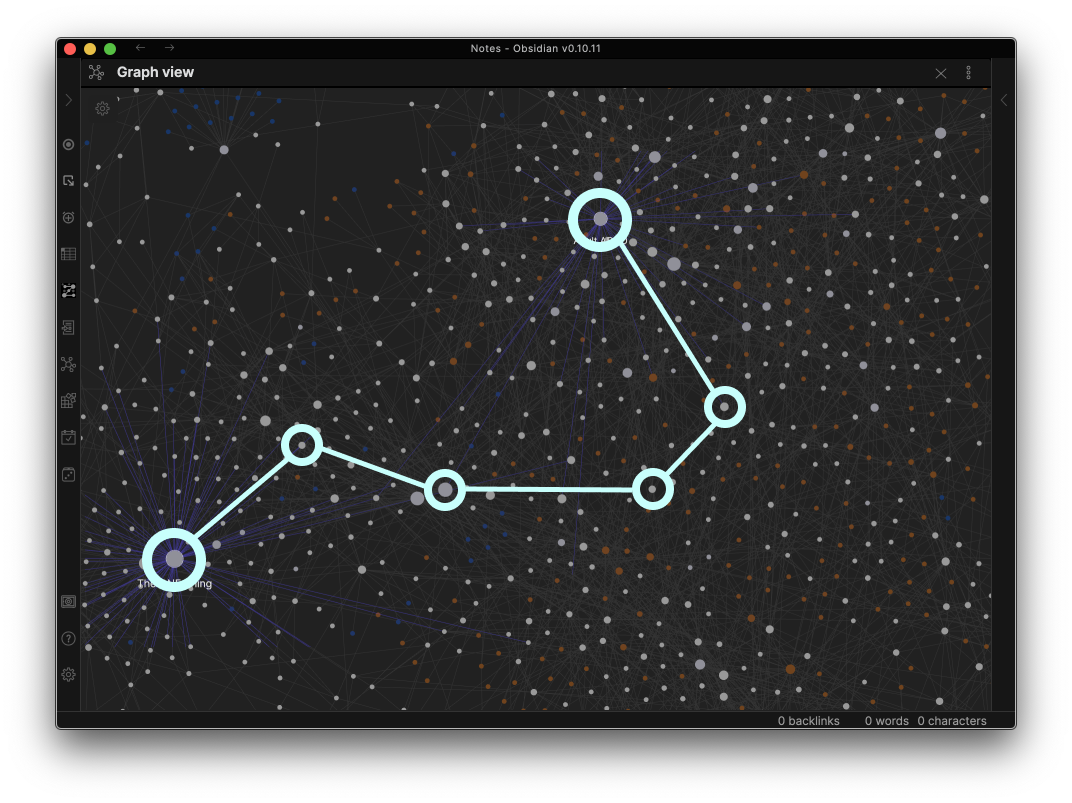
How my Obsidian "digital garden" has exploded (March 2020 - September 2021)

This is a time-lapse video of how my digital garden grew since starting to use Obsidian in March 2020 up to today. See it at publish.obsidian.md/alexisrondeau

  • ⚫️ Gray dots are notes that I've written
  • 🔗 Lines between dots are links between notes
  • 🟡 Yellow dots are tags
  • 🔵 Blue dots are attachments (like pictures, drawings)

Software: obsidian.md
Music: TheSpirit by XendomArts - pixabay.com/users/xendomarts-11117859

3:41 long

obsidian-recursor

An ambient plugin that will place your cursor back to where you left off.

8 stars · 1 fork · TypeScript

Recursor - Obsidian

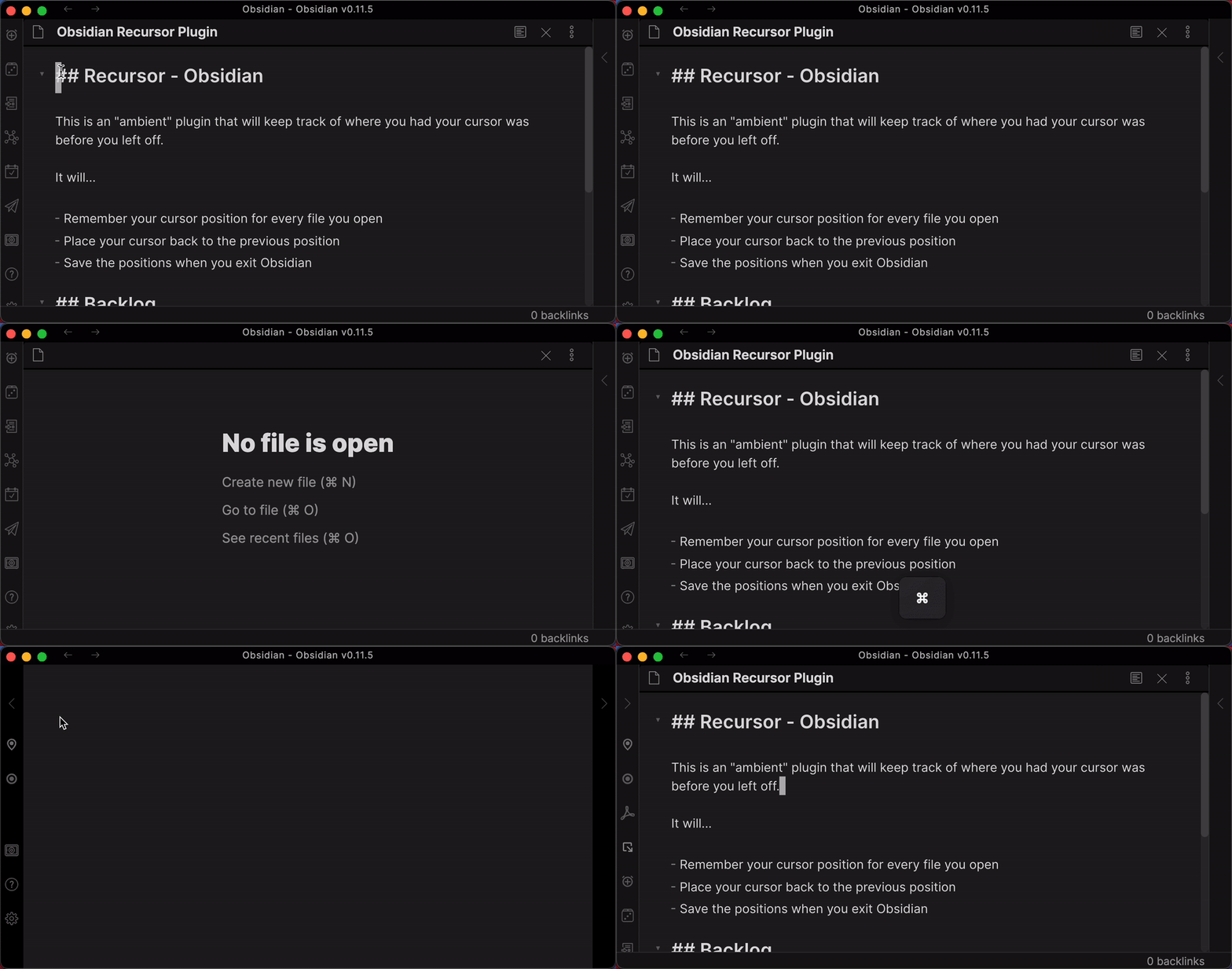
This is an “ambient” plugin that will keep track of where you had your cursor was before you left off.

It will…

  • Remember your cursor position for every file you open
  • Place your cursor back to the previous position
  • Save the positions when you exit Obsidian

Basic Functionality

Reporting issues

If you discover something not working, please submit an issue here. Thank you!

Origins

Based on this forum thread by alexobsidian.

Backlog

  • Figure out why scrollTo(cursor) isn’t fully scrolling
  • Handle file rename
  • Handle file delete

obsidian-footnotes

Makes creating footnotes in Obsidian more fun!

145 stars · 27 forks · TypeScript

Obsidian Footnotes Plugin

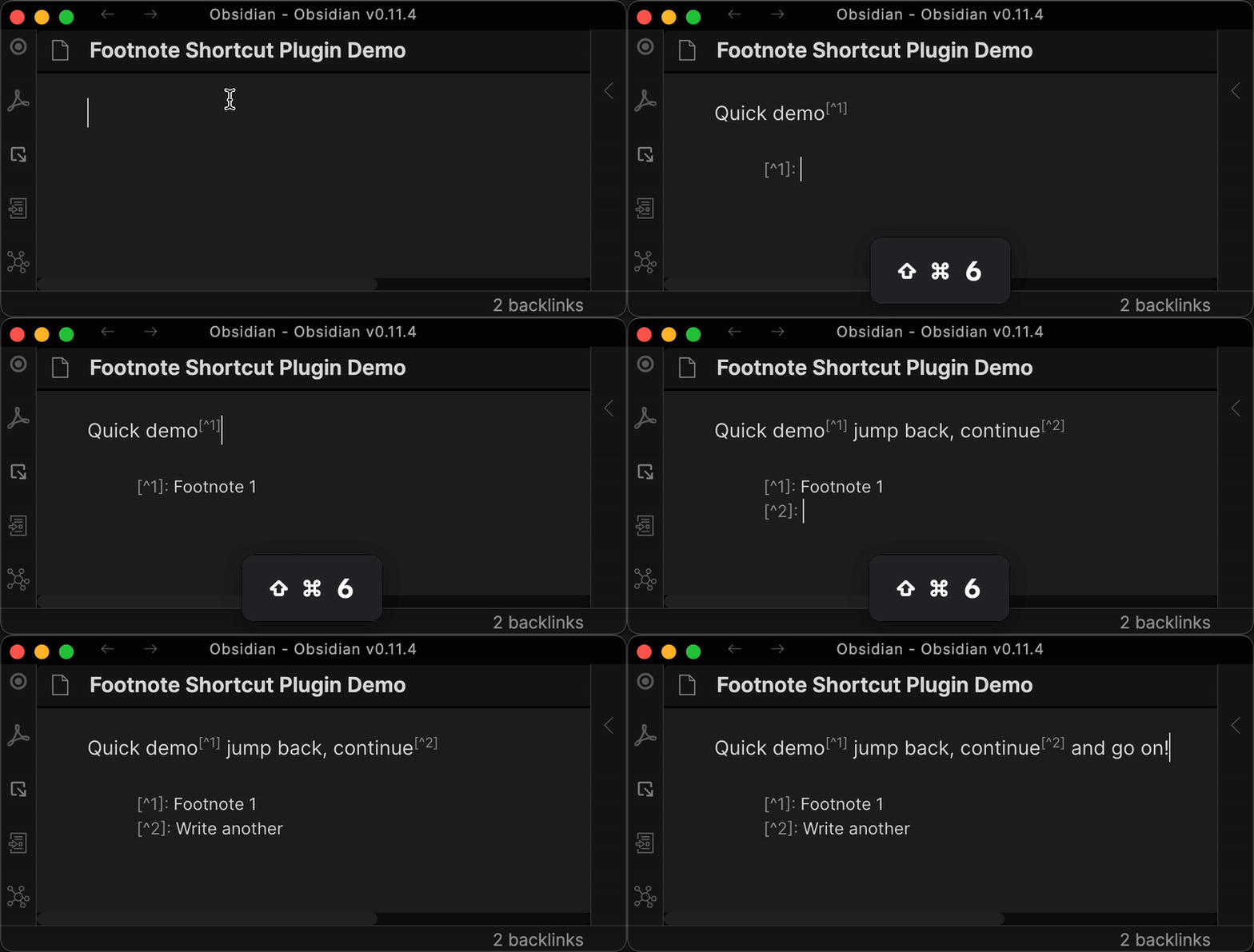
This hotkey lets you:

  • Insert a new footnote marker (e.g. [^1]) with auto-incremented index in your text

    • Adds the footnote detail (e.g. [^1]: ) at the bottom of your text
    • Places your cursor so you can fill in the details quickly
  • Jump from your footnote TO the footnote detail
  • Jump from your footnote detail BACK to the footnote

Overview

IMPORTANT: You must to set up your footnote hotkey

After installing and activating this plugin, you still have to SET UP your hotkey. This is easy and quick:

Settings -> Hotkeys -> Search for "Footnote" -> Customize Command -> Your preferred hotkey

I personally use Command+Shift+6 because “6” on a US keyboard is where the uptick/footnote character “^” is.

Hotkey

Default Feature Details

Scenario: No previous numeric (e.g. “[^1]”) footnotes exist:

  • Given my cursor is where I want a footnote to exist (e.g. Foo bar baz▊)
  • When I hit my footnote hotkey
  • Then a new footnote marker (e.g. [^1]) is inserted where my cursor was (e.g. Foo bar baz[^1])
  • And a new footnote details marker (e.g. [^1]: ) is inserted on the last line of the document
  • And my cursor is now placed at the end of the detail marker (e.g. [^1]: ▊)

Scenario: Previous numeric (e.g. “[^1]”) footnotes exist:

  • Given there is one or more numeric footnotes in my text
  • And my cursor is where I want a footnote to exist (e.g. Foo bar[^1] baz▊)
  • When I hit my footnote hotkey
  • Then a new footnote marker with the next numeric index (e.g. [^2]) is inserted where my cursor was (e.g. Foo bar[^1] baz[^2])
  • And a new footnote details marker (e.g. [^2]: ) is inserted on the last line of the document
  • And my cursor is now placed at the end of the detail marker (e.g. [^2]: ▊)

Scenario: Jumping TO a footnote detail

  • Given I’m on a footnote detail line (e.g. [^1]: ▊)
  • When I hit my footnote hotkey
  • Then my cursor is placed right after the first occurence of this footnote in my text (e.g. [^1]▊)

Scenario: Jumping BACK to a footnote

  • Given I’m on - or next to - a footnote (e.g. [^1]▊) in my text
  • When I hit my footnote hotkey
  • Then my cursor is placed to the right of the footnote (e.g. [^1]: ▊)

Known Limitations or Untested Scenarios

Indices are not updated

Inserting new footnote in-between two existing footnotes will insert the next numeric index (e.g. 1, 3, 2).

It will NOT update the indices according to their natural order (e.g. 1, 2, 3).

Example sentence[^1] with two▊ footnotes[^2] already.
  
[^1]: Foo
[^2]: Bar

After insertion:

Example sentence[^1] with two[^3] footnotes[^2] already.
  
[^1]: Foo
[^2]: Bar
[^3]: Baz

See “Automatically Re-Index Footnotes” below for a proposed feature

Future Possible Feature Ideas

Automatically Re-Index Footnotes

Re-index and re-sort all footnotes when you insert a new one in-between one or more existing numbered footnotes:

Example sentence[^1] with two▊ footnotes[^2] already.
  
[^1]: Foo
[^2]: Bar

Base Scenario

  • Given there are two footnotes already
  • When I enter a new footnote in-between those two
  • Then the NEW footnote gets the index “2”
  • And the previously second footnote gets the index “3”
  • And the NEW footnote detail is inserted as the second entry at the bottom
  • And the previously second footnote detail at the bottom is updated to be “3”
  • And the previously second footnote detail at the bottom is updated to be in third position
Example sentence[^1] with two[^2] footnotes[^3] already.

[^1]: Foo
[^2]: Baz
[^3]: Bar▊

Edge Cases to consider (“What if…?”)

What if… new footnote is inserted before the first footnote?
Some sentence▊ with existing note[^1]

[^1]: Details
What if… text has the same footnote at several places?
Some sentence with existing note[^1] and the same▊ footnote re-appears later[^1].


[^1]: Details
What if…Footnote details are spread across the text?
Some sentence with existing note[^1] some more text▊ 

[^1]: Inline footnote details

Another text part▊
What if… the footnote details are multi-line on the bottom?
Some sentence with existing note[^1] some more text▊ 

[^1]: The details that
Span across
Multiple lines
What if… there are non-numeric footnotes in the text?
Some sentence with existing note[^✝] some more text▊ 

[^✝]: Details

Background

This plugin is based on the great idea by jacob.4ristotle posted in the “Footnote Shortcut” thread.

Use case or problem:

I use Obsidian to take school notes, write essays and so on, and I find myself needing to add frequent footnotes. Currently, to add a new footnote, I need to:

  • scroll to the bottom to check how many footnotes I already have
  • type [^n] in the body of the note, where n is the next number
  • move to the end of the note, type [^n] again, and then add my citation.

Proposed solution:

It would be convenient to have a shortcut to automate these steps. In particular, I envision that the shortcut would: Using the smallest natural number n that has not yet been used for a footnote

  • add [^n] at the insertion point
  • add [^n]: to the end of the note, and move the insertion point there.

Footnotes

I wanted to add a footnote without breaking my train of thought. One hotkey drops a numbered marker and its note at the bottom of the page, and the same key jumps you between the two — no counting, no scrolling, no losing your place. Footnote-heavy writing finally feels effortless.

Open →

Super-Heroes, Super-Villains and an Ancient Code in Obsidian

Here's the story how I discovered an ancient code hidden inside Obsidian with the help of a super-hero and a super-villain.

Before we dive in, a heads-up:

1. This journey is not for the faint of heart
2. It's is going to be long and raw and unpolished
3. There will with high-HIGHS and low-LOWS

Please share your super-hero and super-villain story in the forum:
forum.obsidian.md/t/video-super-heroes-super-…

23:40 long

extracthighlights-dist

Custom PDFJS library for highlights

3 stars · JavaScript

PDF.js

PDF.js is a Portable Document Format (PDF) library that is built with HTML5. Our goal is to create a general-purpose, web standards-based platform for parsing and rendering PDFs.

This is a pre-built version of the PDF.js source code. It is automatically generated by the build scripts.

For usage with older browsers/environments, without support for modern features such as e.g. async/await, Promise, and ReadableStream, please refer to the es5 folder.

See https://github.com/mozilla/pdf.js for learning and contributing.

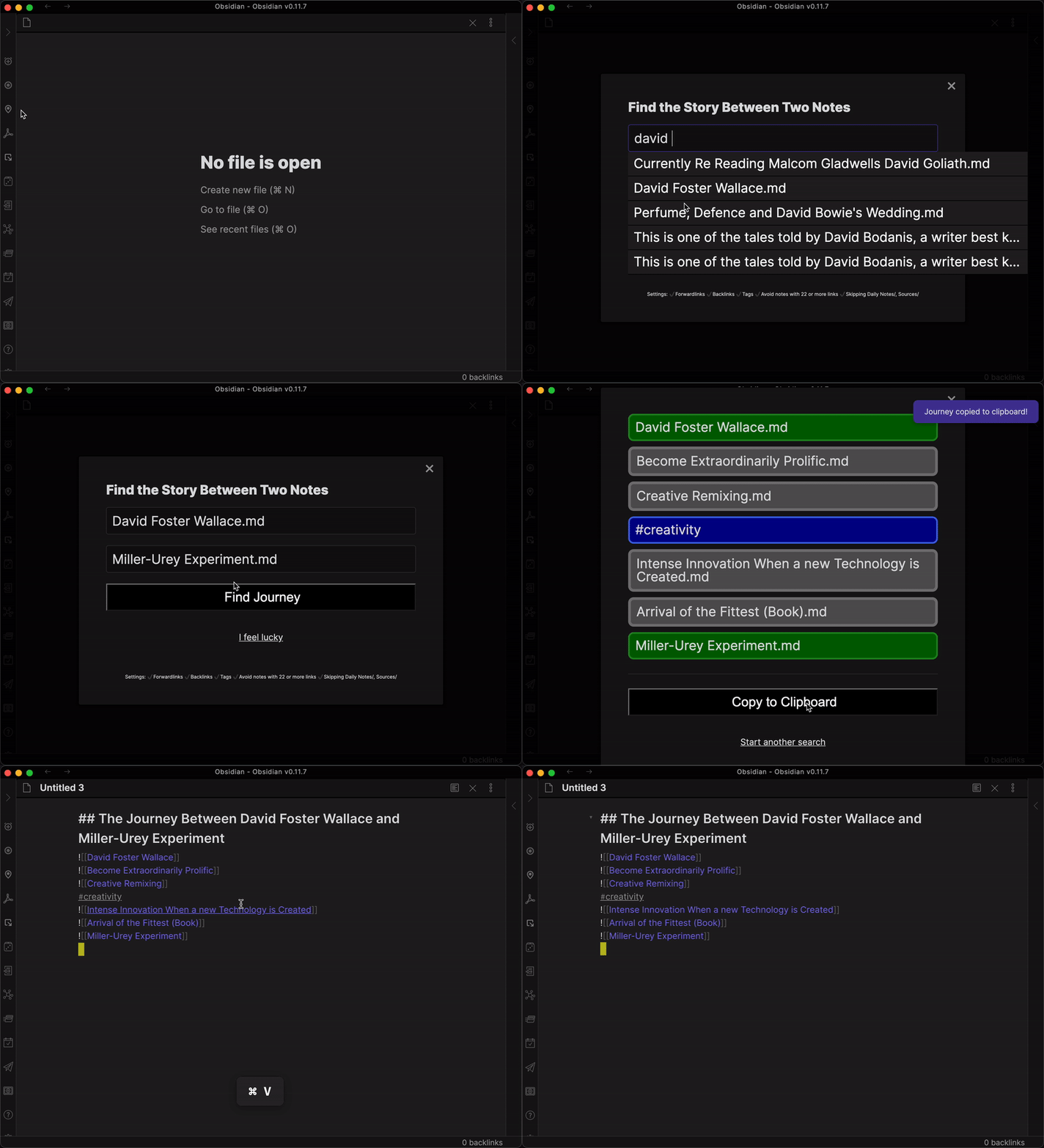
How To Use: Obsidian Journey Plugin

Discover the stories between your notes with Journey!

In this video, you'll learn
1. The basic usage to find your stories fast
2. How to use the "I feel lucky" button to get inspired
3. How to configure your search using #tags to add more possibilities
4. How to configure your search excluding MOCs to avoid boring notes
5. How to configure your search excluding certain folders to avoid irrelevant notes
6. How to configure high-contrast mode to see better :)

Join the conversation at: forum.obsidian.md/t/new-plugin-journey-find-t…
Post issues at: github.com/akaalias/obsidian-journey-plugin/i…

6:58 long

How to Create Outlines for Publishing Faster - Journey for Obsidian Plugin Demo

NEWS:

SHARE YOUR EXPERIENCE!

Hey there! Alexis here - Obsidian enthusiast and student at the University of Life! I want to show you a new Obsidian plugin I've been working on. This plugin automatically creates an outline for your publishing (An outline for an article, a blog post, or even a book!).

Why? I’ve noticed that my creative output using Obsidian hasn't been as prolific as I’d like it to be. I have hundreds of atomic notes, I’ve followed every best-practice, but right now, Obsidian doesn’t help me take that next step.

It’s really hard to extract a good story from my vault.

That's why I've created this new plugin :)

7:24 long

obsidian-journey-plugin

Discover the story between your notes in Obsidian

167 stars · 7 forks · TypeScript

Obsidian Journey Plugin - Discover the story between your notes!

GitHub release) GitHub all releases

Hey there and welcome!

Alexis here - Obsidian enthusiast and student at the University of Life!

I want to show you a new Obsidian plugin I’ve been working on.

This plugin automatically creates an outline for your publishing.

An outline for an article, a blog post, or even a book!

Why do we need this?

I’ve noticed that my creative output using Obsidian hasn’t been as prolific as I’d like it to be.

I have hundreds of atomic notes in my vault, I’ve followed every best-practice, but right now, Obsidian didn’t help me take that next step.

It’s really hard to extract a good story from my vault.

This plugin automatically finds and creates the outline of my story like so:

What the plugin finds for you

Tutorial

Watch on Youtube: https://youtu.be/6k2Lp1pCZpY

Included Features

Based on the amazing community feedback and comments, I realized that there are many different ways to go on that journey and so I’ve created a bunch of features you can toggle on or of to your liking.

These features are like preferences you can give your navigation-system in your car. Maybe today, all you care about is getting from A to B quickly. Maybe tomorrow, you have more time to “take the scenic route.” I want you to be as flexible as possible.

✔ Path-Finding Features

➡️ Use “Forward-Links” (Enabled by default)

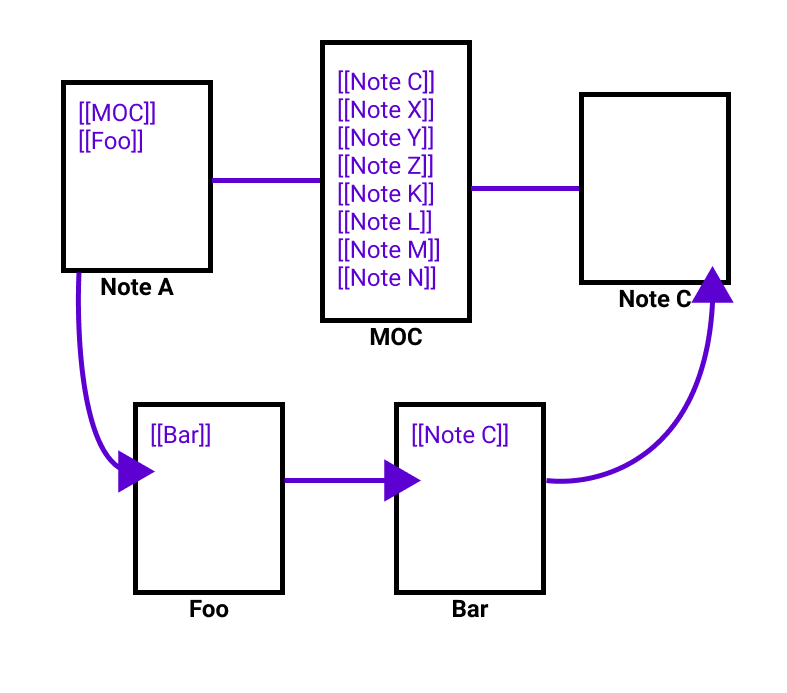
If set, allows to travel using forward-links. If you have a graph like this: A -> B -> C and you ask about the story between A and C, it will give you ‘A, B, C’ since A forward-links to B and B forward-links to C

⬅️ Use “Back-Links” (Enabled by default)

If set, allows to travel using back-links. If you have a graph like this: A -> B -> C and you ask about the story between C and A, it will give you ‘C, B, A’ since C has a back-link from B and B has a back-link from A

✔ Include Tags Feature

🏷 Use tags (Disabled by default)

If set, allows to travel using tags.

✔ Avoid Traveling via Certain Notes Features

🏞 “Take the scenic route” (Disabled by default)

If set, will skip ‘hub’ notes with too many links (MOCs). Configure exactly how many links make a MOC below.

⚙️ “How many links make a MOC?”

Configure at which point to skip a note because it contains too many out-bound links. Applies only if ‘Take the scenic route’ above is set.

🙅🏻‍♀️Exclude specific folders (Disabled by default)

If set, will note include notes from the specified folders in your search. Please use comma to deliminate several folders

✔ Clipboard Settings Feature

🔗 Enable automatic linking (Disabled by default)

If set, will turn titles in the list into links to their respective note

🤪 Enable automatic transclusion (Disabled by default)

If set, will automatically create transcluding links for you (’note’ instead of ‘- note’)

✔ Accessibility Feature

🔎 Enable High-Contrast

If set, will increase the contrast to make the result-list easier to read.

Join the Discussion!

Share your ideas and feedback on the plugin. We regularly vote on which features should be built next

https://forum.obsidian.md/t/new-plugin-journey-find-the-story-between-your-notes/12153

A huge shout-out to thoresson, alltagsverstand, Thecookiemomma, cestvrai, matteor, Danashafir, EhuddRomero, I-d-as, osgav, Erick_James_Dodge, 3mbry0, Klaas, ryanjamurphy, EdElgar and Daveb08 for helping making this awesome for everyone!

How to submit an issue

🐞 If you run into a TECHNICAL ISSUE or BUG: Please submit a Github Issues at https://github.com/akaalias/obsidian-journey-plugin/issues

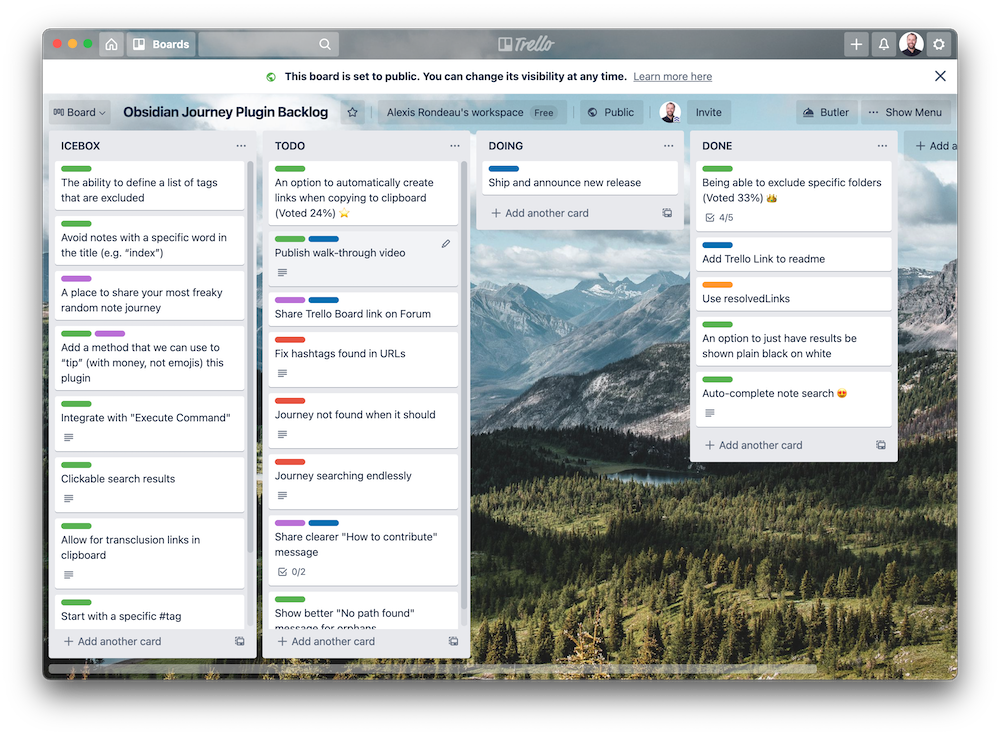
See what features are coming up

https://trello.com/b/ICKWjoBu/obsidian-journey-plugin-backlog

Trello

Path-Finding Feature Deep Dive

Because each feature has an impact to whether the plugin CAN FIND or CANNOT FIND a path between your two notes, I want to demonstrate what each does as simply as possible.

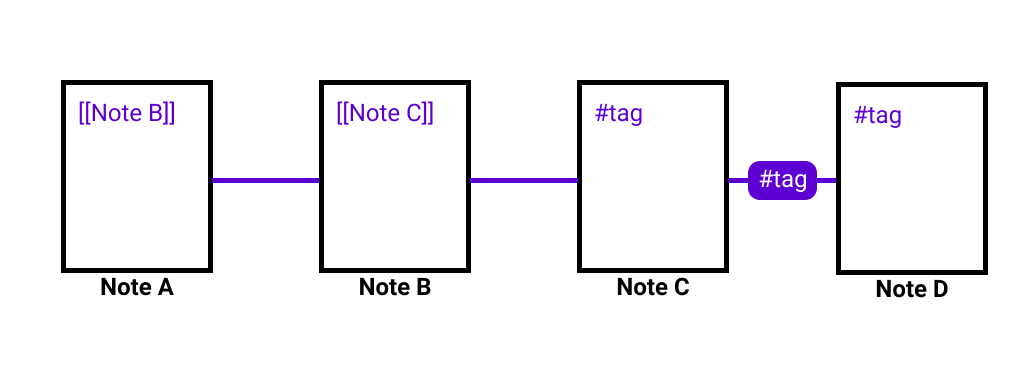
So, let’s start by imagining this very basic vault with 4 notes. “Note A”, “Note B”, “Note C” and “Note D”

  • A links to B
  • B links to C
  • C shares the same tag as D

Vault

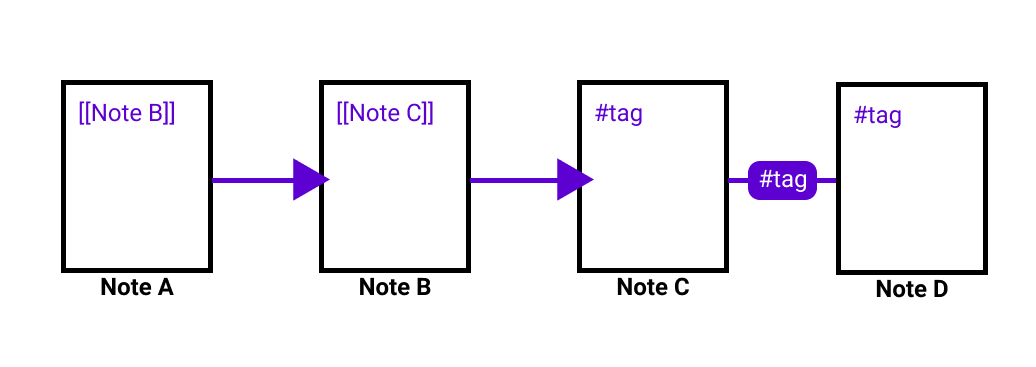
Feature 1: Use “Forward-Links” (Enabled by default)

Links are basically one-way streets from one note to the next. That means the plugin will show you only a path IF a forward-linked path exists but it won’t show you a path that goes “against” the one-way street.

forwardlink

With the example and this feature turned ON, the plugin will…

  • Successfully find you a path from A to C (Via B)
  • NOT find you a path from C to A because that would be against the one-way street

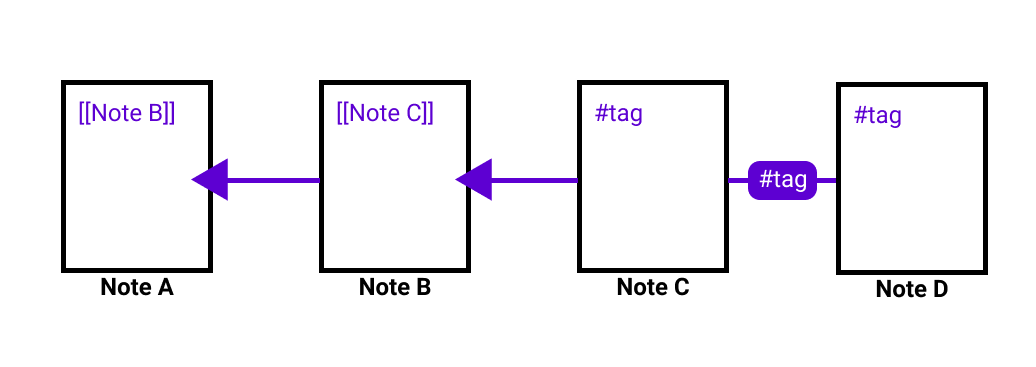
Feature 2: Use “Back-Links” (Enabled by default)

This is basically the inverse of using “forward-links”. With this feature, you navigation system will find ONLY paths that are based on going against the one-way streets.

backlink

With the example and this feature turned ON, the plugin will…

  • NOT find a path from A to C because there are no back-links to follow
  • Successfully find you the path from C to A (Via B) because the back-links point that direction

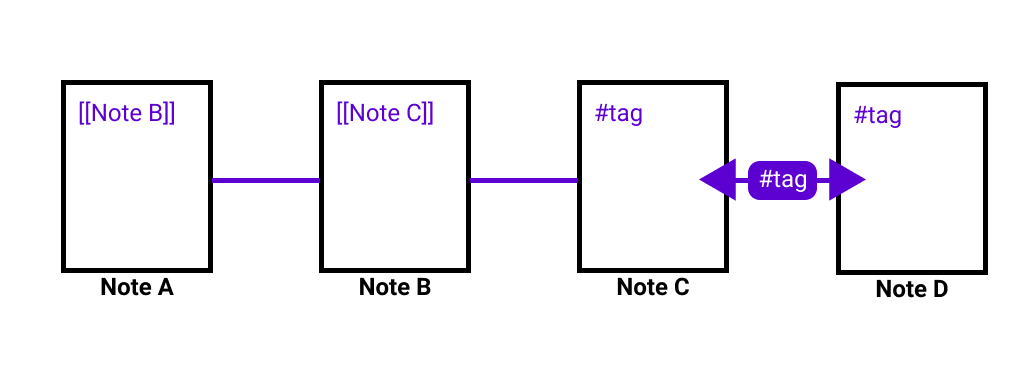
Feature 3: Using Tags (Disabled by default)

Thank you alltagsverstand for the idea which I had not thought of and which resonated with many of you.

As the name suggests, Tags can now also be paths between notes.

tag

With the example and this feature turned ON, the plugin will…

  • Successfully find the path from C to D (C -> #tag -> D) and from D to C (D -> #tag -> C)

If I now have Back-Links and Forward-Links enabled as well, I can now find the path from:

  • A to D (A -> B -> C -> #tag -> D)
  • D to A (D -> #tag -> C -> B -> A)

Note that this feature is disabled by default.

Feature 4: “Take the scenic route” aka Avoid MOCs (Disabled by default)

One of thoresson’s many ideas that turned out to be really, really useful when I started to pressure-test finding cool paths.

Avoid Y (perhaps a tag used for MOC and other structured notes so that only atomic notes are included in the journey)

If turned on, this feature will exclude finding a path via MOC notes and help you “take the scenic route” instead. With this feature, you avoid passing through the “big city” (aka MOC) and instead find a path less traveled.

In the following example, with this feature turned ON, the path from A to C would be:

  • A -> Foo -> Bar -> C (instead of A -> MOC -> C)

MOC

“How many links make an MOC?”

A sub-feature for “taking the scenic route” where you can define at what amount of links inside a note makes it an MOC to avoid.

The original launch demo

Watch on Youtube: https://youtu.be/iRydNlinRlc

Journey

You’ve collected hundreds of notes — but where’s the story in them? I built Journey to trace a path between any two ideas in your vault and hand you a ready-made outline, surfacing connections you’d forgotten you made. A blank-page cure that turns your scattered thinking into the first draft of something worth publishing.

Open →

obsidian-shuffle

Create custom and randomized writing prompts

53 stars · 3 forks · TypeScript

Shuffle for Obsidian

This plugin allows you to create your custom, randomized writing-prompts from lists of variables you define.

Based on Eleanor Konik’s post at https://forum.obsidian.md/t/rfc-oblique-strategies-writing-prompts-reflection-creators-block/9997/2

Example

Input template

## Prompt
1. Include one of these words: $WORD, $WORD or $WORD
2. Begin with a word that starts with `$LETTER`
3. Take place in $LOCATION or $LOCATION

Randomized output:

## Prompt
1. Include one of these words: Wall, Wind or Book
2. Begin with a word that starts with `g`
3. Take place in London or Los Angeles

How to to install manually

  • Download the latest main.js, mainfest.json and styles.css from https://github.com/akaalias/obsidian-shuffle/releases/
  • Create a new folder named ‘obsidian-shuffle’
  • Place the two files in the folder
  • Place the folder in your .obsidian/plugins directory
  • Reload plugins
  • Activate the “Shuffle” plugin

How to use the plugin

  • Hit the ‘Dice’ button in the sidebar to generate a new prompt note
  • Customize your variable names, values and template to your liking in the settings

Load custom packs

Try out new prompts by loading their pack into your settings. (Will replace your custom prompts.)

Currently available packs:

  • ⚫ Oblique Strategies by Brian Eno and Peter Schmidt
  • ⚡️ Flash Fiction Pack by Eleanor Konik

Share YOUR custom prompts!

If you have created your own custom set of prompts, PLEASE SHARE them! Contact me via the Obsidian Forum or per issue in this repo.

obsidian-extract-pdf-highlights

Extract highlights, underlines and annotations from your PDFs into Obsidian

243 stars · 17 forks · TypeScript

Extract your PDF text-highlights into Obsidian

This plugin allows you to extract highlighted and underlined text from your PDFs into a markdown file in your Obsidian vault.

How it works

After you’ve installed and activated the plugin:

  1. Drop your highlighted PDF into your Obsidian vault
  2. Open the PDF in Obsidian
  3. Click the “PDF” icon in the left sidebar

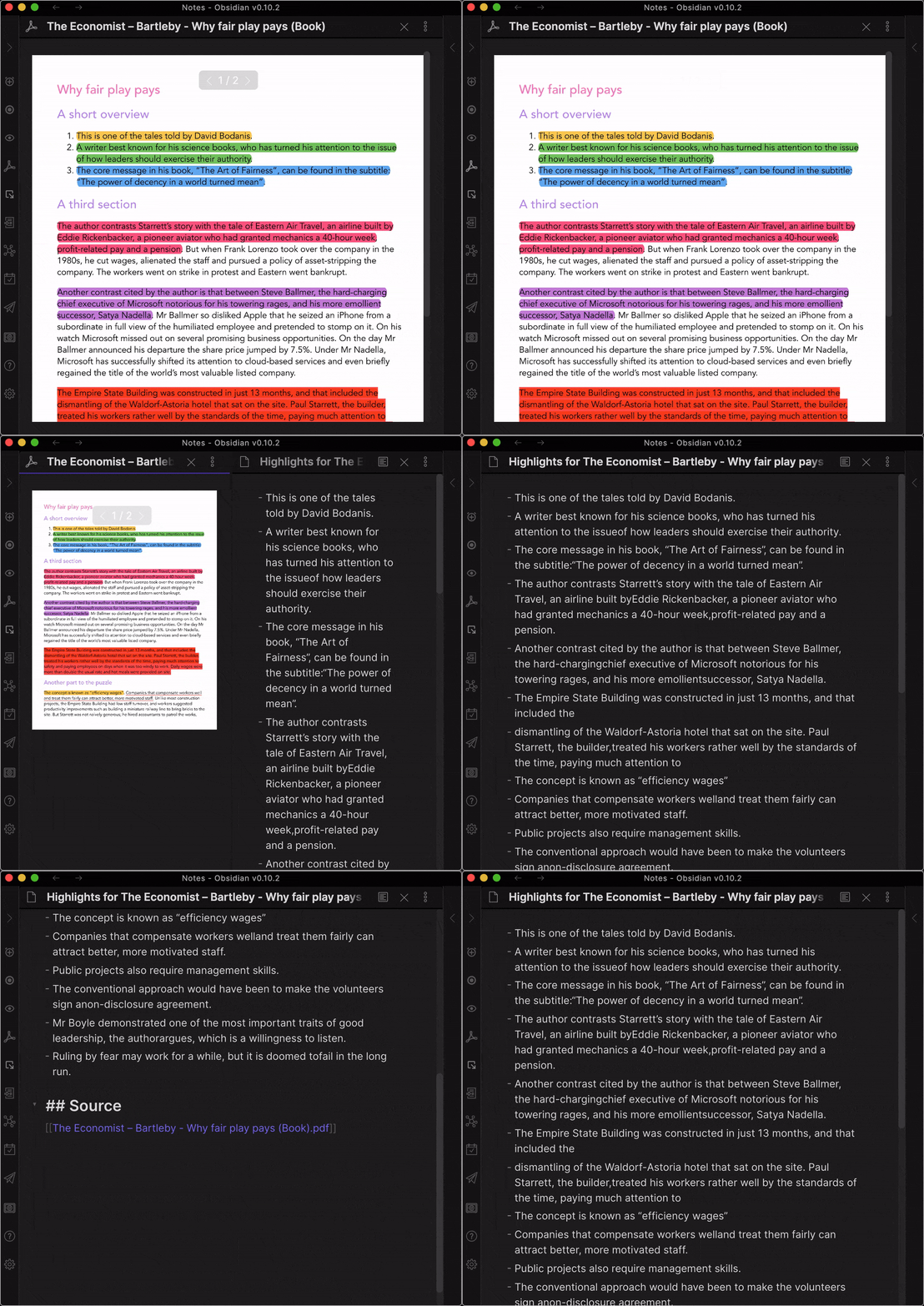
Demo with default settings

Simple

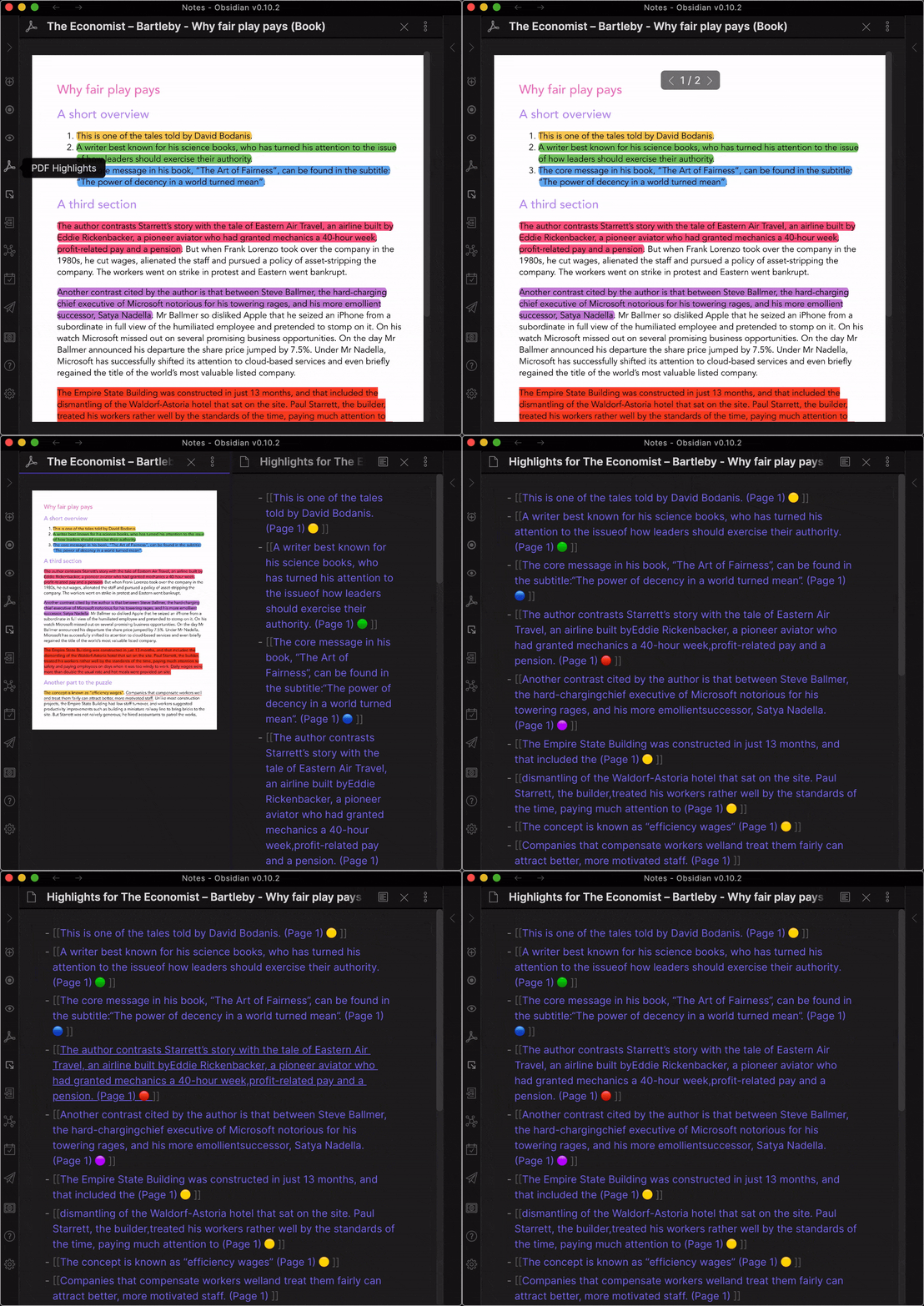
Demo with all optional settings turned on

Settings

Optional settings

  • Include page number (Default: off)
  • Include highlight color (Default: off)
  • Create links (Default: off)

Backlog

The list of features and improvements for this plugin.

ICEBOX

  • Record demo video, quick-start walk-through for new users

TODO

  • Auto-create notes from links with highlight/annotation as quote with backlink to source PDF
  • Group highlights by highlight color (Optional)
  • Add progress bar/modal to show “Processed Page 5/10 (50%)” or similar for longer PDFs
  • Fix missing space after newline (Very complex)

DOING

…

DONE

  • Refactor pdfjs import to not overload Obsidian worker (Ideas from @lishid?)
  • Show highlight color (Optional)
  • Auto-link list items (Optional)
  • Refactor/extract PDF from main.ts
  • Add Page-number to each highlight (Optional)
  • Sort highlights by position in document and page (Mandatory)
  • Extract unsorted list of HIGHLIGHT annotations
  • Extract unsorted list of TEXT annotations
  • Extract unsorted list of UNDERLINE annotations
  • Decide if to integrate with existing Highlights Plugin

Contribute

I’d love to hear from you, so please check out the Contribution page to get in touch!

Major Thanks

This plugin stands on the shoulders of Joseph Devietti and his 2012 pull-request for PDFJS.